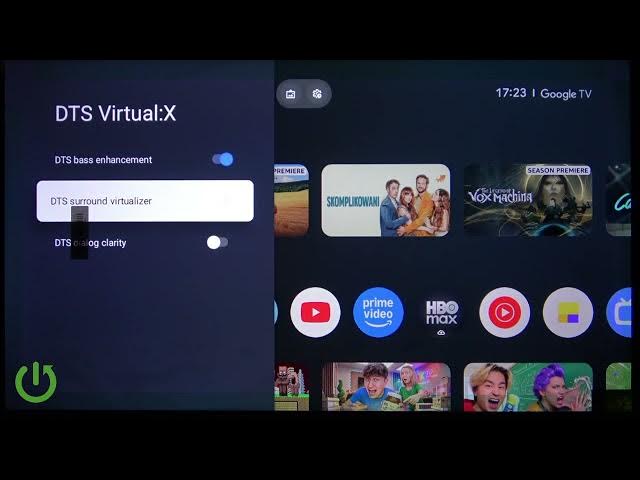

XIAOMI TV A Pro 32 (2026) – Enable DTS Virtual X Sound Enhancements
Jun 7, 2026

Learn how to enable DTS Virtual X sound enhancements on your XIAOMI TV A Pro 32 (2026). This quick step-by-step video shows you which remote buttons to press and exactly where to find the audio options. You will open All settings from the gear icon, go to Display & sound → Sound → DTS Virtual X, and toggle DTS Bass Enhancement, DTS Surround Virtualizer and DTS Dialog Clarity. Enabling these features makes audio louder, adds richer bass, widens the soundstage and improves dialog clarity for movies, streaming and gaming on your Xiaomi TV.
How to enable DTS Virtual X on XIAOMI TV A Pro 32 (2026)?
How to turn on DTS Bass Enhancement on XIAOMI TV A Pro 32?
Where is the DTS Virtual X setting on XIAOMI TV A Pro 32 (2026)?
0:00 Intro – what we will do
0:08 Press the gear button on the remote to open Settings
0:22 Open Display & sound → Sound
0:30 Select DTS Virtual X options
0:39 Enable DTS Bass Enhancement, DTS Surround Virtualizer, DTS Dialog Clarity
0:55 Wrap up, sound effect summary and subscribe
#XIAOMI #DTSVirtualX #XIAOMITVAPro32 #TVAudio
Find out more:
https://www.hardreset.info/devices/xiaomi/xiaomi-tv-a-pro-32-2026/
Follow us on Instagram ► https://www.instagram.com/hardreset.info
Like us on Facebook ► https://www.facebook.com/hardresetinfo/
Show More Show Less #Science