Up next in 10


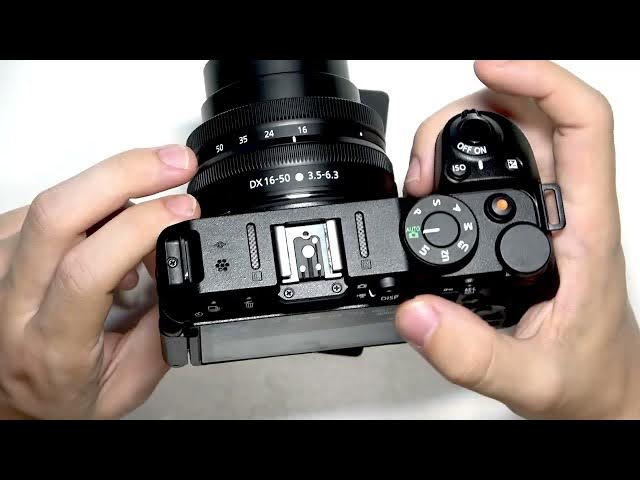
In this video I show the best video settings for beginners on the NIKON Z30. You will learn which mode to use (Auto, Programmed, S, A, M), how to pick file type (MOV vs MP4), set video quality, and choose frame size and frame rate (4K vs 1080p). I also explain white balance, picture control, simple tips to avoid high ISO noise, and when to use 120/160fps for slow motion so your first videos look clean and smooth.
How to set the best video settings on NIKON Z30?
How to choose 4K or 1080p on NIKON Z30?
How to record slow motion on NIKON Z30?
0:00 Intro
0:15 Mode dial: Auto vs Programmed
0:33 Programmed mode & I button options
1:13 White balance & Picture Control
2:41 Shutter priority (S) for video
3:36 Aperture priority (A) and background blur
5:46 Manual mode overview
6:09 Photo vs Video switch and SD card
6:55 Video menu: file type & quality (MOV vs MP4)
7:54 Frame size / frame rate: 4K vs 1080p and slow motion
09:07 Wrap up & outro
#NIKONZ30 #VideoSettings #4K #BeginnerFilmmaking
Show More Show Less View Video Transcript
0:00
Hello. In today's video, I'll show you
0:03
how to um set up you how to use the best
0:07
video settings for beginners on your um
0:12
Nikon Z30.
0:19
Okay, so I have the camera right here
0:21
and uh let's uh see the modes. First of
0:24
all, the mode dial. It is pretty
0:26
important. The most automatic mode, the
0:29
easiest one is going to be this green
0:31
auto mode. Um, it is great for beginners
0:35
because it doesn't require you to adjust
0:38
anything. I mean, none of the modes do
0:41
besides the manual, but this one is
0:43
actually like you can't really adjust
0:46
anything. you just point and shoot,
0:50
which may be great for beginners because
0:53
you just take photos or videos uh
0:56
depending on what you need and you don't
0:58
really need to um
1:02
you know um
1:06
like care about anything. So,
1:09
uh now let's talk about the um other
1:12
modes. This is programmed auto. So, it
1:15
basically has almost the same things as
1:18
auto, but when you click on the I
1:21
button, you have a bit more functions.
1:24
Let me show you. In auto mode, some of
1:27
these are grayed out like the white
1:29
balance, the picture control, um,
1:33
metering, and active D lighting. And
1:36
then when you switch to programmed, you
1:38
can adjust active D lighting to low,
1:41
normal, high, or extra high. Um you can
1:45
also adjust metering to matrix center
1:47
weighted or highlight weighted metering.
1:51
Uh so uh the camera knows like how to
1:54
adjust the settings automatically based
1:56
on what to adjust it. Then there's a
1:59
white balance that you can set. You can
2:01
set it to auto, natural light, auto
2:04
direct sunlight, cloudy shade, um
2:07
incandescent,
2:08
fluescent flash. You can choose the
2:12
color temperature or use presets. Uh
2:15
I'll leave it on auto for now. And this
2:17
picture control you can set it to auto,
2:20
standard, neutral, vivid, monochrome,
2:24
chromatic, morning, dream, pop,
2:26
whatever. So the filter is basically
2:29
when you set it to standard uh then it's
2:32
basically in standard. Um yeah, so that
2:36
is the mode. Now uh the the other modes
2:39
may also be useful even for beginners.
2:41
Uh the S which is shutter priority auto.
2:45
Uh in that mode you can actually adjust
2:49
the shutter. Um
2:53
so uh yeah that may be useful. Hold on a
2:58
second. Yeah. So in uh shutter priority
3:03
I can't really do anything in video
3:05
mode. So, I would need to flip this
3:07
switch. And now I can simply adjust the
3:12
um shutter. So, as you can see, as I'm
3:15
changing the this dial right here, then
3:19
it adjusts the shutter and then adjusts
3:22
the ISO automatically accordingly and
3:26
the uh aperture. But the shutter is the
3:29
thing that I'm adjusting manually.
3:33
So, that's what you can do. Um basically
3:37
uh then there's a which is aperture
3:40
priority auto and then when I'm uh
3:43
adjusting the switch I'm actually
3:44
adjusting the aperture
3:47
somehow it's not doing anything
3:52
it is absolutely not doing anything. Um
3:56
yeah I don't know why. I'm not sure.
4:01
But as I'm zooming in, it changes the
4:05
aperture and I'm zooming out, it changes
4:07
it. But I can't really change it with
4:10
this button.
4:13
Okay. But you know what? Uh without me
4:16
um switching this, I can still change
4:19
the aperture by clicking here on this
4:22
button right here and then change my
4:23
aperture like so manually. Uh and then
4:27
it adjusts it of course um it affects uh
4:32
the aperture affects uh the lighting
4:36
uh but it also affects the blur in the
4:39
background. So when you're trying to
4:41
capture something
4:45
of the aperture will will blur the
4:47
background more like the lower aperture
4:50
will blur the background more. Um but
4:54
then uh some higher settings of the
4:56
aperture will um
5:00
affect the lighting. So uh that is
5:03
important to understand uh that yeah it
5:08
of course makes the ISO higher if it's
5:10
in auto mode and makes the make make the
5:14
shutter speed higher as well. Um
5:18
but um so it may loosen the quality
5:23
especially considering the ISO being uh
5:26
higher. The higher the ISO is the lower
5:28
the quality may be. It may become the
5:31
photo may become grainy and stuff like
5:34
that. So you may want to um
5:39
you may want to just uh like avoid that.
5:42
But it's just up to you depending on
5:45
what you actually need. Um, and then
5:47
there's uh manual mode which is for
5:50
professionals. It has all those settings
5:52
that you may not want to adjust if
5:54
you're a beginner. So that may be
5:57
explained in another video on our
5:59
channel. But for now, let's focus on
6:01
these four modes here.
6:04
So this is the first thing that is
6:08
important to know. Now, uh the other
6:11
settings to adjust are like uh quality
6:14
and everything else. So, let's go to the
6:16
menu. By the way, remember that you can
6:19
switch between photo and video modes
6:21
like so. Um because this is pretty
6:24
important to know that if you're trying
6:26
to shoot a photo, you need to be in the
6:28
photo mode, then click on this button to
6:30
take that photo. Uh if you are in video
6:33
mode, then you click on this button to
6:35
start recording. Of course, I'm enabled
6:37
because I don't have a SIM uh SD card
6:41
inserted. To insert an SD card, you
6:44
should do it right here on the bottom.
6:47
Um yeah, right here, right next to the
6:49
battery.
6:51
Now, uh let's go to the menu and change
6:54
a few things. So, uh since this video is
6:58
about video settings, let's go to video.
7:01
And now, let's change a few things. So
7:03
video file type you can set it to MP3 or
7:06
MOOV. I think MOOV is better but MP4
7:11
I I think I said MP MP3 earlier. MP4 is
7:16
better uh for like compatibility. It's
7:18
available on more devices. Um MP4 may
7:22
not be playable on Windows without like
7:25
a VC player or something like that or
7:28
any other like external third party
7:31
player. So, uh, yeah, but is I think
7:35
superior. It compresses less and it's
7:38
just like better to be honest. Then, um,
7:43
there is, um, video quality. You can set
7:46
it to normal or high. I'd set it to high
7:49
to be honest. Then this is important,
7:51
the frame size and frame rate. So here
7:55
um you have all these different settings
7:58
and um the first one is quality on the
8:01
left side and that is uh this setting
8:04
right here. You can see it at the top.
8:06
This is 4K, so it's the best quality.
8:09
And 4K on this camera lets you set to
8:12
30, 25, or 24 uh frames per second. Um,
8:17
which is okay for movies, but it won't
8:20
let you uh do a slow-mo later. You won't
8:25
be able to slow it down later because it
8:27
will appear um
8:31
not smooth enough. Uh then you have
8:34
1080p and you can set it to 120 frames
8:38
per second, 160, 50, 30, 25, 24. You can
8:45
also do slow motion automatically. So
8:47
once you record it, it's already slow
8:49
motion. And these modes are available in
8:51
1080p. It's 30p* 4. So it'll be like
8:55
times for slow motion, times for slow
8:57
motion for 25p and times 5 slow motion
9:01
for 24p.
9:03
Uh so yeah, these are the options here
9:06
available. And um
9:10
depending on what file size you may want
9:13
to achieve because shooting in 4K is
9:16
great because it's great quality, but if
9:18
you don't need the quality, you may want
9:19
to set it to 1080p so it saves storage
9:22
on your SD card. Um so these are the
9:26
settings that are pretty important. Uh
9:29
besides that, I don't think the other
9:31
ones are important for beginners. Um
9:34
they are more like for um for like more
9:39
professionals. Um and that is basically
9:42
it for this video. Uh I hope that this
9:46
video uh was helpful. Don't forget to
9:48
like and subscribe and I'll see you in
9:50
the next one.
#Science