0:00
Hello everyone, and welcome back to our
0:02
channel. In front of me, I have Xiaomi
0:04
Watch S5. And today, I'm going to show
0:06
you a few settings I recommend to change
0:08
on this watch. So, let's get started.
0:17
First thing I recommend to check and
0:18
change is the screen brightness. By
0:20
default, it's going to be automatic, so
0:21
the watch will adjust the screen
0:23
brightness automatically according to
0:25
surrounding light. But, sometimes it's
0:27
not that great. Sometimes it's a bit
0:29
wonky. And I recommend to
0:31
first set it manually, check it out. If
0:33
you like it more, leave it at manual. If
0:35
don't, then just re-enable the um
0:39
automatic one. And to do it, we need to
0:40
open the menu, tap on the settings icon,
0:46
display and tap on it.
0:48
And here we have brightness.
0:51
Like I said before, by default, the auto
0:54
will be enabled, and you can enable also
0:55
the sunlight mode. And basically, it
1:00
when you're in direct sunlight. But, I
1:02
also recommend to turn off the
1:04
brightness, tap on custom, and here you
1:05
can adjust the brightness automatically.
1:09
uh not automatically, manually, my bad.
1:12
And one the benefit of adjusting the
1:14
brightness manually is that it will stay
1:15
at the specific level. It won't change.
1:18
Uh so, if you like the brightness to be
1:20
at the one level and keep it that way,
1:22
you can set it manually and it will stay
1:24
it that way. If you don't care and you
1:26
just want to brighten the brightness to
1:28
adjust automatically, enable the auto
1:30
option and leave it at that.
1:32
Okay. And since we're in the display
1:34
settings, another thing I recommend to
1:35
check is the screen timeout. By default,
1:37
it will be on 5 seconds, and for me,
1:40
it's a bit too short. Basically, the
1:42
screen turns off almost immediately, and
1:44
I don't like that. I usually use
1:45
something like 10 seconds. Uh 20 seconds
1:48
is a bit much, but also in the realm of
1:51
normality, I would say. Uh anything
1:53
above 20 it will be very long, and also
1:55
it will use more battery life because
1:57
the longer uh make the screen stay on
1:59
for longer, which may which uses
2:01
basically more battery. So, be aware of
2:03
that. I recommend something like 10
2:05
seconds. That's a nice sweet spot.
2:09
also I recommend to check the sound
2:11
volume settings. So, you can go to sound
2:15
or sound and vibration, my bad. And here
2:17
we have volume sliders. As you can see,
2:19
we have one for media, one for alarm,
2:21
and one for ring. The ring is grayed out
2:23
because the silent mode is enabled. If
2:24
you disable the silent mode, you will
2:27
be normal now, and you can adjust the
2:30
sound volume for the ring. So, for the
2:33
some for the notifications, for calls,
2:36
notifications for like
2:38
um alarm and stuff like that. Is it for
2:42
No, alarm has the different uh slider.
2:45
So, I say something like call
2:46
notification, normal notification, and
2:48
stuff like this. Media is music, videos,
2:52
And then we have the alarm. So, this is
2:54
for the alarm clock. And you can adjust
2:56
the volume separately and do do whatever
2:58
you like. I recommend to check it and
3:01
Okay. Another thing I recommend to check
3:03
and change is the gestures.
3:06
If you go to settings, to the bottom,
3:07
and tap on gesture and preferences, here
3:09
we have the quick gesture settings.
3:11
Uh by default this is disabled, but you
3:15
And this allows you to basically
3:17
uh use your watch a bit differently. A
3:21
Basically, it allows you to perform some
3:22
gestures with your hand when you have
3:24
your watch on your wrist
3:26
uh to open stuff, start stuff, and stuff
3:31
convenient, more versatile, basically.
3:35
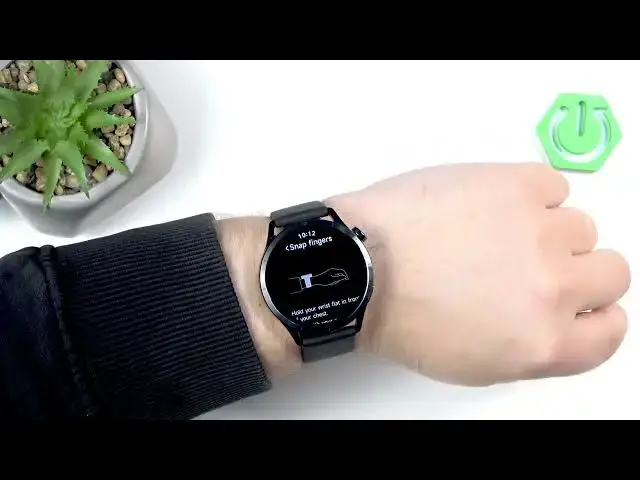
for example, we have this snap finger
3:36
one. Uh you will need to strap your
3:38
watch on your wrist, perform the
3:46
couple of times for it to like recognize
3:47
your gesture. And once you do that, you
3:49
can basically set a function to it. Give
3:51
me a second, I need to strap it on.
3:57
So, here I have our our watch.
4:00
And uh we have a snap finger. And
4:02
basically, you need to do something like
4:09
And you can assign the function for it.
4:11
For example, we have open up. This
4:13
allows you to open application with the
4:16
with these gesture. We have control
4:19
other devices. So, you can hook it hook
4:21
it up to Xiaomi Home and control other
4:23
devices with with your watch. You can
4:26
select none, so it will it will be
4:27
disabled. You have also quick action, so
4:29
you can reject call and notification,
4:32
ignore notification or call, take a
4:37
Come on, go back. And we have start a
4:39
workout, and you can basically start a
4:40
workout automatically by performing
4:44
gesture. I'm going to use open up, and
4:46
for example, maybe let's open
4:51
phone. Phone up. And now,
4:53
if I do this, it should open the phone
4:56
application. And it's quite nice. I
4:58
recommend to check it out, set it up
5:00
your way, and this will probably make
5:02
your watch more versatile, more easy to
5:03
use, more convenient to use. So, uh like
5:06
I said before, just check it. I
5:09
And the last thing I recommend to change
5:11
is the schedule for your Do Not Disturb
5:12
mode. By default, it will be disabled,
5:14
but you can enable it. And I recommended
5:17
especially if you prefer to sleep with
5:18
your watch on your wrist. And basically,
5:20
you can set up the schedule to turn on
5:22
when you go to sleep and turn off when
5:24
you uh wake up. And this is useful
5:26
because you won't be disturbed during
5:28
the sleep. It will basically mute all of
5:29
the notifications for you, which is
5:31
quite nice. And to do that, you need to
5:34
open the menu, tap on settings, go to
5:39
uh I believe sound and vibration, then
5:43
And here you can enable the mode
5:45
normally by tapping on the switch, but
5:47
we just want to enable the custom
5:50
And as you can see, we have
5:52
repeat, start, and end. Repeat is uh
5:54
basically how often the schedule or on
5:56
which days it should work. And we have
5:58
only once, daily, and custom. And custom
6:01
specify specific days. So, let's say I
6:04
want the Tuesdays and Thursdays.
6:06
And then we have start time.
6:08
So, you can set it on which time it
6:10
should be turning on.
6:12
And not which, on what time, my bad. And
6:16
then we have end time.
6:17
So, on what time it should be turning
6:24
And here we have it. And now my schedule
6:26
will work each Tuesday and Thursday
6:28
on and will be starting at 10:30 p.m.
6:32
and turning off at 8:30 a.m.
6:34
And if you don't want
6:37
don't want to use this schedule anymore,
6:38
you can always disable the custom
6:40
option, but I recommend to check it and
6:43
And that's about all. So, if you found
6:45
this video any helpful, please consider
6:46
subscribing to our channel and leaving
6:48
the like on the video. Thank you for
6:50
watching and see you in the next one.