Up next in 10


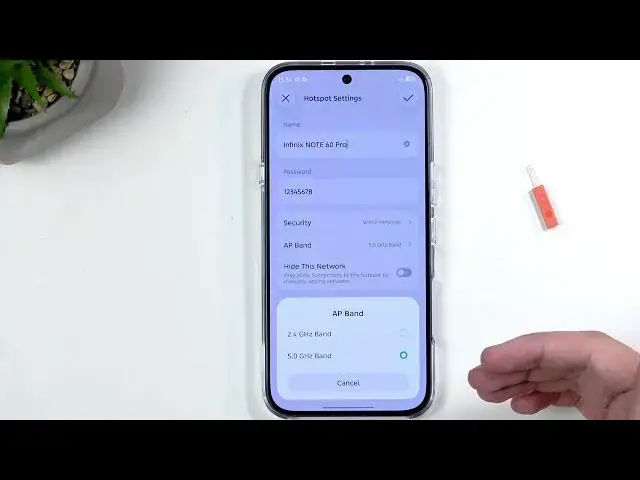
Learn how to enable and set up the Portable Hotspot on your INFINIX Note 60 Pro. In this video we show step-by-step how to add the Hotspot quick toggle, open Hotspot settings, change the Wi‑Fi name (SSID) and password (minimum 8 characters), and manage security. You’ll also learn why the AP band may be locked to 5 GHz when Wi‑Fi 6 is enabled, when to use 2.4 GHz vs 5 GHz for better compatibility, how to enable automatic turn‑off to save battery, and how to view and block connected devices or set a one‑time data limit so your monthly cap is protected. This guide is perfect if you need a simple, search‑friendly walkthrough to get your INFINIX Note 60 Pro hotspot working reliably and safely.
How to enable Portable Hotspot on INFINIX Note 60 Pro?
How to change the Hotspot password on INFINIX Note 60 Pro?
How to set a data limit for hotspot on INFINIX Note 60 Pro?
0:00 Intro – what we’ll cover
0:13 Open quick toggles and find the Hotspot button
0:58 Add the Hotspot toggle if it’s missing (24 toggle limit)
1:27 Open Hotspot settings – change password and SSID
2:35 AP band and Wi‑Fi 6 vs 2.4 GHz / 5 GHz explained
9:42 Auto turn‑off and battery/data saving options
10:39 Connection management – block devices & set one‑time data limit
15:57 Turn on the hotspot and final tips
#InfinixNote60Pro #PortableHotspot #HotspotSetup #MobileHotspot
Find out more:
https://www.hardreset.info/devices/infinix/infinix-note-60-pro/portable-hotspot/
Show More Show Less View Video Transcript
0:01
Welcome. Ephme is an Infinix Note 60 Pro
0:05
and today I will show you how we can
0:08
enable and also set up your portable
0:10
hotspot.
0:18
So to get started, you will want to
0:21
swipe down from the top right side of
0:24
your screen as that's where our toggles
0:25
are. And in here, we're going to be
0:28
looking for our hotspots toggle. Now, I
0:32
believe it's this one right here, but
0:34
I'll check it in a second. As right now,
0:36
you can see there is no labels for these
0:39
toggles. Now, if we click right here,
0:42
it's actually going to show us the
0:43
labels. And yep, that was the hotspot.
0:45
But if you don't see this toggle
0:47
anywhere in this list, actually, while
0:49
in editing mode, which we are right now,
0:51
you can swipe down and here you'll find
0:53
all the toggles that you can add. And if
0:56
you didn't see it at the top, you'll
0:57
definitely see it here. And just to
0:59
demonstrate it, um you just need to
1:01
press on the plus like so to add it. You
1:04
are limited to 24 toggles in this uh
1:06
first list right there. So if you have
1:09
already 24, you will need to remove one
1:11
of the ones that let's say you don't use
1:14
to add a different one. And there when
1:16
you go back, this toggle will be
1:17
available to you somewhere in here.
1:20
Now, on the first uh first interaction,
1:24
I recommend holding this toggle and then
1:26
selecting more settings. This takes us
1:28
to the actual settings. And in here, we
1:30
can go to hotspot settings and change
1:32
the password. It is a randomly generated
1:35
password. And without navigating here,
1:38
I usually would say you have no way of
1:40
knowing what it is, but we actually did
1:42
see it. Yep. Here. Let's be honest, this
1:45
isn't a fun password to type. So, I
1:47
recommend just getting rid of it and
1:48
setting up your own. This is always the
1:50
best course of action. Now, your
1:52
password can be as simple as you want,
1:55
but it will need to have at least eight
1:59
characters in length. Now, there can be
2:01
letters or numbers or both. It doesn't
2:03
matter.
2:06
Now, when it comes down to the name,
2:08
this refers to the name of the hotspot
2:10
that you will be creating. So, it's what
2:12
you're going to be looking right here
2:13
for in the Wi-Fi list. Uh below that we
2:18
have security. Keep it as it is
2:20
otherwise you can just turn off your
2:22
password which means anyone without
2:24
password can connect to your hotspot.
2:27
Not the best kind of thing. And we also
2:30
have AP band which is uh
2:33
unchangeable for some reason in here. I
2:36
have no clue why. Set to five.
2:42
H
2:44
interesting. So, we have 5 GHz band
2:46
right here enabled and I can't change
2:49
it. Now, typically you would be able to
2:52
change it to something like 2.4. I am
2:54
completely baffled why that is not the
2:58
case right here. I'm going to turn off
3:00
some of the toggles. Maybe one of them
3:01
is just being annoying.
3:06
Nope. If I go back about this.
3:10
Ah, there we go. So, it looks like using
3:14
the Wi-Fi 6 protocol enables only the 5
3:18
GHz connection.
3:21
Now, I'm not sure why this is a thing
3:24
considering if I go in here and change
3:26
it to 5 GHz. This is Wi-Fi 6. So, I'm
3:30
not sure why the toggle there is just
3:32
kind of like a weird thing
3:36
cuz in here you can choose between the
3:39
Wi-Fi and Wi-Fi 6 protocol while in
3:43
there it's a toggle that prevents you
3:44
from changing it here. So, it makes it a
3:46
little bit annoying.
3:48
Uh but in case explain this the 2.4 and
3:51
5 GHz both of them I would say do have
3:54
their time and use. I personally use the
3:58
2.4 for all the time just because it's
4:01
more convenient and because this is
4:04
going to be a hotspot running from
4:05
mobile network the benefits from the 5
4:08
GHz connection
4:10
mean absolutely nothing. So to explain
4:14
this
4:16
any kind of device that uh ever had
4:18
Wi-Fi connectivity
4:20
ever released in time was using the 2.4.
4:24
Now later on you started getting things
4:25
like Wi-Fi uh 6, Wi-Fi 6 e- labels and
4:29
then now 7
4:31
uh these are just newer versions of just
4:34
Wi-Fi which uh give access to different
4:37
frequencies. Um to explain this just a
4:40
little bit um so for instance Wi-Fi 7
4:43
uses all frequencies 2.4 5 and six which
4:46
isn't here. Uh Wi-Fi 6 which we do have
4:50
here is using the 5 GHz. Don't get me
4:53
wrong, it is I know. I know.
4:54
You know, calm down. I I know that there
4:57
was a much better way to name this. Like
4:59
Wi-Fi,
5:01
no, five for 5 GHz. And then guess what?
5:03
There's also Wi-Fi 6 GHz.
5:06
Now, that one is labeled Wi-Fi 6E.
5:11
Um, yeah. Um, so in any case, uh, the
5:16
way you want to look at it is anything
5:17
with a number. The higher the number,
5:19
the the newer the technology. Anything
5:21
with additional letters to it, like
5:24
Wi-Fi 6E, is better than the nonlet one,
5:29
at least for now. Let's be honest, a
5:31
Wi-Fi is So, they might do
5:33
some stupid that completely messes
5:35
that up again. But, uh, till now, that
5:37
that's been the logic. Um, and
5:41
the higher the number, it's always
5:42
backwards compatible. So if you have
5:44
Wi-Fi 7, it supports everything below
5:46
that 6E6 and just normal one, which
5:49
means that 5 GHz or anything that is
5:51
labeled as Wi-Fi 6, like the six Wi-Fi 6
5:54
protocol, uh will be able to connect to
5:57
hotspots or just Wi-Fi that use 5 GHz
6:00
and also 2.4. So it makes it, you know,
6:05
bit uh easier to to deal with. If you
6:07
know that you have a newer device, you
6:09
don't really need to think about, oh,
6:10
can I connect to this or not? But if you
6:12
have an old device, I don't know, 15
6:15
years old, let's say, uh chances are you
6:18
will only be able to connect it to the
6:20
2.4. Uh the devices back then didn't
6:23
really support the Wi-Fi uh 5 GHz as I
6:26
don't think it was a thing back then. So
6:29
because it wasn't a thing, you were only
6:32
supporting the
6:34
the first thing that came out back then.
6:36
Uh and anything that came after that
6:38
obviously that device wouldn't support.
6:41
So you are backwards compatible but not
6:43
forwards.
6:45
Anyway, uh and now I just kind of talked
6:48
about compatibility and that
6:49
So let's kind of go to benefits and
6:51
drawbacks. Uh 2.4 is going to be
6:54
generally when we're talking about the
6:55
technology, right? Uh the frequency is
6:58
going to be slower with a higher
6:59
latency, meaning that when you click on
7:01
something, it takes a longer time for it
7:02
to to have the appearance of doing that
7:06
thing that you just tried to compared to
7:07
the five. We're talking about literal
7:09
milliseconds, but there it's there and
7:12
for gaming purposes, it's important. Uh
7:14
so higher latencies, uh slower speeds of
7:17
network and uh less devices that can
7:20
connect to that uh that band at once.
7:26
Now 5 GHz obviously improves on all of
7:28
those. Um so in a way it obviously it's
7:32
going to be better but for like I said
7:34
purposes of mobile network this doesn't
7:36
really have that much meaning because
7:38
you are for the most part going to be
7:40
always bottlenecked by your service
7:41
provider. This is the case for me. Um, I
7:45
have like 30 megabits speed uh on my
7:48
network with um
7:53
speeds that are varied depending on how
7:56
close or far away and how many obstacles
7:59
are between me and the the cell towers
8:03
that I'm connecting to. So,
8:07
uh, obviously
8:10
for me, whichever I choose, they're both
8:12
about the same because I am primarily
8:14
bottlenecked by my service provider. And
8:16
if you're the same, it doesn't matter
8:18
which one you choose, I would probably
8:19
recommend 2.4 as it just makes it much
8:22
easier to deal with it and not need to
8:23
worry about will I be able to connect to
8:25
it or do I need to go into the settings
8:26
and change it. Um, now there is one
8:30
scenario where the 5 GHz will be better
8:32
and that is if you live in a very
8:33
densely populated area and some annoying
8:36
person decided that uh his whole house
8:38
will be decked the hell out with all
8:41
smart bulbs uh that use 2.4 GHz
8:43
connectivity Wi-Fi so he can turn them
8:46
on when he's taking a uh and has a
8:49
phone on him but realized that he left a
8:51
light in the kitchen and you know I need
8:53
to turn it off. Um so for those purposes
8:58
uh or those scenarios because of those
9:00
light bulbs what might happen is there
9:02
might be basically a traffic on the 2.4
9:04
GHz connection which creates
9:06
interference between other 2.4
9:09
uh connections meaning your hotspot and
9:12
because of that you might be
9:15
encountering just random disconnects
9:17
from your hotspot or just general
9:19
problems keeping a connection or keeping
9:21
network. In this case, switching it to
9:23
five would resolve your problem
9:25
hopefully as 5 GHz network isn't as
9:27
prone to interference uh as the 2.4 and
9:31
also smart devices don't really operate
9:33
on 5 GHz frequencies. So, you also got
9:36
that benefit.
9:38
So, anyway, uh once everything in here
9:40
is set up, we can click on a check mark
9:41
to save the changes. And before we go
9:43
any further, I do want to quickly also
9:45
talk about the turn off hotspot
9:46
automatically when uh no devices are
9:48
connected uh for a certain period. I
9:51
love the certain period instead of
9:52
telling you like what the period is.
9:53
It's certain. Um,
9:56
now it is AI detect right here. I think
9:58
that's what it means for certain, but it
10:00
can specify for what exact period you
10:02
want it to run to. Uh, so if you are in
10:05
a coffee shop using your laptop and you
10:07
close the lid, put it in your bag,
10:09
usually your device would go to sleep,
10:11
at which point it would disconnect from
10:12
your hotspot and this would then start
10:14
the timer or AI detect, whichever one. I
10:18
have no idea how AI detect works to be
10:19
honest. Uh but with a timer, you know,
10:22
let's say 5 minutes, 5 minutes passes,
10:24
turns off. Now, you want this because
10:27
hotspot will consume more of your
10:28
phone's battery and when you're done
10:30
using it, it just pro protects your
10:32
battery.
10:33
Anyway, before I go also further out, uh
10:36
let's quickly touch upon the connection
10:38
management. So in here if uh someone
10:41
manages to guess your password you can
10:43
actually go in here and check out as
10:45
there will be a new field added for what
10:48
devices are right now connected. It will
10:50
be the name of the device actually. So
10:52
for instance uh if your um
10:58
phone has a name of something like John
11:00
hotspot
11:01
uh well it's going to show up here as
11:04
the name of the phone John hotspot. And
11:07
uh you can then for instance click on it
11:09
to just straight up blacklist it and it
11:12
will then appear in this list right here
11:13
which is empty meaning that that person
11:16
even with the password will not be able
11:17
to connect to your hotspot. And you can
11:19
also set up in here a one-time data
11:21
limit. So whenever you enable your
11:23
hotspot your hotspot cannot exceed the
11:25
specified amount of gigabytes used which
11:28
is a very handy option to enable in case
11:31
you have a limited data cup per month
11:34
from your service provider. You can also
11:36
do this by going into the settings. Uh
11:39
let me just go back settings. This one
11:42
will be a little bit uh better I would
11:45
say. Let's go into SIM and network
11:48
management. And in here we're going to
11:50
navigate to
11:52
I think it's data usage. Let's quickly
11:54
check data usage. data saving mode. I
11:58
think it was
12:05
no
12:08
network assistant.
12:11
But I think that's how did it just take
12:13
me to a different page.
12:23
So that's I think where we need to be
12:25
network assistant. But this is a
12:27
separate application that I get taken to
12:29
by the looks of it. And uh
12:33
see where the hell was the data saver?
12:41
Nope. Bear with me while I'm trying to
12:43
figure this out. Uh I do have to say the
12:45
options right here for Infinex are
12:49
they do exist, but they're pretty
12:51
freaking bad. And the way to find them
12:53
is also absolutely infuriating.
12:56
Um,
12:59
I know for a fact it's one of these
13:00
piece of options, but figure out
13:03
which
13:05
option it is. I have no goddamn clue.
13:10
I'm going to pause the video, try to
13:12
find this uh crappy option because I do
13:14
find it very important for people that
13:15
do have a data cup limit. And I believe
13:18
you should uh potentially just enable
13:21
this if you have something like 5 GB of
13:23
data per month. Uh this would kind of
13:26
save your ass and in the long run when
13:28
using hotspot usually, you know, all
13:30
Google kind of website services
13:33
uh hoover up data like crazy. So this
13:36
would basically give you a little bit of
13:38
peace of mind that uh crappy Google,
13:40
right? If you use hotspot to I don't
13:42
know, maybe give data to your smart TV,
13:46
right? Wrong choice, Bucko. That's going
13:48
to be like 2 GB gun instantly. Uh, smart
13:52
TVs hoover up data because they need to
13:54
basically send uh screen images of what
13:56
the TV is showing. So, anyway, I'm going
13:59
to pause it, try to find it, and uh come
14:01
back either with no info if I didn't
14:03
find it or with the actual info.
14:07
Okay, I eventually found it. So, we're
14:11
going to go back to the SIM and network
14:12
settings. Going to scroll down data
14:14
usage. Uh so you have the network
14:17
assistant open. You're going to scroll
14:19
down and select settings right here. And
14:21
this is the options. Now these are
14:23
pretty damn bad like I mentioned. Uh but
14:25
they're better than nothing. And the way
14:28
this works right here is let's start off
14:29
with the middle option right here. Data
14:31
uh when data plan is used up. You can
14:33
either have it uh warn and turn off
14:35
mobile data. You can only get a warning
14:38
or do absolutely nothing. Uh the default
14:40
option is the first one that is selected
14:42
which is okay. And here you can specify
14:45
in percentage uh when that data like
14:48
data usage warning levels. So 80%
14:52
um which means that in this case once
14:55
you reach 80% of your monthly cap used
14:58
which I have no clue how it knows how
15:00
much of that that is because
15:03
you can't specify it in here. Um, so
15:07
assuming it actually detects that you
15:09
get like, I don't know, 5 GB, you can
15:11
set it up that once it reaches 80% of
15:13
that 5 GB, it will give you a warning
15:15
and also cut you off. And, uh, this
15:18
might seem kind of stupid that you're
15:20
leaving 20% on a table. But, uh, the
15:23
reason that this is actually good is
15:25
sometimes you might encounter a time
15:27
where you are left with zero gigabytes
15:29
because you used them all. and you do
15:31
need to maybe order a taxi and you can't
15:35
because you have no network. You go back
15:37
in here and basically change it to for
15:40
instance 90 or 100% and from there you
15:43
can use up uh the rest of the remaining
15:45
network that you had for the rest of the
15:47
month to for instance order a cab.
15:51
So in this way that's kind of handy I
15:53
would say. But anyway, with that out of
15:55
the way, let's move to the actual
15:56
hotspot, which was the point of this
15:58
video uh before I got sidetracked, and
16:00
find a toggle. Now that everything is
16:01
set up, we can just click on it, select
16:03
to turn on, and you're good to go. You
16:06
want to also quickly check uh everything
16:08
here seems to work. Sometimes uh when
16:11
you have Wi-Fi enabled, uh you can't use
16:13
uh hotspot or vice versa, it will
16:15
automatically turn off your Wi-Fi when
16:18
you turn on hotspot. So, in here, it
16:21
looks to work fine. Now, once you're
16:23
done, you don't need to wait for the
16:25
device to turn off this hotspot for you.
16:27
You can do that yourself by clicking on
16:30
the toggle.
16:33
So, there we go. That's basically
16:34
everything that you should know about
16:35
the hotspot right here, setting it up
16:37
and all that stuff. And if you found
16:38
this very helpful, don't forget to hit
16:40
like, subscribe, and thanks for
16:42
watching.
#Science