0:01
Welcome. In front of me is an Infinix
0:03
Note 30 VIP and today I will show you
0:07
how you can enable and set up your do
0:18
So to get started, you will want to
0:20
swipe down from the top of your screen,
0:24
more precisely top right side. This will
0:26
bring down all your toggles. And in here
0:29
you should hopefully see the do not
0:31
disturb mode which will look I presume
0:33
like this one a moon icon and swipe down
0:35
on it. Yep, it is a do not disturb mode.
0:38
Now if you don't find this toggle in
0:40
this list, we can click right here on
0:42
these three dots and then select edit
0:47
and swipe down and everything with the
0:49
plus right here can be added. So in this
0:53
case, you would most certainly be able
0:54
to find your do not disturb mode in this
0:55
list somewhere in here. And from there,
0:57
click on the plus to it on it and it
1:00
would get added. When you go back, it
1:05
So once it's in here, first time I
1:07
recommend holding it. This will take us
1:09
to the settings. Now that being said,
1:12
doesn't have the best settings for do
1:14
not disturb mode, but I still want to go
1:15
over the ones that we do have. So first
1:18
things first is the obviously turn on
1:19
and off toggle. We're not even going to
1:22
use that ever, so you don't need to
1:24
worry about it. We have then people. And
1:26
here you can select who will be able to
1:28
call you or message you. And uh the
1:32
options that we have right here are
1:33
things like favorite contacts. Oops, let
1:36
me just go back. Favorite contacts, all
1:38
contacts, everyone no matter if they're
1:41
saved into your contact list or not, or
1:43
no one. And there's additional toggle
1:45
allow repeated callers. If someone calls
1:48
you twice within a 15 minute period with
1:50
this toggle enabled uh whoever calls you
1:53
within that uh twice within that 15
1:55
minute period they will bypass whatever
1:56
you have selected right here.
2:00
Now call uh sorry messages has the same
2:02
uh options as calls minus the repeated
2:04
callers. Now if we go back we also have
2:07
applications right here. You can specify
2:09
which applications can bypass the do not
2:12
disturb mode which essentially means uh
2:14
you can choose which applications can be
2:15
annoying you even when do not disturb
2:17
mode is enabled. Next we have alarms and
2:20
other interruptions. Below that we have
2:22
schedule. So we can create multiple
2:24
schedules. I take it back. Actually we
2:26
do have decent amount of options right
2:29
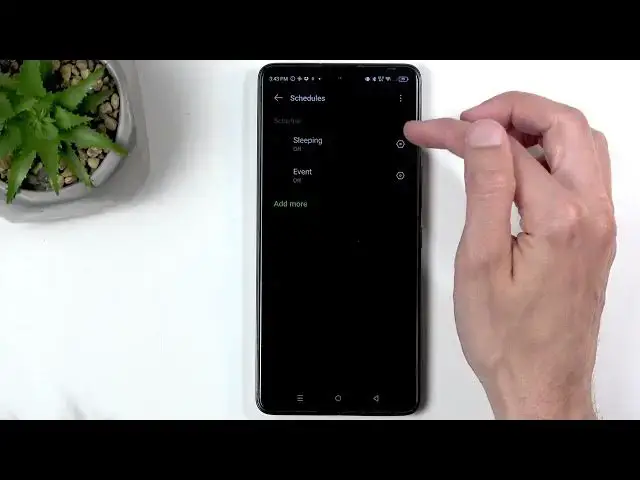
Um so here we have schedules. You can
2:32
create however many you want. You can
2:33
edit the existing ones. And uh premise
2:37
right here is start, end time, days of
2:40
the week that you want it to run
2:41
through. And that's about it. And with
2:43
any toggle in toggle on like so, it will
2:46
automatically turn the do not disturb
2:48
mode on and off at a specified day of
2:55
Uh below that, we have duration for
2:57
quick settings. This is a great option
2:58
for people that will be using this mode
3:00
manually instead of on a schedule. Here
3:04
you can select what will happen when you
3:06
manually toggle on do not disturb mode.
3:09
Now default option is until you turn it
3:11
off. So if you turn it on and you forget
3:13
about it, it will just run indefinitely.
3:16
But we also have the option for
3:17
specified amount of time or to ask you
3:19
every time. Now ask every time will show
3:21
you these two first options every single
3:24
time. Uh and you can change the timer
3:27
for for the second one every single time
3:30
you click on the toggle. Uh so that's
3:32
nice. But if I were to select this right
3:34
now in the settings right here and
3:36
choose for instance three hours, anytime
3:38
from now on that I will tap on it
3:39
manually, it will run exactly for three
3:40
hours and then turn itself off. Um
3:43
unlike the ask every time, if I select
3:45
three hours, it turns itself off. Then
3:48
next time I turn it on, I again can
3:50
select a different time.
3:54
And that's really everything that we
3:55
have right here. So let's close this up
3:57
and find the toggle and simply tap on
4:00
it. It doesn't tell us how long it's
4:02
going to be running even though it's set
4:03
to 3 hours. Some devices do give a timer
4:06
like till what time it's going to run
4:08
here. Unfortunately, we don't have that.
4:10
Oh, no. We do actually when we extend it
4:12
can see right here under the name until
4:14
6:45. So, it is for that 3 hours.
4:19
Now, like I mentioned before, you don't
4:21
need to wait for this to the timer to
4:23
run out. You can just find the toggle,
4:24
tap on it again, and off it goes.
4:28
So, if you found this video helpful,
4:30
don't forget to hit like, subscribe, and