Up next in 10


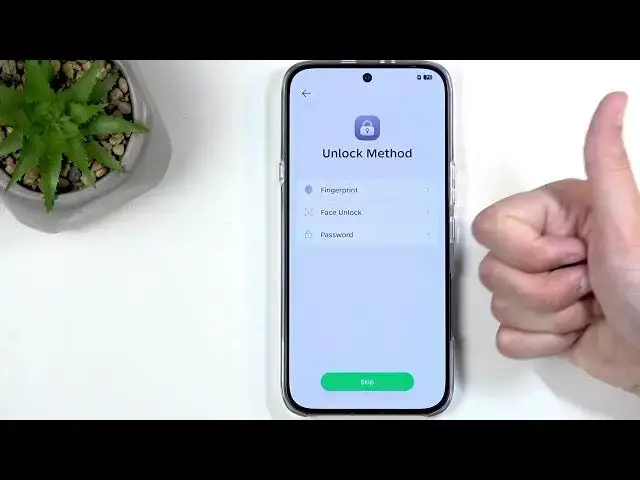
In this video we walk through the complete INFINIX Note 60 initial setup. You’ll learn how to choose language and region, transfer data from an old phone, skip or use SIM and Wi‑Fi during setup, pick unlock methods (PIN, fingerprint, face), and configure Google privacy options like location, scanning and diagnostic data. We also explain the hidden OTE update behavior, why you may want to turn off some recommended services, and how Mobile Cloner can move everything from your old device. This is a clear, step‑by‑step setup that helps you get your INFINIX Note 60 ready and private in minutes.
How to set up INFINIX Note 60 step by step?
How to transfer data to INFINIX Note 60 from another phone?
How to change Google privacy settings during INFINIX Note 60 setup?
0:00 Intro and what we’ll cover
0:14 First boot, setup screen, select language & region (EU tip)
3:12 Transfer data from another device – number matching
4:11 Insert SIM or skip, connect to Wi‑Fi (optional)
5:04 Choose unlocking method: PIN, pattern, fingerprint, face
7:30 Google services: location, scanning, diagnostics explained
11:00 Install updates vs OTE updates – what OTE means
16:24 Recommended services, Mobile Cloner, choose navigation & finish
#INFINIX #InfinixNote60 #PhoneSetup #AndroidSetup
Find out more:
https://www.hardreset.info/devices/infinix/infinix-note-60/setup/
Show More Show Less View Video Transcript
0:02
Welcome. In front of me, I have an
0:04
Infinex Note 60. And today, I'll show
0:07
you how can go through the setup process
0:09
of this device.
0:17
So, when you boot up your device for the
0:20
very first time, you should be presented
0:21
with the same screen that you can see on
0:23
my end, which is our setup page. We're
0:26
going to click on the sorry, we're going
0:28
to click on the arrow. And in here we're
0:30
gonna find our desired language. Uh now
0:32
it does show region or languages that
0:35
you're also in a region of like Polish
0:37
for instance right here. But I'm
0:39
actually going to select English right
0:42
here. United States. Now the specific
0:45
region right here doesn't really matter
0:46
of the English. It doesn't really change
0:48
how like what is written and we actually
0:53
have the region selection on the next
0:54
page anyway. Now in here I would maybe
0:56
recommend choosing some region that is
0:58
part of European Union could be
1:00
potentially completely baseless idea
1:03
here but if it is here you don't lose
1:06
anything from it and if it's it's
1:09
actually not
1:11
then you might actually gain something
1:12
from it in the future. So reason for
1:15
selecting some kind of country from
1:16
European Union is because European Union
1:18
is a little bit more consumer friendly
1:20
as long as it doesn't come to to stop
1:23
killing games and then you know their
1:25
pockets get filled but whatever. Um so
1:29
for purposes of being more consumer
1:31
friendly they do come out often with
1:33
laws that corporations don't really
1:35
like. Now US is exactly opposite. They
1:37
will screw you over in hopes that
1:39
corporations can make a buck. uh here
1:42
it's a little bit different and in case
1:45
that European Union ever steps on the
1:48
toes of corporations so much that the
1:50
corporation decides to um comply only in
1:54
this region and not changes globally or
1:56
basically cease to do operations in here
1:58
they still will need to change it
2:01
that's inevitable
2:03
um so at that point usually like I said
2:06
those are consumer friendly changes so
2:08
it means that if you are from here you
2:11
could potentially be getting this
2:12
change. As a hypothetical situation,
2:14
let's say that uh Google goes to
2:16
completely lock Android down and only
2:19
allow you to install applications from
2:21
Play Store or apps that have been signed
2:23
by them and European Union starts to
2:25
consider this as a absolutely
2:27
monopolistic behavior and tells Google
2:29
to stop and Google might only in Europe
2:31
but not everywhere else. And in this
2:33
case, if you select that you're from
2:35
Poland as an example, you may be able to
2:38
install applications from anywhere that
2:40
you want, no matter if they're signed or
2:41
not, unlike what Google would want you
2:43
to to be able to do. So, that's kind of
2:46
where it what it boils down to. But like
2:48
I said, this could be completely
2:49
baseless and we don't really have
2:51
anything right now to check this with if
2:53
if it ever will work. Anyway, moving on,
2:56
we have terms of use. So, we have terms
2:58
of use right here and privacy policy.
3:00
You can read both of them and it's
3:02
probably recommended to do so. But if
3:04
you don't, don't worry. No one does. We
3:06
just check the box right here and move
3:08
on.
3:10
And then we get the setup using another
3:12
device. Let me bring up another device.
3:14
And you can see on another device, you
3:15
get pop-up like this. Setup new device.
3:18
And I can click on setup. And what it
3:20
would uh tell me to do is I believe this
3:24
device would get the single number
3:26
visible. Let's say 69. Nice. uh and the
3:30
other phone the one that is uh that had
3:32
that popup it would have something like
3:33
126972
3:35
for instance right and what I need to do
3:37
is just select uh what the number that I
3:39
can see here I need to select it from
3:40
the three numbers on the other device
3:42
once I do so I might also need to
3:44
confirm the screen lock that is on that
3:45
other phone and it will then move all
3:48
the data such as uh primarily Google
3:50
accounts and everything that is assigned
3:52
with Google accounts so contacts photos
3:54
applications it's a honestly great way
3:57
to just quickly move all of your
3:59
accounts without ever needing to sign
4:00
into them. If they're signed in on that
4:02
device, they get moved here without you
4:04
ever needing to put in a password for
4:06
them. All you need to do is just do that
4:07
number matching and screen lock and
4:09
you're good to go.
4:11
Moving on, we have insert SIM.
4:14
I do have it taken out, but um this is
4:17
not a mandatory step. You can completely
4:19
skip this if you want to.
4:21
Next, we have connect to Wi-Fi. And
4:24
again, this is optional. You don't need
4:26
to connect to network if you don't want
4:27
to. So, I'll be skipping it. Now, at
4:31
this moment, the device is being set up
4:32
in what could be considered offline
4:34
mode. I neither have SIM card in here
4:36
nor connection to Wi-Fi. And this could
4:38
result in number one, the phone uh
4:40
setting up incorrect uh date and time,
4:42
which it might actually show up a page
4:44
for for me to fix. If I connected to any
4:46
kind of network, it would completely
4:48
skip that page. I won't be able to sign
4:50
into Google account, restore apps and
4:52
data, and get software updates. This
4:54
only applies to setup. And after this
4:56
wrap has been completed, you cannot
4:57
change all of these things in the
5:00
settings. Now moving to what we have
5:02
right now visible, we have unlocking
5:04
method. We have three different methods.
5:06
So we have fingerprint, face recognition
5:08
and on the password we have pin pattern
5:10
or password. Now, for the first two
5:12
options, which are biometrics, you will
5:14
always need to select pin pattern or
5:16
password, as biometrics aren't 100%
5:19
reliable. And in times where they just
5:21
fail to unlock your device for some
5:23
random reason, maybe because you get a
5:25
tiny little blemish on your face or your
5:27
finger, you can always rely on that pin
5:29
pattern password, which doesn't care
5:30
about those blemishes.
5:33
Now, also do recommend at least setting
5:35
pin, pattern, or password on your
5:36
device. You don't need to do that
5:37
biometrics, but set something like a pin
5:39
at least. Uh reason for that is if you
5:41
are ever to lose your device, obviously
5:43
it stores all of your personal
5:44
information. So whoever finds it, it
5:46
would be nice for you that they don't
5:48
have access to for instance all of your
5:50
photos. Let's say uh whatever those
5:52
photos might be. Now additional benefit
5:55
is typically you will also have your
5:57
phone signed into a Google account
5:59
typically. I'm not saying that everyone
6:03
that is watching this video might, but a
6:05
lot of people will. And in this case, if
6:07
you were to lose your device and someone
6:09
finds it and is being a little and
6:12
doesn't want to give it back because,
6:14
hey, they found it fair and square, um,
6:16
at least you can take revish and the in
6:19
and the fact that this obnoxious little
6:22
uh, the waste of oxygen that is
6:25
keeping your phone because they found it
6:26
and you have no idea who that is. Well,
6:28
they won't be able to use it because you
6:30
have screen lock and you have Google
6:32
account. They don't know the screen
6:34
lock. So, their next best course of
6:37
action would be to reset the phone.
6:39
Sucks for you because you're going to
6:40
lose data. But you can take joy in the
6:43
fact that you know that they won't be
6:45
able to use it anyway because once they
6:46
reset it, now they even in deeper
6:48
because now the phone is telling them,
6:50
"Oh, throughout the setup, um, you know,
6:52
connect to network. Once you connect to
6:54
it, um, you know what? Verify that it's
6:56
really you. Provide us with either
6:58
screen lock or the Google account that
7:00
was signed in. If you can't do either
7:01
one of those, well, you can't really
7:03
finish up the setup. Therefore, you
7:05
can't really use the phone. So, you get
7:08
a little bit of a, you know, last laugh,
7:10
I guess. Um, anyway,
7:14
like I said, do as I do, not as I say.
7:17
Sorry,
7:19
the other way around. Do do as I say,
7:21
not as I do. This is a work phone. Um,
7:24
so I'm not really setting up screen
7:25
locks here, but I would recommend you
7:27
do. Moving on, we have Google services.
7:30
Now, I'm going to spend a little bit of
7:31
time ranting about this crap right here,
7:33
just so you're aware of what we're
7:34
dealing here. If you couldn't give a
7:36
less about your privacy and what
7:38
you're dealing here with, then by all
7:40
means, skip this by several minutes. But
7:42
if you do care, I'll be going a lot in
7:44
depth into this and talking about this
7:46
and what these actually mean for you.
7:49
So, let's start off with the location.
7:51
Uh, quick little description. I'm not
7:54
going to read the entire thing. Allows
7:55
apps and services with a with a location
7:58
permissions to use your devices
7:59
location. Location accuracy uses
8:00
informations about wireless signals such
8:02
as Wi-Fi access points, cellular network
8:05
towers, and GPS. That's really all that
8:08
matters. By turning that off, it doesn't
8:10
mean that your phone no longer uses uh
8:12
connections to Wi-Fi, GPS, and stuff
8:13
like that, and it's being tracked. It
8:14
just prevents applications and services
8:16
from being able to supposedly utilize
8:18
this. I'm saying supposedly because it
8:20
doesn't mean Um it doesn't also
8:23
prevent Google from accessing this
8:25
information because Google is in the
8:26
business of getting your information and
8:27
selling it. they don't consider
8:30
themselves to be a service or an app.
8:33
It's more like an operating system. So,
8:37
uh that's one one problem. And number
8:38
two, you have creepy pucks like
8:40
Zuckerberg which looks at this kind of
8:43
thing. You tell them not to do something
8:45
and he's supposed to be legally binded
8:47
by this and he's looking at it as a
8:49
general guideline and goes like, "Eh,
8:51
screw that. I'm still going to get your
8:53
data." Uh, and now he's in class action
8:55
lawsuit. Get loser. Um, so obviously I
9:01
would basically like that regardless
9:03
what your idea here is because when
9:05
creepy motheruckers like Zach uh decide
9:08
to disregard what you told them to do
9:11
and completely intrude on your privacy,
9:13
at least you can know that when they're
9:15
taken to court and class action
9:16
lawsuits, you can get a little bit of
9:17
money from them. You can flee them just
9:19
a little bit.
9:21
Now moving on we have allow scanning
9:23
which automatically gets turned off
9:25
along with the location
9:27
just to show this again you can see
9:29
there we go now allow scanning allows
9:31
apps and services uh to scan for Wi-Fi
9:33
network and nearby devices at any time
9:36
even when Wi-Fi or Bluetooth is off
9:38
which is the most important part which
9:40
means that your phone even though you
9:41
supposedly turned off your Wi-Fi or
9:43
Bluetooth never actually turned it off
9:45
it just pretends that it's off and
9:47
additionally it again just like before
9:49
it prevents apps and services not the
9:51
phone itself from um scanning for this
9:54
and furthermore doesn't prevent other
9:56
phones and services for scanning for
9:57
your device which uh yeah uh privacy
10:02
right a good joke that we have right
10:04
here. Uh moving on we have uh send user
10:06
and diagnostic data. Uh this turn that
10:09
off. It's basically Google wanting your
10:10
data so they can monetize it and sell
10:12
it. Uh so help improve your Android
10:14
device experience by automatically
10:16
sending diagnostic device and app usage
10:18
data to Google. Uh, no. Just know it's
10:22
in Google's best interest to improve
10:23
their Android experience so you are
10:25
incentivized to buy another Android.
10:27
Otherwise, you can look to the other
10:29
side like Apple. So, it's not on you to
10:34
give away your data that they monetize
10:36
for them to improve something.
10:39
At that point, you paying for that
10:41
improvement with your own data. And
10:42
Google doesn't pay you money for this
10:44
data. So, there's no reason why you
10:45
should be sharing it for free. The
10:47
approach is here. If Google can sell it
10:49
and make money off of it, you should be
10:51
making money off of it, too. After all,
10:53
you're the one generating it. If you're
10:55
not getting paid for it, you shouldn't
10:56
be sharing it. Moving on. Install
10:59
updates and apps. Um, now this one is
11:02
the most uh disgusting one and also the
11:05
one that is written in the most kind of
11:07
bullshitty way and one that doesn't
11:08
really talk about what it actually
11:10
refers to. So uh quickly going uh by
11:13
continuing which automatically starts
11:14
like blackmail uh you agree that this
11:17
device may also automatically download
11:19
and install updates and apps from Google
11:22
uh and your carry blah blah doesn't
11:24
matter rest doesn't matter. So
11:27
um you might be thinking well I can turn
11:31
off system updates and up updates in the
11:34
settings after the setup and yes you can
11:37
but this is not what the setting is
11:38
about. There is a reason why there has
11:40
no toggle right here unlike the ones
11:41
that you have in the settings because
11:43
the ones in the settings actually talk
11:44
about the exact thing as a system update
11:48
or app update.
11:51
This is not talking about this. This is
11:53
insinuating that it's talking about it
11:55
but it it just basically blows smoke up
11:57
your ass. What it actually refers to is
12:00
OT update services. And you might be
12:02
right now scratching your head. What the
12:03
is an OT update service? That's by
12:06
design. Uh what this is actually is
12:09
basically a process running in the
12:11
background of your phone which you don't
12:13
really see normally unless you download
12:14
specific applications to see them. That
12:16
is designed to install security patches
12:19
which is good. Security patches if
12:22
they're not patched obviously could be
12:23
used as a vulnerability to gain info of
12:25
your device and some uh you know uh
12:28
personal information from your phone by
12:29
hackers. So that's that's okay. Uh, but
12:33
what it's also used for is forced
12:35
updates that you never see coming into
12:37
your device.
12:39
They're just going to get installed and
12:40
you had no way of knowing. You probably
12:42
already experienced this at one point or
12:45
another where you open up an application
12:47
one day and it just all of a sudden
12:49
looks different even though the phone
12:51
has never updated. Neither the
12:53
application nor the phone itself but yet
12:56
the application looks different. That's
12:58
OTAA updates for you. And the reason why
13:02
I despise this is because we have
13:04
started seeing this more and more used
13:06
in a nefarious way. So companies started
13:09
using this as a way to change the terms
13:11
of purchase after the purchase. That's
13:13
basically what it allows them to do in
13:14
this case. Uh and we do need to agree to
13:17
it.
13:19
So to give you some examples, Samsung
13:22
was and still is selling smart fridges,
13:25
the ones with a display, you know, so
13:26
you could put your family photos on it,
13:29
make groceries, and all that nice stuff
13:31
that the fridge was initially designed
13:32
for. Well, Samsung looked at it and was
13:35
like, "Whoa, top market. Time to put ads
13:39
on this bitch." And now people that
13:42
bought this fridge year two years ago
13:44
got a forced update that didn't even
13:46
know about. And now they're getting nice
13:48
little uh ad ads on their smart fridge
13:51
because it has a display. So it has
13:53
space for ads. Um so that's great,
13:55
right? $3,000 fridge now is basically as
13:58
good as a piece of You might as
13:59
well never had that display in there to
14:01
begin with because now it's just
14:03
annoying you for $3,000 of your expense.
14:06
So but don't worry, we're not just going
14:08
to talk about fridges because we also
14:09
had other instances from Sony in this
14:12
case. Probably no surprise there when it
14:14
comes on to being a creepy piece of
14:16
company. It must have been Sony, right?
14:18
So, Sony sells their uh Sony Xperia
14:22
phones. These phones were specifically
14:24
designed uh for the most part for usage
14:26
with their Alpha cameras. Sony also have
14:30
uh has mirrorless cameras. And what that
14:33
phone allowed you to do is connect it
14:34
using a cable to that camera to use the
14:37
phone as a bigger display
14:40
for the camera. So instead of using, you
14:42
know, the the tiny little screen that
14:43
you have on your camera to see what the
14:45
camera sees, you can plug in your phone
14:46
and use that instead. And it's a much
14:48
bigger display, also color calibrated,
14:50
pretty good. Well, it was part of the
14:53
Sony uh phone for free. And if you
14:57
bought that phone, you probably bought
14:59
it for that reason. And you overpaid for
15:01
that reason because the phone was
15:02
already more expensive than it should
15:04
have been, but it had some benefit.
15:06
Well, Sony came out and was like, "Well,
15:08
you know what? not enough people are
15:09
using our phones uh and this
15:11
application. So, we're gonna add
15:14
subscription, which basically means, you
15:16
know what, the suckers that bought this
15:17
phone for this specific reason, we're
15:19
going to just going to dry in there,
15:20
right? Yeah. And you're getting screwed.
15:23
Um we don't need lube for that. Uh sucks
15:26
to suck, loser. Oh, you bought the phone
15:28
year ago for that purpose. Well, now you
15:30
can pay a subscription for that purpose.
15:32
Uh, so you overpaid and now you get to
15:34
also pay a subscription to still use the
15:36
feature that you paid. Or alternatively,
15:38
you can just screw screw that and uh
15:41
start using monitor plus instead, which
15:44
is wireless and works on every phone.
15:45
You can thank me later. Anyway, uh now
15:49
with all that out of the way, there is
15:51
some things that it can do. You can
15:53
technically delete OTA update services.
15:54
your device becomes vulnerable to
15:56
exploits if ever there are some that
16:00
wouldn't be patched because you deleted
16:01
this. Uh but you know what I have the
16:03
approach of it that if a company can
16:06
change a terms of purchase after the
16:08
purchase without my permission seems
16:09
like a very very big exploit there and
16:13
if I see that happening more than my
16:16
phone getting hacked you know what I
16:19
think I prefer to patch it myself by
16:20
removing it that's just my approach
16:23
anyway let's move on
16:25
so next we have recommended services so
16:28
we have join user experience programs
16:30
don't personalize ized recommended
16:33
services. No auto update services. No,
16:37
we can keep most of this off. If you
16:39
want something very much, you can turn
16:40
it on. Obviously, I'm not telling you
16:42
that you need to have these off. I just
16:44
recommend uh if there's something that
16:46
you do want, maybe AppCenter, turn that
16:49
on by all means.
16:51
Uh user experience improvement programs.
16:53
Yeah, we're not joining that. That's
16:54
basically the same thing that Google
16:56
give us your data so we can sell it and
16:58
make record-breaking profit. We can make
17:00
double the money from selling your data
17:02
than we did from selling you the phone.
17:04
Disagree. Um, next we have mobile
17:07
cloner. This is actually pretty good
17:09
application all things considered. Uh,
17:11
it can be downloaded on other devices
17:14
and what it will allow you to do is for
17:16
instance if you have an old Samsung that
17:17
you are coming from, you can download
17:19
mobile cloner on that Samsung and then
17:21
connect these two phones together and
17:23
select what kind of data you want to
17:24
move from that Samsung to this one. And
17:28
uh if you're thinking well I already
17:29
backed up using Google then you haven't
17:32
really backed up your device uh and I do
17:34
recommend using this instead uh because
17:36
uh mobile cloner creates connection
17:39
between these two phones together. So
17:40
it's completely uh offline
17:43
or off the grid more like um and
17:47
it's uh not going to be cherry picking
17:49
what kind of data you can move up to how
17:51
much data you can move. It just allows
17:53
you to move everything as long as you
17:55
have enough space on the phone itself.
17:57
And you can move everything like photos,
17:59
videos, no matter if there's more than
18:01
15 gigabytes unlike Google. Uh
18:03
applications, if they came from outside
18:04
of Play Store, no problem. It's moved.
18:07
So, it's going to be much better and
18:09
also faster.
18:11
Next, we have system navigation. So,
18:13
choose whichever navigation you prefer.
18:14
I like gestures, so that's what I'm
18:16
going to stick with.
18:18
And this basically finishes up the
18:20
setup.
18:21
So,
18:24
it's like get ready.
18:26
And here it is. Now, with that being all
18:29
said, I hope you found this video
18:30
helpful. And if you did, don't forget to
18:32
hit like, subscribe, and thanks for
18:34
watching.
#Science