0:00
Hi everyone. In front of me, I've got
0:02
Infin Note 60 Pro and let me share with
0:04
you how to change the wallpaper on this
0:12
So in this device, we've got plenty of
0:14
options to choose from. I mean plenty of
0:16
wallpapers, different options, etc. So
0:18
first of all, I'll try to discuss all of
0:20
them and after that I'll show you how to
0:23
exactly set the wallpaper. Uh so let's
0:26
begin with opening the settings. And
0:28
here we need to scroll and find
0:30
wallpaper uh wallpapers and
0:32
personalization. Let me maybe change the
0:34
brightness so you will see a little bit
0:37
better what's happening on the screen. I
0:40
don't think it's better. All right, just
0:42
leave it like this. All right, so uh
0:44
after entering wallpapers and
0:46
personalization, we've got my
0:48
combinations. And basically here we can
0:50
check the preview of the lock screen and
0:52
home screen. As you can see, I've got
0:53
different uh wallpapers applied on both.
0:56
So what we uh can do here is to actually
0:59
tap on edit and your device will uh open
1:02
the again the preview of your wallpaper.
1:05
Here you can decide uh to match the lock
1:08
screen as simply after tapping on this
1:10
option your device will also apply the
1:12
the wallpaper that is on the lock
1:14
screen. Uh here you've got the
1:16
customization. So you've got the blur
1:18
effect. H after tapping on this drop
1:20
icon you can make it blurred and depth
1:22
effect. However, you need to be aware
1:25
that this option works only for
1:27
portraits. Uh so that's for this
1:30
abstract uh thing. Uh moreover, here you
1:33
can tap on photo and you will be
1:34
transferred to your own files. So your
1:37
own photos. Uh you can apply uh the
1:40
photo as your uh as your wallpaper. Of
1:42
course, uh simply tap on it and it will
1:44
be immediately set here. I will also
1:46
show you later on how to uh do it using
1:49
different section. So basically this is
1:51
the first section you can use to change
1:53
the wallpaper. However, here you can
1:55
only pick um the the one that is set as
1:59
a lock screen or something from your own
2:01
albums. Um moreover uh let me go back uh
2:06
right here. I mean under it we've got AI
2:09
them generator and death effect home
2:11
screen. So again this one will work if
2:14
you've got the portrait. Um and here
2:17
we've got also this information. So
2:18
custom portrait is only supported for
2:20
single person photos. Uh probably it
2:23
will be changed later on but um right
2:25
now it is only for this option. So you
2:28
can tap on custom portrait portrait
2:30
death effect or system death effect
2:32
because here you've got some uh some
2:35
wallpapers. For example, this one is um
2:38
is connected with this death effect. You
2:41
can of course apply it uh apply it here.
2:43
And here you've got the um let's say the
2:45
preview of how it it can look like. Um
2:48
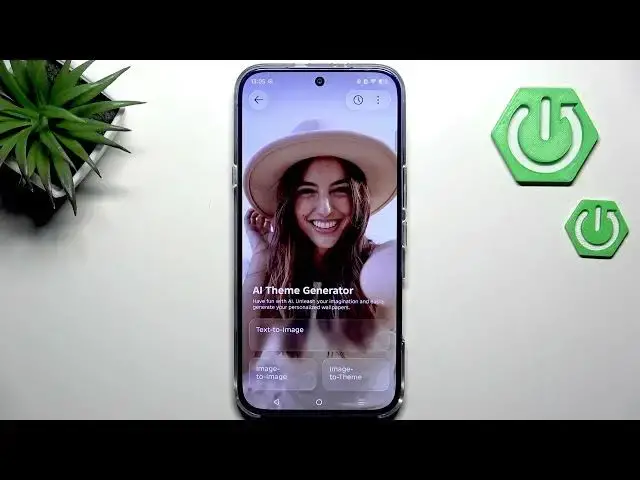
all right. Uh here we've got also AI
2:50
theme generator. So if you want to you
2:53
can actually create your own wallpaper.
2:55
Uh you can write what you'd like to uh
2:57
generate. You can use a specific image
2:59
and for example tell the device to make
3:02
the animated version of this photo. Um
3:05
and here you've got also image to them.
3:07
So I actually I highly recommend to just
3:10
have fun with this section and and
3:12
create your own wallpaper. If you don't
3:15
really want to do it, um you can simply
3:18
tap on more wallpapers here and we will
3:20
be transferred to a completely different
3:22
section in which again we've got
3:24
wallpapers. Uh so again depth effect,
3:27
home screen, AI and our own gallery and
3:29
under it we've got featured themes from
3:32
which we can also choose the the the
3:35
wallpaper from. So, as you can see, a
3:37
lot of things here to to choose from,
3:40
cartoons, portraits, doodle, etc. But
3:44
here we've got another option, online
3:46
wallpapers. So, if you've got the
3:47
internet connection, you can enter
3:49
online wallpapers which you can
3:51
download. So, for example, this one was
3:53
on my log screen or actually is on the
3:55
lock screen. After scrolling down, you
3:57
can see that there are plenty of
3:59
different sections from uh and
4:01
categories from which you can choose the
4:03
wallpaper from. uh for example, what's
4:06
new. Uh and here more options. Uh so let
4:09
me quickly pause the video. I'll choose
4:11
something that I'd like to apply and I
4:15
All right. So I found the photo that I'd
4:17
like to use. So all we need to do is to
4:19
tap on it. Now we need to tap on
4:22
download. And here your device will
4:24
immediately ask you where you would like
4:26
to apply the wallpaper. So home screen,
4:28
lock screen or both. I'll choose both
4:30
options. So let me tap on it.
4:32
And as you can see the wallpaper has
4:34
been applied successfully. Of course you
4:36
can go back to this um preview section
4:38
and you can for example apply the blur
4:40
effect on it etc. All right so that will
4:44
be all. Thank you so much for watching.
4:45
Please hit the subscribe button and