0:01
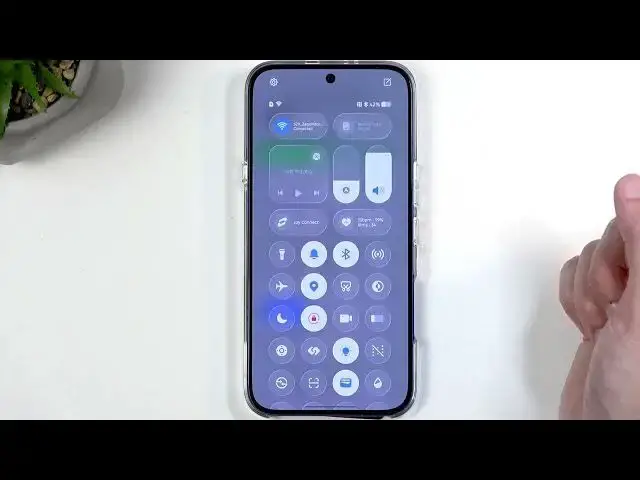
Welcome. In front of me is an Infinix
0:03
Note 60 Pro and today I'll show you how
0:07
you can enable power saving mode on this
0:18
So to get started, you will want to
0:21
swipe down from the top of your screen.
0:24
more precisely from the top right side
0:26
of the screen as this is where our
0:28
toggles live. And somewhere in here, we
0:31
should hopefully have our power saving
0:33
mode. I think it's this one right here.
0:35
Looks kind of intuitive.
0:38
Uh now, if you don't see this icon
0:40
anywhere, you can click right here on
0:42
this weird icon right above your battery
0:45
and swipe down below here. And every
0:47
toggle that you can see with this plus
0:49
means that it's a toggle that you can
0:51
add to that list that we've seen. Now we
0:53
are limited here to only 24 uh toggles
0:57
which I already reached. So I'm going to
1:05
Oh boy. Sorry for that.
1:10
uh I am actually looking for one toggle.
1:12
On there we go. It's right here. Ultra
1:14
power saver. So this is also a power
1:16
saving mode. And I'll add this just so
1:18
you can see how that looks like. but it
1:20
is basically a more intensive version of
1:23
a power saving mode. Let's click on
1:26
done. And we're going to obviously start
1:28
off with the normal one. So, just click
1:29
on it. And well, that's about it. It's
1:32
already on. If we hold it, it actually
1:35
takes us to the settings and tells us
1:36
what kind of changes will happen. So,
1:38
the first one is just the fact that the
1:40
tackle is enabled, but and other things
1:42
will be things like this. Reduce refresh
1:44
rate to 60. Dark theme. Um, for some
1:46
reason it's off. I believe normally it
1:48
would actually be enabled. Uh screen
1:51
timer set to 15 seconds.
1:55
Uh we also have some notification
1:56
enabled. So uh when battery is at uh or
1:59
below 20% you will get a notification
2:01
automatically enable battery saver. When
2:03
battery drops below 25% auto disable
2:06
battery saver when you charge it uh to
2:09
uh to 75% or more. and then sleep uh
2:12
standby optimization, meaning that your
2:14
device kind of optimizes uh during night
2:16
time to preserve battery life. Anyway,
2:19
uh so these are just normal power saving
2:20
modes. And if we go back to the main
2:22
page by just backing out or by let me
2:25
just demonstrate this
2:28
by going into the settings and uh we are
2:32
looking for battery and power saving.
2:34
And here you can see uh it's the same
2:36
page. Now, it right now tells us we're
2:38
getting or going to be getting about 11
2:40
and a half hours of battery life with
2:42
power saving mode being enabled in the
2:45
current mode, which is battery saver.
2:47
I'm going to uh switch it back to the
2:52
equilibrium mode. Wow, fancy name. And
2:55
this one gets us about 9 hours of
2:59
So, we get two and a half hours of
3:01
battery life extended with the power
3:03
saving mode at uh little below 50%. So,
3:08
let's just assume 50% gets us about 2
3:10
and 1/2 hours. That means that 100%
3:13
battery when you enable power saving
3:15
mode uh you get about uh what 5 hours of
3:20
And obviously, this will decrease the
3:22
lower the battery uh you have. So again,
3:25
if we cut this by like um by like half,
3:28
so 20%, we would be looking at 1 hour
3:32
and like what 15 minutes of uh
3:36
additional battery life.
3:39
So instead of having nine uh we would be
3:41
getting like what uh in this case uh
3:46
four and a half, five, six hours. So
3:49
this is just rough kind of estimate and
3:53
doesn't show us the completely accurate
3:56
time just so you know uh because if it
4:00
did so keep in mind right now we're at 8
4:03
hours and 58 minutes. If I change the
4:06
brightness we if I actually could change
4:10
the brightness. There we go. It's
4:11
definitely lower now in the meantime.
4:13
And you can see that the time didn't
4:15
change at all. Uh it should most
4:18
certainly change but it didn't.
4:23
It did change now because of the
4:24
percentage we had 43% now we have 42.
4:29
So obviously the time uh right now
4:31
decreased by a little over 10 minutes.
4:35
if we now take a look at the ultra power
4:38
saver you can see that right now we
4:40
would be going from about 8 hours and 46
4:42
minutes to 14 hours. So, this is nearly
4:47
doubling the battery life. Not quite
4:49
there, but it it's doing a pretty good
4:51
job. So, if you are left at like 10%
4:54
battery life and you're going to be
4:55
getting, I don't know, 2 hours of uh
4:58
yeah, two hours of battery life about uh
5:01
this would make it actually into closer
5:03
to 4 hours of remaining battery life on
5:05
the same percentage. spot.
5:08
Uh, it's probably not something that you
5:09
want to utilize all the time because
5:12
let's find this toggle and turn it on
5:14
just so we can see how that looks like.
5:17
Enable. It does everything that the
5:18
normal power saving mode does plus
5:21
extra. There we go. Here's our home
5:23
screen. Uh, we don't have a
5:25
notifications nor toggle tray anymore.
5:29
Uh, we have up to six apps that can add
5:36
And uh you're only limited to six. Every
5:38
other app will be disabled. So it won't
5:42
be able to run whatsoever in the
5:44
background. And we also have some
5:46
toggles like Wi-Fi data, mobile data
5:49
localization, and Bluetooth. And that's
5:51
it. Now, anyway, let's leave this mode
5:53
by clicking right here on this exit
5:54
button. Okay. And this will obviously go
5:56
back to the normal one. There we go.
6:00
So, like I mentioned, that mode is
6:02
primarily designed for uh Why the do you
6:07
stay on auto? There we go. So, it's
6:10
going to be utilized more for like dire
6:14
situations where you know you want to be
6:16
able to charge your device for some time
6:19
and you need that device to last. Uh, so
6:22
you enable this mode, you sacrifice
6:24
decent amount of usability of your
6:26
device, keep only the essentials and
6:28
nothing else. And hopefully that gets
6:30
you through. Anyway, uh, with that being
6:33
said, I hope you found this video
6:35
helpful and if you did, don't forget to
6:36
hit like, subscribe, and thanks for