0:00
Hello everyone and welcome to our
0:02
channel. In front of me I have my watch
0:04
R and today I'm going to show you how to
0:07
set a custom watch face on this watch.
0:09
Basically if you want to use your own
0:11
image or a picture as a watch face. So
0:20
So, if you want to use a custom watch
0:22
face on your watch, uh, one thing to
0:24
mention before we continue is that your
0:25
watch needs to be paired with a phone
0:27
via the My Moofit application for this
0:29
to work. And once the devices are paired
0:31
together, we can continue and we can
0:33
open the My Moofit application on the
0:36
phone that is paired with our watch. And
0:39
once you open the app, you should see
0:41
homepage. Now, tap on device icon right
0:43
here. And on this page, you should see
0:45
your MyOma watch R. Under it you will
0:47
see this watch face category. Tap on
0:49
this arrow right here in the corner to
0:52
open the watch face page and on it you
0:55
will see at the top different pages or
0:58
categories. We have local, online and
1:00
custom. We are interested in custom one
1:04
and here we have three options. We have
1:06
album. So basically you can take a
1:08
picture or pick a picture from your
1:10
phone and use it as a watch face. Then
1:12
we have fun art. So you can use the
1:14
picture or take pick the picture and
1:16
then kind of edit it which is kind of
1:18
nice. Not many watches do this stuff.
1:21
And then we have uh different outfits.
1:24
So basically you can customize some
1:25
other watch face with other styles. So
1:28
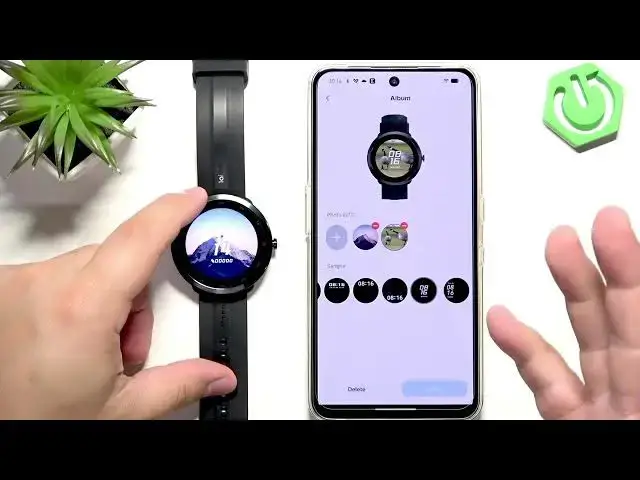
the album one like I said before you
1:29
just put a picture on your watch face.
1:32
So if you just want to see a picture on
1:33
your watch face, you can add a picture.
1:35
As you can see you have take photo or
1:37
album. Take photo allows you to take a
1:39
photo and use it as a watch face. an
1:41
album uh opens the photo app and you can
1:44
pick a photo from your phone and if you
1:47
pick it crop it because the whole
1:49
picture won't fit on the watch face. So
1:51
you need to select a part of the
1:52
picture. You can zoom in, zoom out, move
1:54
left, right, uh top, bottom and then we
1:58
have a a picture as you can see and you
2:00
can customize it a bit further by
2:03
selecting the type of the clock. Um
2:06
maybe something like this or maybe this.
2:10
And then you can tap on upload and use
2:13
and it will uh basically be uploaded and
2:15
once it's done it will be applied on
2:22
This might take a while. So I'm going to
2:24
come back to you once it's done.
2:31
Okay, it's done uploading. And now if I
2:33
wake up the screen, I have my uh watch
2:36
face. For some reason, as you can see,
2:38
the previous photo is also here. So I
2:40
have two photos. I forgot to mention
2:42
that you can have up to seven photos
2:43
uploaded. And when you tap on the
2:45
current watch face, it basically cycles
2:47
between them. You can also remove them
2:49
if you want to have only one. So that's
2:51
not a problem. Uh okay, let's go back.
2:55
And now let's check out the fun art and
2:57
outfit. Fun art. Like I said before, it
2:58
allows you to apply some interesting
3:00
field filters on your watch face, which
3:03
could be uh nice. So, let's wait until
3:08
Now, we can, as you can see, we have
3:10
pre-existing photos already. You can
3:12
remove them if you want to, but if you
3:14
don't care, you can just add your own
3:15
photo. Again, you can take a picture or
3:17
use the album. I'm going to use the
3:19
album again. Pick the same picture, but
3:21
now we're going to uh spice it up a bit.
3:24
So, we can select this part. And as you
3:27
can see here, we have the list of styles
3:28
and we can download them and use them.
3:30
There's quite a few of them. So find the
3:32
style you enjoy on the camera. They're
3:35
not very visible. So the best option
3:38
probably will be just download them all
3:39
and test them out. But I have one
3:41
downloaded right here. I can apply it.
3:43
And as you can see, it applied kind of
3:45
different filter. It looks kind of
3:48
unique. And now now we can also select
3:50
the type of the clock. Apply it.
3:53
Upload and use. And of course, it's
3:55
going to take a while. So, I'm going to
3:57
wait until it's done and going to come
3:59
back to you once it Oh, something went
4:06
Let me try again. Maybe.
4:10
Yeah, the watch disconnected from our
4:12
phone for some reason. Let's try
4:15
reconnecting it. Let's see what's the
4:20
It should be connected.
4:40
Oh, now it's connecting. So, I can go
4:50
I wonder if it remembered our set up.
5:20
It didn't. Okay. Okay. So, I'm going to
5:22
uh use the use the same setup. So, I'm
5:24
going to add the photos, apply the
5:25
filter, uh upload it, and I'm going to
5:27
come back to you once it's done.
5:34
Okay. And it's done uploading now. This
5:36
time it went without problems. And here
5:38
we have our unique kind of unique watch
5:41
face. It kind of looks cool in my
5:42
opinion. And you can play with it and
5:44
find your best uh the style you like the
5:49
Okay. And the last part is the or last f
5:52
last last option is the outfit. And here
5:54
you can I believe just create some um
6:01
I don't know actually what it is. Let's
6:03
see. Uh we can add our own photo
6:06
apparently. So let's add it
6:08
the same photo as well.
6:38
And I guess that's what it does.
6:39
Basically, it takes a picture and then
6:42
picks the color scheme and gives you
6:45
like a different shapes
6:47
uh you can use as a watch face from the
6:49
color scheme you you upload it basically
6:52
and then you can apply it as well if you
6:59
which will also take a while. So I'm
7:01
going to come back to you once it's
7:08
Okay, it's done uploading. And that's
7:10
how it looks like on the watch. And
7:12
basically, that's how you set a custom
7:14
watch face on this watch. Actually, this
7:16
watch has a lot more customization than
7:19
most of them. So, it's quite nice
7:21
actually. Um, so I recommend to check
7:25
all of the options, find whatever you
7:27
like, and use it to spice your watch up
7:29
a bit, make it more pleasing uh to look
7:32
at. So, if you found this video any
7:34
helpful, please consider subscribing to
7:36
our channel and leaving a like on the
7:38
video. Thank you for watching and see