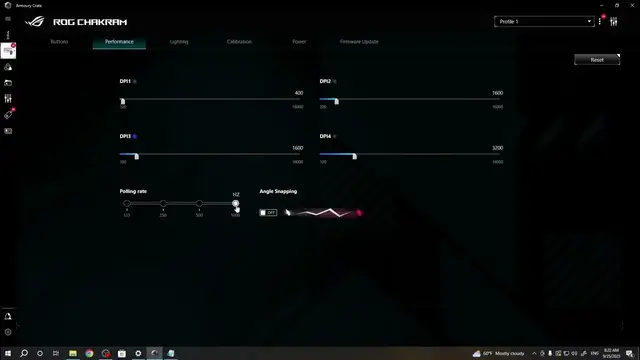

How to Adjust DPI Settings on Your Asus ROG Chakram Mouse
Mar 3, 2024

Find out more: https://www.hardreset.info/devices/
Welcome to HardReset.Info's latest tech guide, where we delve into the advanced features of the Asus ROG Chakram gaming mouse. In this video, we focus on a critical aspect for gamers and professionals alike - adjusting the DPI (Dots Per Inch) levels. Understanding how to customize DPI settings is crucial for enhancing your gaming precision, speed, and overall experience. The Asus ROG Chakram offers a range of DPI settings to suit various gaming styles and needs. We'll guide you through the process of accessing and adjusting these settings, ensuring you can tailor your mouse's sensitivity to your personal preference. Whether you're a competitive gamer or a creative professional, mastering the DPI adjustments on your Asus ROG Chakram can significantly improve your performance. Stay tuned to learn more about optimizing your gaming gear, and don't forget to subscribe to HardReset.Info for more in-depth tech tutorials.
#AsusROGChakram
#GamingMouseSettings
#DPIAdjustment
Relevant "How To" Questions:
How to access the DPI settings on the Asus ROG Chakram?
How to customize the DPI levels for different gaming scenarios on your Asus ROG Chakram?
How to test and find the optimal DPI setting for your gaming style on the Asus ROG Chakram?
How to save and switch between DPI profiles on the Asus ROG Chakram?
How to troubleshoot common issues when adjusting DPI on the Asus ROG Chakram gaming mouse?
Follow us on Instagram ► https://www.instagram.com/hardreset.info
Like us on Facebook ► https://www.facebook.com/hardresetinfo/
Tweet us on Twitter ► https://twitter.com/HardResetI
Support us on TikTok ► https://www.tiktok.com/@hardreset.info
Use Reset Guides for many popular Apps ► https://www.hardreset.info/apps/apps/
Show More Show Less #Computer Peripherals
#Computer & Video Games
#Science