
MECCHA CHAMELEON - How to Change the Resolution
Jun 17, 2026

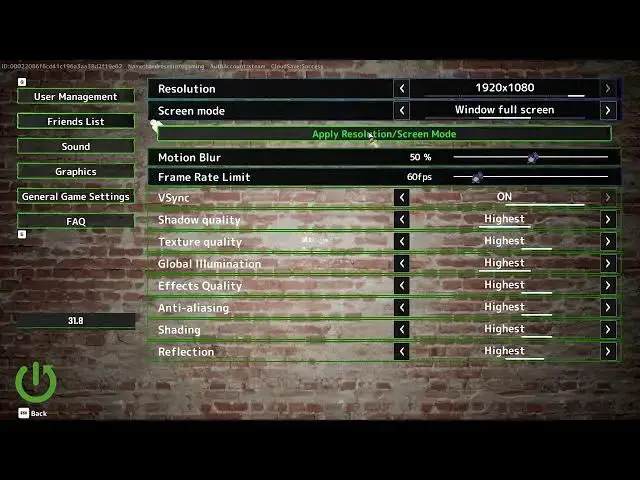
In this short video you will learn how to change the in-game resolution in Mecha Chameleon. We show where to open Settings, how to enter the Graphics section, choose a resolution preset that fits your monitor (for example 1920x1080), and how to apply the change so the game uses the new resolution. This is useful if the game looks stretched, blurry, or you want higher FPS by lowering resolution. Follow these simple steps to set the best resolution and get the visuals and performance you want in Mecha Chameleon.
How to change resolution in Mecha Chameleon?
How to apply a chosen resolution in Mecha Chameleon?
How to find the Graphics settings in Mecha Chameleon?
0:00 Intro – what we’ll change
0:06 Open Settings menu
0:15 Select Graphics section
0:18 Choose a resolution preset
0:26 Tip: pick 1920x1080 for full HD
0:31 Hit Apply Resolution to confirm
0:40 Back out and check the result
0:46 Outro – like, comment and subscribe
#MechaChameleon #GameSettings #ChangeResolution #GraphicsSettings
Find out more:
https://www.hardreset.info/devices/game/game-meccha-chameleon/
Show More Show Less #Science