0:01
Welcome. In front of me is a Realme 16
0:04
and today I will show you how you can
0:05
import contacts from your SIM card to
0:16
So to get started, you will first want
0:18
to open up your contacts application
0:22
like this one right over here.
0:25
Now I'm signed into a Google account
0:27
which does change how this entire app
0:30
kind of looks like. If you're not signed
0:32
in, there's going to be a little bit of
0:34
a difference. So I'm going to first
0:36
select no thanks. Uh dismiss. So number
0:39
one, we can see that I am signed in
0:41
right here. And if I click on the
0:43
contacts or all contacts, you can see
0:45
that I have 88 contacts in total and 88
0:48
of them are on a Google account along
0:49
with three being on SIM card. Now the
0:52
reason why we are not seeing uh 91 right
0:56
here because we have 88 and three is
0:58
because these three contacts already
1:00
also exist on the Google account. So the
1:03
application already kind of knows that
1:04
these are the same contacts. So it just
1:06
shows me a total of uh individual
1:09
contacts instead of ones that are
1:11
Anyway, uh so to import, we're going to
1:14
go to organize and in here you have a
1:17
Google account. I'll just scroll all the
1:18
way to the bottom. If you don't have a
1:20
Google account, this section right here,
1:22
this device will actually be at the very
1:24
top and there won't be anything else.
1:26
And from here, select manage SIM. Now, I
1:29
do want to just stop right here because
1:31
I want to take time to absolutely
1:33
dismantle and on this
1:35
design. I hate it. It's absolute scammy
1:39
piece of design. Uh that is, in my
1:42
opinion, should be completely illegal.
1:44
So, uh what we're seeing right here,
1:47
let's be honest. First thing, it doesn't
1:48
really seem all that bad. We have device
1:50
and Google and then more options. Now,
1:53
uh device and Google basically allows
1:55
you to import to both locations which
1:57
would include Google cloud and your own
1:59
device. Fine. Now, if you're looking for
2:02
just a device, that option is hidden
2:04
under more. Now, if you have multiple
2:06
accounts, there's enough space right
2:07
here to fit other accounts listed as
2:10
well. There is no problem fitting those
2:12
device and Google account one, device
2:14
and Google account two, and so on.
2:15
Right? But the device only is hidden
2:17
always unless you don't have anything
2:19
else other than this option. Now, this
2:22
is just Google trying to circumvent
2:25
asking for consent and all that
2:26
and trying to trick you into selecting
2:28
this option because it includes them.
2:29
And uh let's be honest, they're in the
2:31
business of selling data. Um, and in
2:34
this case, they're I would say argue
2:35
they're doing that completely legally
2:37
because the data that they're trying to
2:39
gather here doesn't belong to you, which
2:41
means that they're stealing it from
2:43
whoever else, whoever's contacts these
2:45
are. Um, and that's basically what
2:47
they're trying to do. They're just
2:48
giving you two options to get you kind
2:50
of confused right here. You're looking
2:51
for device. Well, there it is. Right?
2:52
You're looking for Google. There it is,
2:54
too. You're only looking for device. You
2:55
kind of might be looking like, I don't
2:57
see anything else. I see the device and
2:59
Google. So, I guess that's the only
3:00
option. So that's what you're going to
3:01
select most likely. It's basically a
3:03
manipulative behavior right here. So
3:05
make sure you select device only as this
3:08
is the actual like good option. And
3:10
let's be honest, if Google isn't paying
3:12
you for data or or asking for consent to
3:14
the people that this belongs to, there's
3:15
no reason to give them anything.
3:17
Everyone else pays them, so they might
3:19
as well pay you too. It's after all our
3:21
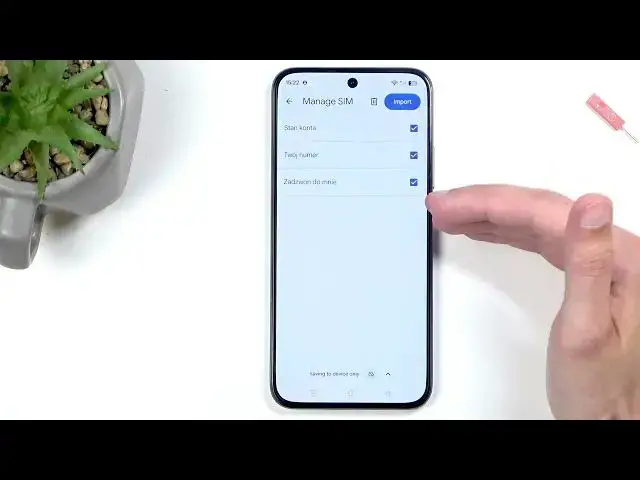
data that they're selling. Uh now from
3:24
there you can deselect contacts that you
3:26
don't want to import. And uh if you see
3:27
some that are already deselected, that
3:29
means that these contacts exist uh in
3:31
the location that you're trying to
3:32
import them to. If you're trying to
3:34
import to both Google and uh and the
3:36
device, these contacts would need to
3:38
exist in both locations at the same time
3:40
to be deselected. They only exist in
3:42
one. They will look like they do right
3:44
here. Now, from there, um you can click
3:48
on import, and you will usually get
3:50
another BS popup uh to basically delete
3:52
uh imported contacts from your SIM card.
3:56
So uh what you're going to get is
3:57
basically a popup exactly stating maybe
4:00
not exactly but roughly stating that uh
4:03
uh clear imported contacts uh to clear
4:05
storage imported or contacts that
4:07
haven't been imported won't be affected.
4:09
Now this is another manipulative
4:11
behavior from Google again trying to
4:12
seize control over data. Uh so by trying
4:15
to delete your copies of your contacts
4:17
that are being stored on the actual
4:18
physical storage, meaning your SIM card,
4:21
they're basically giving like, "Oh, you
4:23
know what? You imported these contacts.
4:25
Well, let me just get in here and delete
4:27
them." So, so you can later on be more
4:29
uh susceptible to us trying to bait you
4:32
into uploading contacts to the cloud,
4:34
which then gives us access to it without
4:36
ever needing to ask for consent. Uh, I
4:38
mean, let's be honest, Google is acting
4:40
like a creepy ass uh uh
4:43
pedo right there. So, it's just
4:46
absolutely annoying me. And with their
4:48
logic, you know what? If I say this, you
4:51
have my consent. I'm because like
4:54
they're getting consent from you to
4:55
access other people's data. Then, you
4:57
know, you have my consent to go into
4:59
Google and take whatever you want. You
5:01
know what? Computers, AI, data center, I
5:03
don't care. Take whatever you want. I'm
5:06
in no way associated with Google, but
5:07
hey, you get my consent. It's basically
5:10
the same thing. So, if it's okay for
5:11
Google, it's okay for you, too.
5:14
Obviously, all sarcastic jokes aside, uh
5:16
obviously I have a problem with this.
5:20
um so you want to obviously se to keep
5:23
these contacts. They don't get in your
5:25
way. They're on a SIM card as a safe
5:27
backup. If something happens with the
5:28
phone, you can just pop out a card, put
5:30
it in another device, and you still have
5:31
your contacts. uh unlike if you choose
5:33
to delete them then they are not there
5:35
anymore and you kind of shed out of
5:36
luck. Now I do want to also just quickly
5:39
point out when you import your contacts
5:41
um so if we go to the device which are
5:44
that's where I have the imported
5:46
contacts right now and I click on one of
5:47
these contacts and select edit
5:50
oh boy wow that's uh so there we go. So
5:54
you can see right here uh for these
5:57
contacts which is basically I'm adding
5:59
the ones that are on the phone but the
6:02
ones that will be on the cloud have the
6:03
same exact options. Actually saying this
6:06
I'm just going to edit this one. There
6:07
we go. You can see this one is on the
6:09
cloud and it has the same options. And
6:10
you can see we have things like our uh
6:13
contact and cover photos. We have the uh
6:15
first last name. We have company. We
6:17
have multiple numbers that we can add
6:18
for that contact. We have notes, email
6:20
addresses, birthday, address where that
6:22
person lives, labels, and then we have
6:24
things like uh websites, related people,
6:26
department, job titles, nicknames. Well,
6:28
that's a lot of personal information
6:30
that the person that this belongs to
6:32
have never consented for Google to have.
6:35
So, you you get what I'm saying now,
6:40
Now, for people that are relying on
6:41
their contacts just kind of being easily
6:44
accessible on other devices without
6:45
needing to refill all this crap, because
6:47
if you check out the contact that is
6:49
stored on a SIM card itself,
6:51
so there we go. This one you can see
6:53
that the SIM contacts only have the
6:54
ability to have name and number and
6:57
nothing else. So for people that want to
7:00
have all that other information uh while
7:02
also not uploading it to the cloud, what
7:05
you could do is download from a play
7:06
store an application, any kind of app
7:08
that would allow you to create a backup
7:09
of your contacts. It would create a VCF
7:13
file. I believe that's the extension if
7:15
I remember correctly. And that file can
7:18
be zipped up, emailed to yourself or
7:20
moved to an SD card and moved to another
7:22
device or anything like that. Uh you can
7:24
even send it to WhatsApp or stuff like
7:26
that. And on the other device, you just
7:28
click on it, import your entire list
7:31
with everything that is along with those
7:33
contacts like photos, multiple fields
7:35
filled and all that stuff. And voila,
7:38
you have all the contacts along with all
7:40
this information on other devices easily
7:42
accessible without ever needing to even
7:44
touch the cloud. So that's probably
7:46
going to be the best, safest kind of way
7:49
uh that doesn't, you know,
7:52
give Google all the data that they even
7:54
shouldn't have. Anyway, uh with that
7:57
being said, I hope you found this video
7:58
helpful. And if you did, don't forget to
8:00
hit like, subscribe, and thanks for