Up next in 10


In this video I walk you through the full XIAOMI 17T setup from first boot. You will learn how to choose language and region, accept terms, migrate accounts, insert SIM or set up eSIM, skip Wi‑Fi if needed, set screen lock and biometrics, and make the key Google and Xiaomi privacy choices (location, scanning, diagnostic data, OTA updates). I also cover basic Xiaomi settings like personalized ads, home layout (app drawer vs classic), system navigation and recent apps so your XIAOMI 17T is ready to use.
How to set up XIAOMI 17T?
How to change language and region during XIAOMI 17T setup?
How to disable personalized ads and diagnostic data on XIAOMI 17T?
0:00 Intro and first boot
0:10 Select language and region (why choose EU)
2:00 Terms & Conditions and quick overview
2:10 Migrate accounts from another device (number matching)
2:55 Insert SIM card or enable eSIM / Wi‑Fi options
3:36 Set screen lock (PIN/Pattern/Password) and biometrics
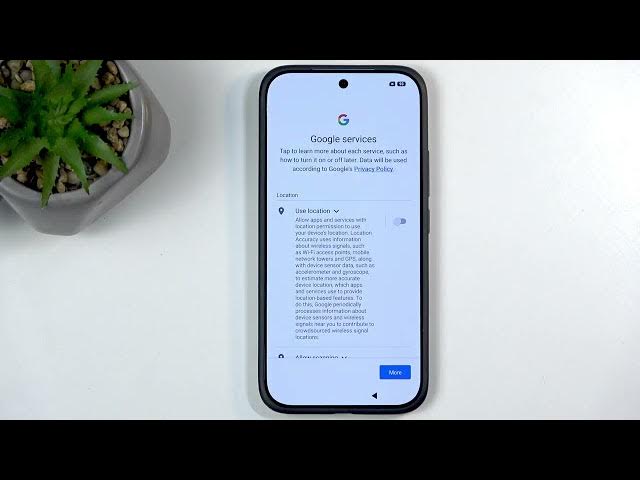
5:17 Google services explained: location, scanning, diagnostics
10:15 OTA updates and why to consider disabling
15:01 Xiaomi basic settings: location, personalized ads, fonts
16:55 Choose home layout (app drawer vs classic)
17:12 System navigation, gestures and recent layout
18:07 Finish & final tips
#XIAOMI17T #Xiaomi #HyperOS #Setup
Show More Show Less View Video Transcript
0:01
Welcome. I'm following me as a Xiaomi
0:04
17T,
0:06
and today I'll show you how we can go
0:08
through the setup process of this
0:10
device.
0:18
So, to get started, when you boot up
0:20
your device for the very first time, you
0:23
should be presented with the same screen
0:24
that you can see on my end, which uh
0:26
presents just the Xiaomi HyperOS, and we
0:28
can click on the arrow
0:30
to go and select our desired language
0:32
from the list. Now, for me it selected
0:34
Polish, but I'll be changing it to
0:36
English.
0:37
Uh there is some regions like Australia,
0:39
India, UK, and so on, but we can
0:40
disregard this as we do have the actual
0:42
region choice right here on the second
0:44
page.
0:45
Now, uh right now it's selected Polish,
0:48
which is fine, as where I'm from right
0:49
now.
0:50
Uh
0:51
and honestly, I would recommend changing
0:54
your location regardless if you're from
0:56
here or not to one that is based in
0:58
European Union. For instance, such as
1:00
Poland. Uh reason for this kind of
1:02
choice right here could be completely
1:05
irrelevant. Uh it's partially based in
1:08
the fact that, you know, European Union
1:11
has very consumer-friendly laws that
1:13
they come up with, and they usually just
1:16
screw over the giga corporations, right?
1:18
Uh by I don't know, maybe giving you
1:20
back some privacy or forcing them to do
1:22
something that is not uh
1:24
optimal for the corporations' revenue,
1:27
like Google's, right?
1:28
And uh
1:30
in case that, for instance, Google ever
1:34
decides that they will only apply these
1:37
changes in region like Europe Europe,
1:40
for instance, but
1:41
do business as usual everywhere else,
1:43
screwing the customer.
1:45
Uh by selecting this region, hopefully
1:47
you would be tied into those changes.
1:49
So, this is just kind of, you know, this
1:51
kind of approach. It could potentially
1:52
have no impact, but
1:54
it doesn't change anything on your
1:56
device, how the device works, so you
1:58
might as well try.
2:00
Anyway, next we have terms and
2:02
conditions. So, we have user agreement,
2:03
privacy policy.
2:05
Don't worry, no one ever reads a single
2:06
word of this, so we can just select
2:08
agree and continue and move on.
2:10
Set up using another device. So, if you
2:12
have another device,
2:14
well, this one won't actually show up
2:16
with it because it has a tail scale on,
2:18
so typically, you would get a pop up
2:20
somewhere at the bottom of your page
2:22
on a older device, which would allow you
2:24
to quickly migrate all of your accounts
2:27
that are signed in on that older device
2:28
right here by just doing the number
2:30
matching where one phone shows you the
2:32
three different numbers and the other
2:35
device just has a single one, so you
2:36
need to match that single one from
2:38
between the three.
2:39
And from there, confirm your screen lock
2:42
and Bob's your uncle, all your
2:45
accounts, Google accounts and all the
2:47
other ones, have now been basically
2:48
instantly migrated to this device,
2:50
signed in, and you're good to go.
2:54
>> [cough]
2:54
[clears throat]
2:55
>> Now, moving on, we have insert card.
2:57
Now, we can also activate eSIM, but for
2:59
this, you will need to have internet
3:01
connection to Wi-Fi.
3:04
So,
3:05
you also don't need to insert any kind
3:08
of cards or a SIM card or eSIM here, so
3:11
you can just skip it if you want to. You
3:12
can also skip connecting to mobile
3:14
network
3:15
or mobile network Wi-Fi if you want to.
3:19
Just know that when doing so, data and
3:22
time won't be set up automatically. You
3:24
won't be able to restore apps and data
3:27
from a backup, at least through the
3:28
setup process, and get software updates
3:31
through the setup process. Later on,
3:33
this can all be changed, so you don't
3:34
need to worry almost at all.
3:37
Now, next we have set screen lock. So,
3:38
we have a couple different options. We
3:39
have the screen lock which contains PIN,
3:41
pattern, or password. We have
3:42
fingerprint and the face recognition.
3:44
And if you planning to use any of the
3:45
biometrics, face or finger,
3:48
you will need to select a physical way
3:49
of unlocking the device, that be PIN,
3:51
pattern, or password, as biometrics
3:53
aren't 100% reliable. So, in times where
3:57
your phone
3:58
basically has a
4:00
you know, some kind of mental breakdown
4:02
and refuses to recognize your finger or
4:03
your face because you got a tiny little
4:05
blemish,
4:07
you can always rely on a PIN, pattern,
4:08
or a password, which couldn't care less
4:11
about your tiny little blemishes.
4:14
Uh I will be skipping this, but I would
4:16
recommend that you
4:17
set some kind of protection to your
4:19
device,
4:20
as it does hold personal information.
4:22
And if you ever
4:24
going to lose your device,
4:26
uh it would be nice that whoever finds
4:27
it doesn't have number one access to
4:29
your data, and number two, if they
4:31
choose to
4:32
not try to give it back to you, but just
4:34
keep the device,
4:36
uh that device kind of becomes useless
4:37
to them because when you are using
4:40
something like a screen lock and have a
4:41
Google account signed in, which
4:44
I think that's probably everyone.
4:46
Uh in this case, when someone wants to
4:49
use the device, they either need to know
4:50
the screen lock. If they don't, they
4:51
will usually probably reset the phone.
4:54
By resetting the phone, the phone will
4:56
become FRP locked, and while going
4:58
through the setup, that person will need
5:00
to verify either the screen lock or the
5:01
Google account that was signed in on the
5:03
device. And without doing so,
5:05
they will not be able to ever finish up
5:07
the setup.
5:08
So, at least, you know, you might have
5:09
lost the phone, but at least you can
5:11
have a little uh peace of mind that uh
5:14
the other person can go uh
5:16
kick rocks.
5:18
Anyway,
5:19
uh moving on, we have Google services.
5:21
Now, I'll spend a little bit of time on
5:22
here explaining these, as I just find
5:24
them absolutely atrocious, and uh it's
5:27
best that you know what the this is. So,
5:30
yeah.
5:31
So, we have things like location.
5:34
Uh by turning that off, you
5:36
your device isn't not being located.
5:39
It just uh prevents
5:41
apps and services with location
5:43
permissions to use uh your device's
5:45
location, uh which location accuracy
5:47
uses information about wireless signals
5:49
such as Wi-Fi access points, mobile
5:51
network towers, and GPS along with, uh,
5:54
device sensors data and blah, blah,
5:57
blah.
5:57
So, um, to elaborate this,
6:01
this is you kindly asking applications
6:03
to not use your sensors right here. But,
6:06
then you have creepy ass
6:09
like Zuckerberg which couldn't give two
6:10
less of what you're asking him to
6:12
do or telling him to do more like. He
6:15
will do that regardless. And this is not
6:18
a speculation. There is a class action
6:21
lawsuit for this
6:22
for a reason.
6:24
Uh, so, just know that
6:27
applications, you might tell them not to
6:30
do this, but they will just look at you
6:32
and be like,
6:33
"Sure, there, kiddo. Mhm. Yeah, right.
6:35
We're going to do that. Mhm."
6:38
So, yeah. Let's be completely honest,
6:40
this doesn't mean absolutely anything
6:43
here.
6:43
Companies that make applications
6:45
couldn't give two shits that you don't
6:47
want them to gather data. It's basically
6:50
uh, their revenue stream. And companies
6:53
nowadays make more money selling your
6:56
data than they actually do selling you
6:57
the goddamn device.
6:59
So, uh, when you consider something like
7:01
Hisense, which made, uh, what is it,
7:03
triple the revenue from just selling
7:05
data off of gathered off of the TVs
7:08
rather than selling the TVs, uh, it
7:10
should give you a little bit of a
7:11
perspective.
7:12
Now, moving on, we have allow scanning
7:14
which automatically gets turned off
7:15
along with, uh, the location. Now, allow
7:18
scanning allows apps and services to
7:19
scan for Wi-Fi network and nearby
7:21
devices at any time even when Wi-Fi or
7:24
Bluetooth is off, which effectively
7:26
means that your Wi-Fi or Bluetooth are
7:28
never actually off even when you turn
7:30
them off. Uh, and again, take this with
7:33
a grain of salt just because you asked
7:34
an application to not do this through
7:37
this toggle, doesn't mean that they
7:39
won't be trying to go backwards, uh,
7:41
through other ways to still try to
7:43
figure out this data because let's be
7:44
honest, they don't give a about
7:46
what you're telling them to do if it
7:48
means that they're going to make another
7:49
record-breaking profit.
7:51
Moving on, we have send user and
7:52
diagnostic data. This is strictly from
7:54
Google.
7:55
Uh these all are in a way. Uh but this
7:58
one is help improve your Android
8:00
experience uh
8:01
by automatically sending diagnostic
8:03
device and app usage data to Google.
8:06
Now,
8:08
why the would I ever want to do
8:09
that?
8:11
What is the benefit? Because
8:14
improve my experience isn't
8:16
isn't the description job for Google.
8:19
Unless they want
8:21
the user base to switch to
8:24
Apple.
8:25
So, it's not like it's your job to share
8:27
your data
8:28
which won't actually be used to do what
8:31
they're saying that they will cuz
8:33
improving your device experience, you
8:35
know what it actually means?
8:37
We're going to give you better targeted
8:39
advertisements. That's how we're going
8:40
to improve your device experience.
8:43
By targeting advertisements better to
8:46
you because we have more data that we
8:47
can gather.
8:49
Oy vey.
8:50
Anyway, um
8:52
so,
8:54
this this regards completely turn that
8:56
off. As long as Google doesn't pay you
8:58
for your data, there's no reason ever
9:00
you should ever be sharing any kind of
9:02
information. As long as they they are
9:04
refusing to pay you which they are
9:06
getting paid for your data, so you might
9:08
as well get that money yourself
9:09
as well, right? If you're not, don't
9:13
share it. That's just as simple as it
9:15
is.
9:16
Uh privacy being privacy, it's whatever.
9:19
We don't really have it nowadays but
9:22
just because you don't have it, you can
9:24
still try to have it. Not because you
9:26
are fooled enough to think that by
9:28
turning that off, this is what you will
9:30
get but because you can know that at
9:32
least when
9:33
companies are proven to not abide by
9:36
their own
9:37
right here,
9:39
there is some greedy lawyer which will
9:41
just file a class action lawsuit for
9:44
that company
9:45
and charge them billions of dollars.
9:48
Which at that point you can probably see
9:49
$10 back off of it, but hey, at least
9:52
you can have a peace of mind and
9:53
satisfaction that because they decided
9:56
to screw you over, at least they might
9:59
not have a record-breaking profit this
10:01
year.
10:04
Anyway, last one and the most egregious
10:05
one is the send user and diagnose uh oh,
10:07
sorry.
10:08
I'm kind of reading the same thing
10:10
again.
10:11
Uh install updates and apps. That's what
10:13
I meant to say.
10:15
So,
10:17
uh this kind of sounds like a
10:18
nothingburger on surface, but it's
10:20
actually the most out of them
10:22
all. So, by continuing which
10:24
automatically starts off like a threat
10:26
or uh just a blackmail here, uh you are
10:29
agreeing that the device may
10:31
automatically download and install
10:33
updates and apps from Google. May? I
10:36
think you
10:38
typed that wrong. Will. Will will is the
10:40
correct answer here or statement.
10:43
Um so,
10:45
uh like I said, this sounds like a
10:46
nothingburger. We all know that our
10:48
devices get updated, the apps gets
10:50
updated. Cool, like who gives a
10:52
right? Uh but what it actually refers to
10:54
is something more dubious, which is the
10:56
OTA update services, which aren't
10:58
actually mentioned here as far as I can
10:59
see.
11:02
Oops, am I clicking the wrong one?
11:04
Right? Yeah, but I don't see anything
11:06
about OTA update services.
11:08
Now, if you're right now thinking, "What
11:10
the is OTA update services?"
11:13
Uh that's probably correct kind of thing
11:14
that Google wants you to to look at. You
11:17
probably couldn't care less by hearing
11:18
this term, but what it is is basically a
11:22
process that is running in the back of
11:23
your phone that is responsible
11:26
for some good and some bad things. Good,
11:29
it's basically the security patches that
11:31
you don't need to ever install or even
11:33
be notified that you're getting to your
11:34
device.
11:35
Which is designed to protect your phone
11:37
from being hacked.
11:38
Uh the bad is when it's being used for
11:41
nefarious purposes to change the terms
11:43
of purchase after the purchase which
11:44
you're agreeing to through here.
11:46
So,
11:47
uh to give you some examples as
11:49
companies for instance such as uh
11:52
Sony
11:53
No surprise there, Sony being a little
11:55
piece of right? Uh Sony uh selling
11:59
their Xperia devices which are already
12:00
egregiously overpriced were selling only
12:03
for single purpose which was the fact
12:06
that you could use that phone as a
12:08
external display for your Alpha camera
12:10
through a cable.
12:12
So, it came with an application that
12:14
allowed you to use that and control your
12:15
camera through a phone and the displays
12:18
there were color calibrated which is
12:20
pretty nice, right? And this was part of
12:23
the phone, part of what you paid more
12:25
than a Samsung Galaxy S uh for instance
12:29
26 Ultra would cost you. Uh at the time
12:32
they would both be released, right? And
12:34
uh you would be paying like upwards of
12:36
$1,400 when
12:39
Samsung cost $1,200. And you're not
12:41
getting a better device, let's be
12:42
completely honest about this. So, that
12:44
was the only purpose there.
12:46
Well, Sony decided to be a greedy piece
12:49
of and year or 2 years after
12:51
someone purchased such a devices, right?
12:53
They decided, "You know what? There is
12:55
not enough people using the application.
12:56
So, instead of I don't know, making
12:58
maybe making it better or uh honoring
13:00
the purchase that someone made
13:02
specifically for that feature,
13:04
uh no, no, no, that's too much to ask.
13:06
We're instead going to do the most
13:08
consumer predatory behavior ever which
13:10
is add a subscription to that
13:11
application year, two, three years after
13:14
someone has purchased this device.
13:16
Because go screw yourself.
13:18
You can now pay us extra for the device
13:20
and you can pay us also extra for the
13:21
subscription if you want to use the
13:23
feature that you probably bought the
13:24
device for. Instead of I don't know,
13:26
buying something like Samsung, and then
13:28
just buying Monitor
13:29
buying, sorry. Uh
13:31
downloading it for free, because it is a
13:33
free Monitor Plus application that does
13:35
the same exact thing wirelessly.
13:37
So,
13:38
um
13:39
that's one example. Samsung, for
13:41
instance, is another one, which uh
13:44
uh they did it with their
13:46
Samsung smart fridges. You know, the
13:48
ones that have a little display on it.
13:49
So, you can put your family photos,
13:52
little grocery shopping list, cute C
13:54
notes, and some other things. Well,
13:57
Samsung saw that and like, "Whoa!
13:59
Untapped market potential.
14:03
Ads? Yes, put ads on there. Year after
14:06
someone purchased the fridge for
14:07
$3,000."
14:09
Um so, this this is what you're going to
14:11
going to be looking at, and Google is
14:12
also, you know, warming [clears throat]
14:14
up to doing the same with uh
14:16
locking down their system and preventing
14:18
you from installing applications that
14:19
are that are outside of Play Store.
14:21
Uh which
14:23
kind of seems like a very monopolistic
14:25
behavior. So, I'm saying all of this
14:28
because you technically can get rid of
14:31
this OTA update services. Uh this would
14:34
prevent your device from getting
14:35
security patches, but it also prevents
14:37
you from your device being vulnerable to
14:40
corporation deciding on a whim that they
14:42
will change the terms of purchase after
14:43
the purchase.
14:45
So, honestly, I'm not sure what is a
14:47
bigger virus. I think companies being
14:50
able to do whatever the hell they want
14:52
at any point just because you're forced
14:54
to agree to it, otherwise you can't use
14:55
a device. Seems like a little bit of a
14:57
vulnerability to me. So,
14:59
that's it. Let's move on.
15:02
Next, we have basic settings. We have
15:03
location, which is repeated because
15:05
these are now from Xiaomi. So, we can
15:07
turn that off. We can disable everything
15:09
that you want, specifically personalize
15:10
ads. Now, I want to point out because I
15:13
Xiaomi stopped this. This is No. This is
15:16
No, unacceptable. Uh you can see, I can
15:19
turn these off.
15:21
Whoa, whoa, whoa, whoa, whoa, whoa, are
15:22
you sure you want to turn off the
15:24
that we actually allows us to make a
15:25
revenue from selling your privacy?
15:28
Um, personalized ads. Now, it's it's
15:32
>> [clears throat]
15:32
>> labeled in such a way like, "Oh, we're
15:34
going to give you such a nice ad
15:36
specifically for you." Which means we're
15:38
going to be gathering so much
15:39
data about you and making revenue
15:42
breaking profits
15:43
by selling this data and you're going to
15:45
be getting more annoying intrusive piece
15:48
of ads. And let's be completely up
15:51
front about this.
15:53
The ad collector rate for majority of
15:55
this is astronomical.
15:59
It's less than a percent that people
16:01
will interact with this. So,
16:03
in reality, this is just data gathering
16:06
and privacy removal So, we're
16:08
going to select turn off, which again,
16:10
even further insult, not only does this
16:13
piece of is the only one that gives
16:14
you a pop-up, Xiaomi has the audacity to
16:17
do a reverse psychology because
16:18
typically when you try to make an
16:19
action, confirmation is selected in blue
16:22
and it's on the right side. Not here.
16:26
Not here.
16:29
Anyway,
16:30
um, you can check out other ones, but
16:32
this is the most egregious one. So,
16:34
let's move on.
16:36
Next is parental control. Obviously,
16:38
it's up to you if you want to check this
16:40
on and set it up.
16:42
Fonts. Uh, so these are just
16:44
customization options that will be going
16:46
on. So,
16:48
fonts we they
16:49
only differ by size in reality.
16:52
Uh, moving on, the classic mode or app
16:54
drawer, whichever one you prefer. I
16:56
actually prefer the app drawer.
16:58
Uh, specifically at Xiaomi has
17:00
categories at the very top of uh, right
17:03
here.
17:04
Not the best, but it's still kind of
17:06
nice that sometimes you can just flip
17:08
through categories and look for a
17:09
specific category of an application.
17:12
Uh, system navigation, gestures,
17:14
buttons. Uh, gestures are selected by
17:15
default and that is what I want to use,
17:17
so let's move on.
17:19
And the recent layout, again, just
17:21
another customization how apps are laid
17:24
out. I'm actually going to go with this
17:26
one as it allows you to see more
17:27
applications at a given time and quicker
17:30
manage them, I would say, as
17:33
I believe for this one, if you want to
17:36
close all of them quickly, you need to
17:37
go to the end of the uh the list and at
17:41
the very like uh far left you will have
17:44
basically close all. While with this one
17:46
you have a little X button somewhere
17:48
basically like right here on the screen.
17:51
So,
17:51
not only do you see more apps, you can
17:53
also quicker kill them all at once.
17:58
And this basically finishes up the setup
18:00
after the
18:02
system has been prepared because it
18:04
didn't have enough time to do that while
18:05
I was
18:06
yapping.
18:24
And there we go.
18:26
So, if you found this video helpful,
18:28
don't forget to hit like, subscribe, and
18:31
thanks for watching.
#Science