0:00
Hello everybody. Welcome back to the
0:02
reset info channel. In today's video,
0:04
I'll show you how to improve battery
0:05
life on your OnePlus Nord 6.
0:13
So, first what you guys want to do is go
0:15
over into the settings. And in the
0:18
settings right here, what are we going
0:20
to do is we're going to go over into
0:22
home screen, lock screen, and style. And
0:25
here, we want to make sure that we go
0:26
over to always on display and make sure
0:28
it's disabled. it is draining our
0:30
battery even if we schedule it. Then we
0:32
want to make sure that we schedule it
0:34
for let's say a couple of hours a day.
0:36
But I would prefer turning this off
0:38
because this will stop draining our
0:40
battery whenever we're not even looking
0:42
at the screen. Now what are we going to
0:45
do next is we're going to leave this and
0:47
we're going to go to display and
0:48
brightness and the display and
0:50
brightness. Now we're going and let me
0:52
quickly um lower the brightness. You can
0:54
also lower it if you can, but um if
0:58
you're on a let's say let's say it's a
1:00
sunny day, of course your brightness
1:02
will spike all the way to the right. So
1:05
you can put it on auto brightness or
1:06
just keep the brightness that you can um
1:09
see. For example, here and not here. So
1:13
now we're going to scroll down a bit
1:16
more. And here we have auto screen off.
1:18
So this is our screen timeout. Now, I do
1:20
have this set for 30 minutes because I
1:23
am recording a video, but I would
1:25
recommend you setting it for either 15
1:27
seconds or 30 seconds because if you're
1:29
not looking at your phone for 30
1:31
seconds, then you know that you won't
1:33
use it um in a couple of let's say
1:35
minutes and the couple of minutes can
1:38
save your battery. That's why we want to
1:40
improve it and not decrease it. And what
1:43
are we going to do next is we're going
1:45
to go over and after changing the screen
1:49
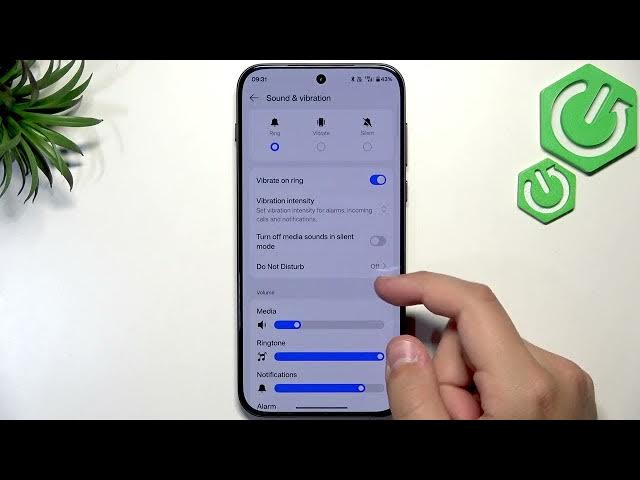
off, we're going into the sound and
1:52
vibration here. What we want to do is we
1:55
want to make sure that we scroll a bit
1:58
down, go to haptics, and disable system
2:02
haptics. Now, it seems like a good um
2:05
feature for the phone, but I wouldn't
2:07
recommend using it since it can
2:08
definitely drain your battery when you
2:11
use it too much. Of course, it's
2:13
supposed to um give you a real feeling
2:16
of the phone and it is a good option. No
2:20
hate towards it, but I wouldn't
2:21
recommend enabling it since it can drain
2:23
your battery. And here we are all about
2:26
improving it. Now, what are we going to
2:28
do next is we're going to go over and
2:30
restrict background app activity. So,
2:33
let's scroll a bit down. We can do that
2:36
in the battery settings or the apps. But
2:38
you can go into the battery and here you
2:41
have a couple of apps that you let's say
2:43
you're not using. As you guys can see
2:45
here we have power consumption controls
2:47
and now we want to click on restrict
2:49
background activity. Click on okay. And
2:51
now this app won't run in the
2:53
background. So the background activity
2:55
time which is 10 minutes and 58 seconds.
2:57
It will be gone. So that's what we can
3:00
do. Of course, there's not a lot of apps
3:02
that we can um do that for because some
3:05
of the apps here are just the system
3:07
apps. And of course, we can even sort it
3:10
as last 7 days. Here we have um let's
3:14
say Chrome. And as you guys can see, it
3:16
is also a system app. So, we cannot
3:18
change it. YouTube is not changeable.
3:22
So, if you find an app that you can um
3:25
change, then I would recommend changing
3:27
it. And after that, as a last resort,
3:30
what are we going to do is we're going
3:31
to go back into the display and
3:35
And here enable the dark mode. Dark mode
3:39
is known for saving your battery since
3:42
um the pixels are not just let's say
3:45
turned off. And that's the quickest
3:47
explanation. It's saving your battery.
3:49
And that's basically it for the video.
3:53
So, I hope it was helpful. If it was,
3:55
then leave a like, subscription, and a
3:56
comment. and I'll see you in the next