0:00
Welcome. In front of me, I've got a
0:02
Model 5 EV. In this video, I'll show you
0:05
all comfort features installed in this
0:08
car. Follow me to learn how to manage
0:10
your car better. A Model 5 EV, as every
0:14
latest car imported from China to Europe
0:17
or US, is loaded with plenty of comfort
0:21
features in just one trim.
0:24
In comparison to competitors, for low
0:28
price, you can find tech that is seen
0:32
only in premium trims in competitors.
0:36
Follow me to learn how to manage
0:38
everything. While we are here on the
0:40
outside, let's start with the key fob
0:43
functions. Firstly, thank to the key
0:45
fob, you can lower Android's windows
0:50
and also open sunroof.
0:56
open the trunk and also close it.
1:01
And in the end, you can activate
1:03
preheating or preconditioning that can
1:06
be set up in the car's system. Thanks to
1:08
this function, you can preheat your car
1:10
and the batteries so it will last longer
1:13
and the car will be warm or cool when
1:17
you enter it. Let's enter the car.
1:24
A model 5 EV is equipped with easy
1:26
access function. In this case, it's
1:29
called approach lock and unlock. When
1:33
the car detects key fob, it will
1:40
But when we walk away,
1:46
the car will automatically close the
1:48
doors. Let's enter the car. Let's start
1:52
from the left side and end on the right
1:55
side of the car. Firstly, we've got
1:58
electric mirrors adjustment and electric
2:05
We can find also electric doors lock and
2:08
unlock. Car is equipped with automatic
2:14
and also high beam assistant.
2:18
On the steering wheel, we can find
2:20
steering assist, cruise control, speed
2:24
limiter, and also voice assistant.
2:27
Thanks to which we can even open the
2:29
windows. Take a look.
2:35
>> Sorry. Please power on or start the car.
2:51
>> On instrument cluster we can change
2:58
thanks to which battery recovery will be
3:03
We can find road sign assistant
3:07
speed and power consumption.
3:10
Also here we can find all assistant
3:15
Next, take a look in the center of the
3:17
car. Right here, we've got the panel,
3:20
thanks to which we can change drive mode
3:22
between normal, sport,
3:29
normal mode, sport mode,
3:32
>> and we've got quick controls for the AC.
3:36
The car is equipped with the plenty of
3:40
drawers we can find. And here for
3:42
example, we can find the cooler. When
3:46
the AC is enabled, you can
3:50
twist this knob to allow cold air to
3:58
on the top of the control center, we've
4:01
got two cup holders and also wireless
4:06
charging tray for our smartphones.
4:13
to use wireless generic tray, you have
4:14
to enable it on the car's system. Under
4:17
the central console, we can also find
4:21
power outlet, airbug switch, and two USB
4:25
ports. USB ports are also located on the
4:29
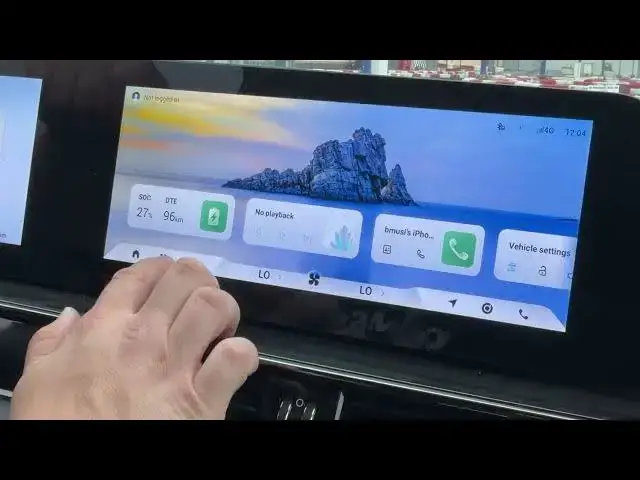
back. Now take a look at the screen
4:32
display. If we go to climate control
4:35
panel, we can find AC, front windshield
4:39
defroster and rapid cooling and rapid
4:44
warming. Here you can also enable
4:46
steering wheel heating
4:49
and pet climate control mode.
4:54
Then we can go to seats. Driver and
4:57
passenger front seat have
5:02
driver and passenger front seat has seat
5:08
and also seat ventilation.
5:13
A model 5 EV is also equipped with the
5:25
In settings, we can set up automatic
5:27
cabin ventilation and air cleaning.
5:33
Let's go to main menu. Now, enter
5:38
menu and go to vehicle settings. Here
5:43
you can set up smart key
5:46
like approach lock and unlock, welcome
5:49
when approaching and turn on smart key
5:52
sensing tailgate. You can set up driver
5:54
assistance, adjust headlight height and
5:58
enable headlight delay. In ambient
6:01
light, you can change ambient lighting,
6:04
brightness, color, you can sync it to
6:07
music and link driving mode. Then you
6:11
can enable HUD and also adjust it like
6:14
brightness and position. In vehicle
6:18
comfort, you can enable child presence
6:22
and adjust side rearview mirrors via key
6:27
via steering wheel buttons. A model 5 EV
6:30
is also equipped with wireless Apple
6:35
wireless Android Auto, video mode, and
6:40
multiple cameras like 3D camera,
6:44
around view camera, front, rear camera,
6:47
and side cameras. You can also check
6:50
view from the hood and boot. If in your
6:53
home you've got the AC charger you can
6:55
connect to your car, you can schedule
6:58
the charging. In order to do it, let's
7:02
charge settings charging management and
7:05
select charging schedule. Here you can
7:08
set up days and hours of charging. Your
7:12
car will automatically charge
7:15
at the selected hour when this function
7:18
is enabled. But if you don't have AC
7:23
charger and you have to charge your car,
7:27
you can quickly find charging station
7:30
via navigation. In order to do it, let's
7:33
go to navigation and press charging
7:38
button. Here you can find all charging
7:41
station in your area.
7:46
One fun thing. Another fun thing about
7:50
the navigation. You can find
7:53
>> your exact range. This function will
7:57
show you where can you go
8:00
on your current chart.
8:05
The map is similar to Google Maps with
8:14
and favorite locations. As you can see,
8:17
a Model 5 EV is rich in the comfort
8:21
features. Apart from everything we just
8:24
saw, you can also adjust your seats via
8:28
electric panel. And in some dreams even
8:32
you can use seat massager.
8:35
Let us know in the comments if you like
8:37
this car, if you would bought it, and if
8:40
the comfort features are enough for you.
8:43
If you find this video helpful, please
8:45
like, comment, and subscribe.