0:00
Here I have Tesla Model Y and let me
0:01
explain the standard autopilot and let
0:04
me show you all the settings that I
0:05
recommend to enable by using the
0:08
autopilot. Let's begin.
0:14
All right, so let's start by using the
0:15
home screen, of course. Here, let's open
0:17
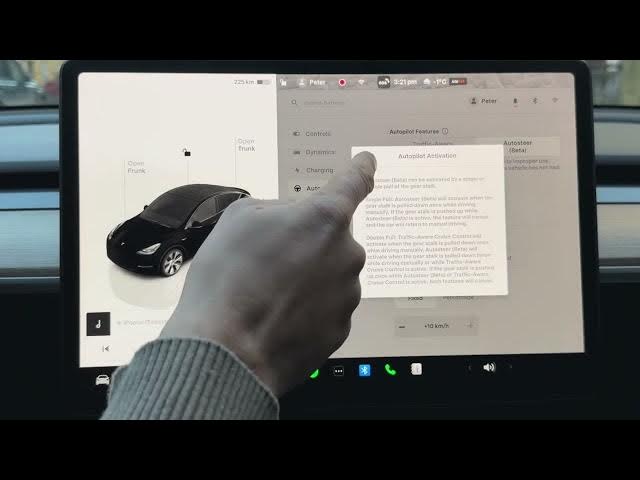
the car icon. Choose here autopilot. And
0:21
here I recommend to use the auto steer.
0:24
It's like this advanced feature of
0:26
autopilot. So, here we've got the
0:28
information about using the autopilot.
0:32
All you need to do is using this gear to
0:35
enable the autopilot and you can adjust
0:41
switcher right here. So, you can scroll
0:44
to set the speed limit and you can move
0:47
right and left to adjust the follow
0:49
distance. Be aware of this. So, let me
0:53
keep the auto steer enabled. So, let's
0:56
tap here. Yes, here we can also change
0:58
the method of activation the autopilot.
1:00
I usually recommend double pull. You can
1:03
read the instruction here. When you
1:05
enable the double pull, the traffic
1:08
aware cruise control will activate when
1:10
the gear stock is pulled down once. And
1:13
if you pull twice, you will enable the
1:16
auto steer. So, let me choose double
1:19
pull. Here you can set the speed limit.
1:22
And it could be the speed limit that is
1:25
fixed. For example, you can choose the
1:27
speed limit with the offset 10 km/ hour
1:32
of the percentage offset like for
1:37
Let me keep it that way. But you can
1:39
also choose the current speed. So for
1:43
example, you are driving with the speed
1:45
of 40 uh the car will save this as a
1:50
speed limit. In my case, I recommend the
1:53
speed limit to see the road speed limit.
1:59
that way. And let's go down to the speed
2:02
limit warning. In my case, I usually
2:05
prefer to see this warning on the
2:08
display without the chime. But you can
2:10
also use chime as as this is like your
2:14
preference. You can also choose the
2:16
speed limit from absolute to relative.
2:20
In my case, let me choose the absolute
2:22
speed limit to 180 km/ hour. You can
2:26
also enable the forward collision
2:30
warning. I recommend to have this
2:33
feature enabled. I like it to have as
2:35
soon as possible this warning. So, let
2:37
me choose early. You can also here
2:40
choose the line departure avoidance. It
2:41
will be just warning, but in my case,
2:44
let me keep it assist. And let's enable
2:47
all of those safety feature. I really
2:49
recommend to have these features
2:51
enabled. So, let's enable the emergency
2:53
line departure avoidance, the automatic
2:55
emergency braking. You cannot even
2:58
disable this feature if you have the
2:59
auto steer uh enabled. Let's also enable
3:02
the obstacle aware acceleration and this
3:06
useful feature, the green traffic light
3:08
chime. So, if you would like to hear the
3:10
simple chime, this simple ding if the
3:13
traffic is changed, let's keep this
3:15
feature enabled. So, that's it for
3:17
today. Thank you for watching. Please
3:19
subscribe to our channel. Leave thumbs