Up next in 10

REALME X50 Pro FORGOTTEN SCREEN LOCK | Bypass Password | Hard Reset by Google Account
Apr 23, 2024

More info about hard reset REALME X50 Pro:
https://www.hardreset.info/devices/realme/realme-x50-pro-5g/
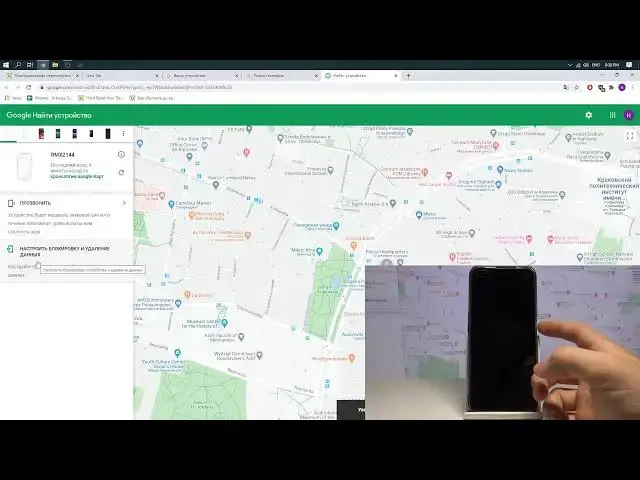
In this video you can find the simple way to hard reset REALME X50 Pro by using Google account. It's the best way to secure you data if you lost your device. It's also the perfect way to bypass screen lock, pattern or password. Follow our steps and erase your REALME X50 Pro. As a result you will remove all personal files like photos, music or contacts. You will also delete settings, apps, password and other data.
How to remotely erase data from REALME X50 Pro? How to remotely factory reset REALME X50 Pro? How to bypass screen lock on REALME X50 Pro? How to remove password on REALME X50 Pro? How to hard reset REALME X50 Pro by using Google account? How to factory reset REALME X50 Pro by Google account? How to use Google account to hard reset REALME X50 Pro?
#hardresetGoogleaccount #RemotelyFactoryReset #RealmeBypass
Follow us on Instagram ► https://www.instagram.com/hardreset.info
Like us on Facebook ► https://www.facebook.com/hardresetinfo/
Tweet us on Twitter ► https://twitter.com/HardResetI
Support us on TikTok ► https://www.tiktok.com/@hardreset.info
Use Reset Guides for many popular Apps ► https://www.hardreset.info/apps/apps/
Show More Show Less View Video Transcript
0:00
Добро пожаловать на канал Hard Reset Info
0:09
Это телефон Realme X50 Pro 5G. Сейчас я покажу вам, как на этом устройстве выполнит�
0:15
сброс пароля экрана блокировки, если вы вдруг его забыли. К сожалению, все данные на вашем устройстве сотрутс�
0:22
в ноль. Итак, что вам для сброса нужно? Для сброса вам нужен телефон, который подключен к интернету
0:30
Это обязательное условие, без этого не получится. Телефон должен быть подключен к интернету
0:36
Либо вставьте в него сим-карту с подключенным интернетом, просто здесь включите его мобильный интернет
0:42
Либо если вы у себя дома, просто включите Wi-Fi и, скорее всего, он у вас автоматически подключится к вашей домашне�
0:49
сети Wi-Fi, как это произошло у меня. Итак, вот он у нас уже севший
0:55
Это плохо, кстати. Он может не сброситься, но мы все-таки попробуем. Лучше телефон зарядить как можно больше, миниму�
1:01
50%, чтобы было. Но я на своей строке риск, попробую, как минимум придетс�
1:05
перезаписывать видос. Итак, что дальше нужно? Дальше вам нужен компьютер и нужно на компе зайти��
1:13
ой, боже, что я делаю? На компьютере нужно зайти в тот же аккаунт, в которы�
1:18
вы вошли через свой телефон. То есть у вас в телефоне по-любому должен быть Google
1:25
Вы же пользовались Play Market? Пользовались. Вам нужно на компьютере зайти в тот же аккаунт
1:30
затем вы переходите на страничку google.com, это… а что же я нажимаю все время, что-то не то, то Gomez, то Biber
1:39
Переходите на страничку google.com, сейчас опять что-то нажму, и затем вот здесь вот в правом углу страничк�
1:44
у вас будет кнопочка Google Account. Нажимаете сюда и нажимаете «Управление аккаунтом Google»
1:50
Затем вы переходите на сайт myaccount.google.com, можете вот посмотреть название аккаунта, вписать себ�
1:58
вручную, так тоже получится. Затем нажимаем на кнопочку «Безопасность», спускаемся вниз и нажимаем на кнопку «Управление устройствами»
2:11
Здесь находим ваш телефон Realme X50 Pro, у меня он подписан так по какой-то удивительной причине, Realme X2144, хоть эт�
2:22
очень странно, потому что Realme X2144 это Realme X50, но мой телефон по какой-то причине, хоть это Pro-версия, тож�
2:31
видится как 2144. Итак, что мы теперь делаем? Видим, что его база-система видела минуты две наза�
2:40
в сети, но это ничего не значит, не переживайте. Вы просто нажимаете на этот телефон, затем нажимает�
2:47
на кнопочку «Найти устройство», после этого вам нужно будет подтвердить ваш пароль от вашего аккаунта, потом�
2:56
что Google точно должен быть уверен, что это вы. Нажимаете далее, после этого вы переходите на вот такую страничку
3:07
Смотрите, что у нас здесь странного. Странное у нас здесь то, что у нас на этом телефон�
3:15
все вроде бы нормально, но нет кнопки стереть все, что нам в принципе и нужно
3:21
Поэтому что мы делаем? Мы, во-первых, проверяем, есть ли у нас связь с телефоном, нажимаем на кнопку «Прозвонить», телефон звонит, значи�
3:28
связь с телефоном у нас есть, это самое главное. Выключаем звонок. Что делаем теперь
3:36
Теперь нажимаем на кнопочку, нам нужно сейчас просто настройки настройки настройки настройки настройки настройк�
3:40
настройки настройки настройки настройки настройки настройки настройки настройки настройки настройки настройки настройки настройки настройки настройки настройки настройки настройки настройки настройки настройки настройки настройки настройк�
3:44
настройки настройки настройки настройки настройки настройки настройки настройки настройки настройки настройки настройки настройки настройки настройки настройки настройки настройки настройки настройки настройки настройки настройки настройк�
3:48
настройки настройки настройки настройки настройки настройки настройки настройки настройки настройки настройки настройки настройки настройки настройки настройки настройки настройки настройки настройки настройки настройки настройки настройк�
3:52
настройки настройки настройки настройки настройки настройки настройки настройки настройки настройки настройки настройки настройки настройки настройки настройки настройки настройки настройки настройки настройки настройки настройки настройк�
3:56
настройки настройки настройки настройки настройки настройки настройки настройки настройки настройки настройки настройки настройки настройки настройки настройки настройки настройки настройки настройки настройки настройки настройки настройк�
4:00
настройки настройки настройки настройки настройки настройки настройки настройки настройки настройки настройки настройки настройки настройки настройки настройки настройки настройк�
4:04
настройки настройки настройки настройки настройки настройки настройки настройки настройки настройки настройки настройки настройки настройки настройки настройки настройки настройки настройки настройки настройки настройки настройки настройк�
4:08
настройки настройки настройки настройки настройки настройки настройки настройки настройки настройки настройки настройки настройки настройки настройки настройки настройки настройки настройки настройки настройки настройки настройки настройк�
4:12
настройки настройки настройки настройки настройки настройки настройки настройки настройки настройки настройки настройки настройки настройки настройки настройки настройки настройки настройки настройки настройки настройки настройки настройк�
4:16
настройки настройки настройки настройки настройки настройки настройки настройки настройки настройки настройки настройки настройки настройки настройки настройки настройки настройки настройки настройки настройки настройки настройки настройк�
4:20
настройки настройки настройки настройки настройки настройки настройки настройки настройки настройки настройки настройки настройки настройки настройки настройки настройки настройки настройки настройки настройки настройки настройки настройк�
4:25
настройки настройки настройки настройки настройки настройки настройки настройки настройки настройки настройки настройки настройки настройки настройки настройки настройки настройки настройки настройки настройки настройки настройки настройк�
4:29
настройки настройки настройки настройки настройки настройки настройки настройки настройки настройки настройки настройки настройки настройки настройки настройки настройки настройки настройки настройки настройки настройки настройки настройк�
4:33
настройки настройки настройки настройки настройки настройки настройки настройки настройки настройки настройки настройки настройки настройки настройки настройки настройки настройки настройки настройки настройки настройки настройки настройк�
4:38
настройки настройки настройки настройки настройки настройки настройки настройки настройки настройки настройки настройки настройки настройки настройки настройки настройки настройки настройки настройки настройки настройки настройки настройк�
4:42
настройки настройки настройки настройки настройки настройки настройки настройки настройки настройки настройки настройки настройки настройки настройки настройки настройки настройки настройки настройки настройки настройки настройки настройк�
4:46
настройки настройки настройки настройки настройки настройки настройки настройки настройки настройки настройки настройки настройки настройки настройки настройки настройки настройк�
4:50
настройки настройки настройки настройки настройки настройки настройки настройки настройки настройки настройки настройки настройки настройки настройки настройки настройки настройки настройки настройки настройки настройки настройки настройк�
4:54
настройки настройки настройки настройки настройки настройки настройки настройки настройки настройки настройки настройки настройки настройки настройки настройки настройки настройки настройки настройки настройки настройки настройки настройк�
4:58
настройки настройки настройки настройки настройки настройки настройки настройки настройки настройки настройки настройки настройки настройки настройки настройки настройки настройки настройки настройки настройки настройки настройки настройк�
5:02
настройки настройки настройки настройки настройки настройки настройки настройки настройки настройки настройки настройки настройки настройки настройки настройки настройки настройки настройки настройки настройки настройки настройки настройк�
5:06
настройки настройки настройки настройки настройки настройки настройки настройки настройки настройки настройки настройки настройки настройки настройки настройки настройки настройки настройки настройки настройки настройки настройки настройк�
5:10
настройки настройки настройки настройки настройки настройки настройки настройки настройки настройки настройки настройки настройки настройки настройки настройки настройки настройки настройки настройки настройки настройки настройки настройк�
5:14
настройки настройки настройки настройки настройки настройки настройки настройки настройки настройки настройки настройки настройки настройки настройки настройки настройки настройки настройки настройки настройки настройки настройки настройк�
5:18
настройки настройки настройки настройки настройки настройки настройки настройки настройки настройки настройки настройки настройки настройки настройки настройки настройки настройки настройки настройки настройки настройки настройки настройк�
5:22
настройки настройки настройки настройки настройки настройки настройки настройки настройки настройки настройки настройки настройки настройки настройки настройки настройки настройки настройки настройки настройки настройки настройки настройк�
5:26
настройки настройки настройки настройки настройки настройки настройки настройки настройки настройки настройки настройки настройки настройки настройки настройки настройки настройки настройки настройки настройки настройки настройки настройк�
5:30
настройки настройки настройки настройки настройки настройки настройки настройки настройки настройки настройки настройки настройки настройки настройки настройки настройки настройки настройки настройки настройки настройки настройки настройк�
5:35
настройки настройки настройки настройки настройки настройки настройки настройки настройки настройки настройки настройки настройки настройки настройки настройки настройки настройки настройки настройки настройки настройки настройки настройк�
5:39
настройки настройки настройки настройки настройки настройки настройки настройки настройки настройки настройки настройки настройки настройки настройки настройки настройки настройки настройки настройки настройки настройки настройки настройк�
5:43
настройки настройки настройки настройки настройки настройки настройки настройки настройки настройки настройки настройки настройки настройки настройки настройки настройки настройк�
5:47
настройки настройки настройки настройки настройки настройки настройки настройки настройки настройки настройки настройки настройки настройки настройки настройки настройки настройки настройки настройки настройки настройки настройки настройк�
5:51
настройки настройки настройки настройки настройки настройки настройки настройки настройки настройки настройки настройки настройки настройки настройки настройки настройки настройки настройки настройки настройки настройки настройки настройк�
5:55
настройки настройки настройки настройки настройки настройки настройки настройки настройки настройки настройки настройки настройки настройки настройки настройки настройки настройк�
5:59
настройки настройки настройки настройки настройки настройки настройки настройки настройки настройки настройки настройки настройки настройки настройки настройки настройки настройки настройки настройки настройки настройки настройки настройк�
6:03
настройки настройки настройки настройки настройки настройки настройки настройки настройки настройки настройки настройки настройки настройки настройки настройки настройки настройки настройки настройки настройки настройки настройки настройк�
6:07
настройки настройки настройки настройки настройки настройки настройки настройки настройки настройки настройки настройк�
#Software
#Software Utilities