0:00
Here I have Tesla Model Y and let me
0:02
show you on this example how to manage
0:04
and let me explain our lights controls
0:06
on the Tesla vehicles. Let's begin.
0:13
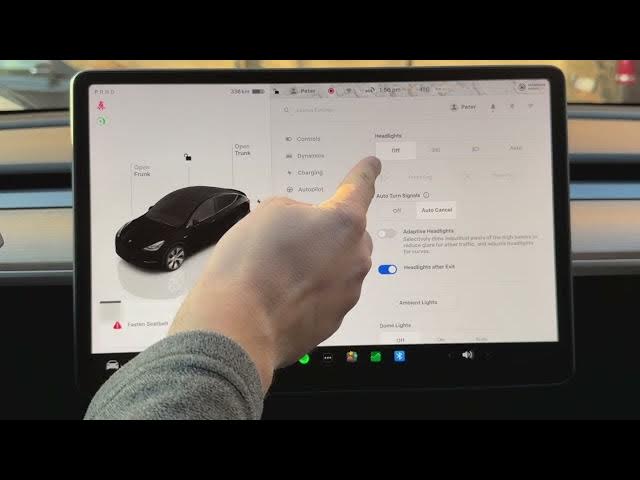
All right. So in order to have access to
0:15
the following lights controls, let's
0:17
start by using the car icon. You can
0:19
find the car icon in the left corner.
0:21
Then from the following list, you can
0:23
access the lights in two sections. The
0:26
first one is controls and the second one
0:27
is lights. Let me start with controls.
0:30
Here you've got the most important
0:32
lights controls. You can here tap off.
0:36
I'm already uh off my all lights. So it
0:40
means the exterior lights are off. Use
0:42
this to completely deactivate all
0:44
outside lightning. You can also use the
0:48
second one, the parking lights. So
0:50
parking lights turns on only the
0:53
position lights for visibility when
0:55
stationary. Be aware of this. You can
0:57
use the third one. This is the low beam.
1:00
So, manually activates the low beam
1:02
headlights for night driving. And you
1:04
can also here use here auto. The most
1:08
useful one. The automatic headlights.
1:10
The car automatically toggles lights
1:12
based on the surrounding brightness. And
1:15
you can also use the auto low beam. So,
1:18
automatically switches between high and
1:20
the low beams to avoid dazzling other
1:22
drivers. In my case, let me tap off
1:25
here. And let me also deactivate this
1:27
one. As you can see, those are the main
1:31
lights controls, but you can also choose
1:33
here the lights section. You've got here
1:36
the same controls as previous, but you
1:39
can also choose here the front fog and
1:43
rear fog. So, as you can see right here,
1:46
if you switch between auto to the low
1:49
beam, you can enable front and rear fog.
1:52
So use this if you have troubles uh with
1:56
fog. In my case, let me tap off. And you
1:59
can also use here other important and
2:02
also useful features. For example, auto
2:05
turn signals. In my case, I'm already
2:08
using auto cancel. You can read the
2:10
information about this right here. Auto
2:13
cancel. So your turn signals will
2:15
automatically turn off after a merge,
2:18
fork, or line change has been completed.
2:21
If the vehicle detects an upcoming turn
2:24
or another line change in the same
2:26
direction, the turn signal will not turn
2:29
off until the maneuver is complete. So,
2:32
let's be aware of this. This is a really
2:34
useful feature. For example, for me, you
2:37
can also use here the adaptive
2:39
headlights. Sometimes I really recommend
2:42
to use this uh so it can be really
2:46
useful. You can also use here the
2:49
ambient lights if you would like to and
2:51
you can manage here the dome lights. So
2:54
if you tap on your dome lights will be
2:57
uh switched on. Let me show you. As you
3:08
Can you see the difference? On. Off. And
3:12
that's it. But for me, the most useful
3:16
is the automatic dome lights. So, let me
3:22
And you can also use the steering wheel
3:25
lights if you would like to. So, I think
3:27
that's it. Thank you for watching.
3:29
Please subscribe to our channel and
3:30
leave thumbs up under the video.