0:00
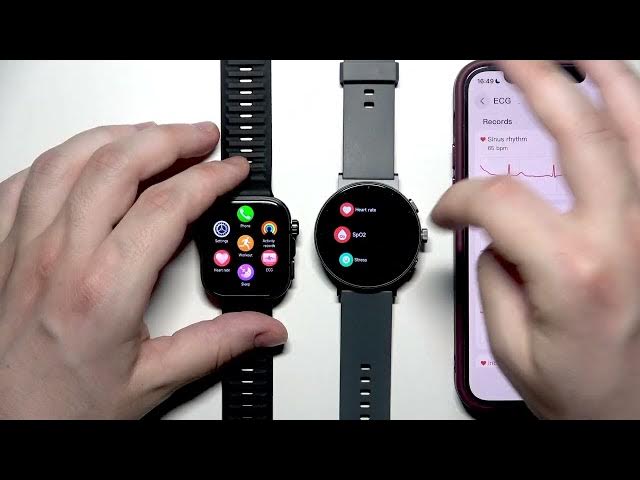
Hello. In front of me, I have all watch
0:02
5 Pro and the Realme Watch S5. And in
0:04
this video, we're going to do a specs
0:12
Okay, both devices are paired with my
0:14
phone. Uh but for now, let me place it u
0:17
next to me and I will zoom in a little.
0:19
Uh maybe we can begin with the
0:23
with the form uh with the rectangular
0:26
shape of our S5 and uh sorry with the uh
0:30
Fit 5 Pro and the uh and the round S5.
0:34
Uh as we turn them on uh we can see that
0:36
the S5 is a little bit uh bigger than
0:39
the uh Fit 5 Pro. Uh but when it comes
0:43
to the shape, it's a personal uh
0:46
personal thing. Some people like round
0:48
watches, some people prefer the uh
0:51
rectangular ones. Uh so it's up to you.
0:54
Uh when it comes to changing the watch
0:56
faces, it's the same the same method. We
0:59
just need to uh hold the hold the screen
1:03
for a few seconds. And in here we can
1:05
select our new custom watch faces. Also
1:08
certain watch faces can be uh customized
1:10
separately. So we can for example change
1:16
add some informations to them. For
1:17
example, the uh current number of of
1:21
your steps uh throughout the day. Uh
1:24
also uh when we go to the features maybe
1:27
let's go to the health features. We got
1:29
to click the chrome button on both
1:30
devices uh to get to the uh to the list.
1:34
I really would like to
1:44
on my S5. I don't know is it possible.
1:47
I hope it is. So, I would really like to
1:50
open up the settings first.
1:54
Actually, I got to find it. Okay, here
1:57
they are. Uh maybe it will be in the
2:08
I would like the list. Okay.
2:15
Okay. So, when it comes to um health
2:18
features, the health section
2:22
uh on both devices, we have the uh heart
2:25
rate measurement, the SPO2 measurement.
2:27
It's available on both uh devices.
2:31
Uh we also have the stress measurement
2:33
and the exercises for it. Same thing
2:36
with the sleep, the breathing courses.
2:45
Of course, both devices are synced with
2:48
uh the dedicated app. So all of the
2:49
information will appear uh on our phone.
2:55
uh the differences in the design uh in
2:57
the apps. Um when it comes to the uh
3:01
biggest uh differences
3:04
actually on both devices we have the uh
3:05
AMOLED display. So, uh that's a pretty
3:08
good quality. Uh but, uh on
3:13
when it comes to the health features on
3:15
the S5 watch, uh the Realme uh we don't
3:18
have the ECG monitoring for example. But
3:21
as you take a look, it's available on
3:27
on the Huawei. That's the feature that
3:29
it's uh not available on the S5, but we
3:32
have it right in here. Uh if you want to
3:34
use that feature, you got to make sure
3:36
that you're connected to the uh OI
3:38
Health app and you have enabled the ECG
3:40
monitoring. Actually, I can show you
3:43
where you can find it. So, I'll zoom out
3:45
so I can place my phone. Um
3:50
I got to open up the OI health,
3:53
then the ECG, and you got to enable that
3:57
right in here. Click on activate.
4:02
you you'll you'll be able to select your
4:04
wrist and then click on next and then
4:07
next once again. And to start a test,
4:09
you got to of course wear your watch on
4:10
your wrist. It should be pretty tight.
4:12
And then you got to place your finger
4:13
right in here uh on that electrode.
4:16
Currently, nothing is happening because
4:17
I'm not wearing the watch. Uh but that's
4:19
the feature that we have on the Huawei,
4:20
but it's not available on the on the
4:25
Uh when it comes to other things uh with
4:28
the health features uh basically
4:33
that's the only difference
4:42
if I'm not wrong uh when it comes to the
4:49
of course on both devices we have the uh
4:51
sleep data uh currently in both uh both
4:59
to the health and to the sleep. I don't
5:01
have many information because you know I
5:02
wasn't sleeping with the uh with the
5:04
watch on my wrist. You got to sleep for
5:07
around uh one week I think to get some
5:10
information. Currently just like I'm
5:11
saying there's no any uh sleep
5:13
informations. I can show you that also
5:15
in the realme link app when you go to
5:19
home actually the health
5:22
in here we also have the sleep section
5:24
but just like I'm saying there's no data
5:26
currently because I'm I wasn't sleeping
5:28
with this watch yet. Uh when it comes to
5:34
the battery life on the Oi Watch 5 uh
5:38
it's up to 10 days while on the S5 it's
5:42
around 10 to 40 something like that.
5:47
When you have the stress monitoring uh
5:51
just like I'm saying it's also available
5:52
on both devices in here. also see the uh
5:57
results. But just like I'm saying, you
5:58
got to wear the watch for a little bit
6:00
if you want to get that uh information.
6:08
Same thing. Actually, a little different
6:14
uh the workout section. Let's go
6:20
Uh click on agree also in here. And now
6:30
and done. Okay. And also in here I want
6:33
to get to the workout section.
6:36
As you could take a look the list is the
6:39
basic list is pretty long. Same thing
6:46
Of course, we can add a new
6:51
workouts to this list or we can hide
6:54
some sport. On the real me, it says that
6:56
we can add up to uh 20 workouts.
7:00
Uh so I would have uh to delete
7:03
something. So maybe I will hide some of
7:05
those things such as trail run, the auto
7:09
the cycle indoor, and the elliptical.
7:14
Okay. I want to remove them. And now I
7:16
would like to add something. For
7:17
example, we have the combat,
7:22
some ball sports. You can see that the
7:26
uh list is pretty pretty long. We have
7:29
multiple sports. If you go to other, you
7:32
have for example the running parachute,
7:34
the car racing, the BMX, the parkour,
7:37
bungee, skateboarding,
7:42
the strength training. Now let's go to
7:44
the Oway watch to compare. But in here
7:47
also if you go to add, you will see a
7:51
really really long list
7:55
and multiple activities that you can add
8:02
on both devices. So if you are a
8:03
sportsman, I'm sure that you'll be
8:05
satisfied with those watches.
8:10
And same thing with uh
8:14
with the workout section in our apps.
8:16
They're also uh available.
8:20
So if you'll have uh some trainings,
8:22
you'll be able to uh monitor them and
8:24
see the uh history of them. For example,
8:27
uh I'll zoom out. So place the phone
8:30
once again in the frame. Uh now we are
8:33
in the uh Realme app. Uh and in here
8:39
the exercise locks. if you'll have some
8:41
throughout the uh year and also
8:44
throughout the uh months. And same thing
8:48
with the all health, you'll see the
9:00
uh health measurements. Same thing of
9:01
course with the Realme and of course the
9:04
workout history and the results that you
9:10
All right, and that's all in this video.
9:11
Thank you all for watching. If you found
9:12
this video helpful, please leave a like,
9:13
comment, and subscribe.