0:00
Welcome and follow me as a TCL 40 SE and today I'll show you how
0:05
you can enable and also set up your Do Not Disturb mode. So to get started pull down your toggles by swiping down from the top of your screen
0:18
like this. Swipe down once again to extend the list of toggles and hopefully you will find that
0:22
one of those toggles is the Do Not Disturb mode. For me it is like right over here at the very
0:27
front but chances are you might also need to swipe to the left to see the second page
0:34
and hopefully you'll find it here. Anyway sticking back to this one so there's my toggle. Once you
0:39
see yours hold it. This will take you to the settings which I recommend navigating to at least
0:45
once just to see how the mode is actually set up by default. Now quickly going into the more
0:51
important options that would be calls. You can select who can call you below that who can message
0:57
you. Then we also have a toggle for repeated colors so if someone called you twice within a
1:02
15 minute period they will be bypassing whatever you have selected right here. Then scrolling down
1:07
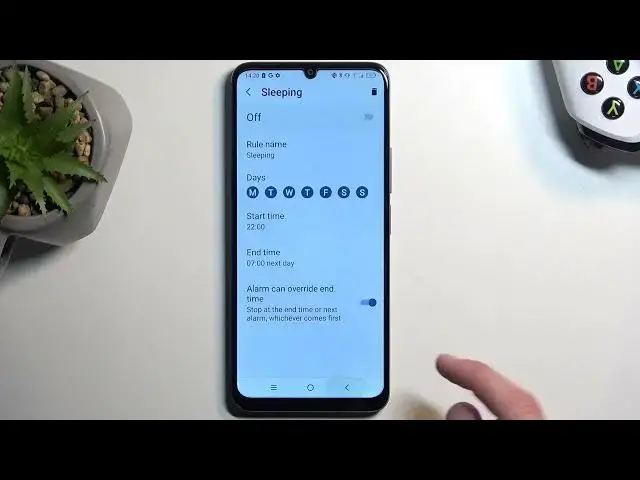
we have a schedule. There is one already made called sleeping and it's basically all week long
1:16
starting from 10 p.m or running till 7 a.m. Now you can obviously enable this one. You can tap on
1:24
it to customize it or you can create your own by tapping right here at the bottom. If you're
1:30
planning to use a schedule just make sure it is toggled on in here and that's all you're going to
1:35
do. The device will do everything else for you meaning turn it on and off at the provided day
1:42
of the week and time. So there we go those are all the worth mentioning options so I'm going to just
1:50
close this and now whenever you want to enable it manually all you need to do is just find the top
1:55
on it. As you can see that enables and that's all you will do. Now on this device we don't have any
2:02
kind of timer set when you enable it manually so when you turn it on you will also need to remember
2:08
to turn it off otherwise it will be running in the background indefinitely and obviously
2:13
if you have selected that for instance no one can call you. That's the settings that will be
2:18
set till you remember that you have your Do Not Disturb mode still running in the background
2:24
And obviously to turn it off just find the toggle once again tap on it to turn it off
2:30
So with that being said if you found this video helpful don't forget to hit like
2:34
subscribe and thanks for watching