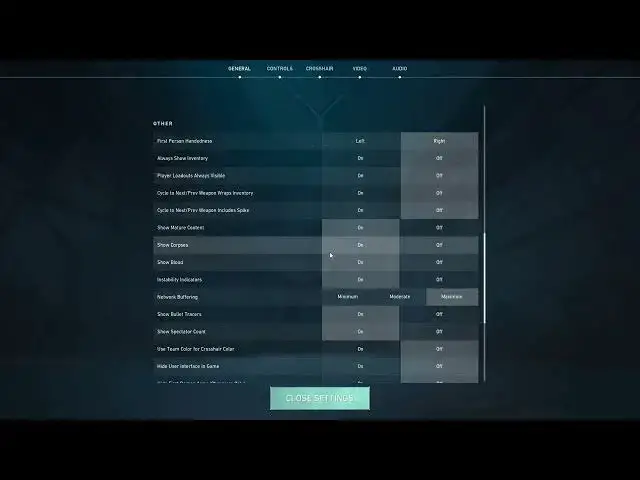

How To Show & Hide Bullet Tracers in Valorant
Jul 30, 2024

Expend Your Knowledge About Any Device On : https://www.hardreset.info
In this video, we will learn how to show and hide bullet tracers in Valorant. Bullet tracers are the visible lines that indicate the trajectory of bullets fired in the game. Although they can be helpful in certain situations, they can also be distracting and give away your position. So, it's essential to know how to toggle them on and off as needed. We will walk you through the steps to do so, along with some tips and tricks to help you improve your gameplay.
What are bullet tracers in Valorant?
Bullet tracers are the visible lines that indicate the trajectory of bullets fired in the game. They can be helpful in determining where your shots are landing, but they can also be distracting and give away your position.
How can I show bullet tracers in Valorant?
To show bullet tracers in Valorant, go to the game settings, then go to the "General" tab, and toggle the "Bullet Tracers" option to "On."
How can I hide bullet tracers in Valorant?
To hide bullet tracers in Valorant, go to the game settings, then go to the "General" tab, and toggle the "Bullet Tracers" option to "Off."
Are bullet tracers helpful in Valorant?
Bullet tracers can be helpful in certain situations, such as determining where your shots are landing or when shooting through walls. However, they can also be distracting and give away your position to the enemy team.
Can I customize the color of bullet tracers in Valorant?
No, you cannot customize the color of bullet tracers in Valorant. The tracers will always be yellow or orange, depending on the type of gun you are using.
Do bullet tracers affect performance in Valorant?
Show More Show Less