0:00
Here I have HAPA NVX 2 and let me show you how to enter troubleshoot mode on the following device
0:10
So, at the very beginning you have to use a keyboard on your device
0:15
So here I have my keyboard connected to my tablet and now all I have to do is start holding
0:20
shift key right here. So this is my shift key, let's hold down shift, keep holding shift and while holding shift
0:28
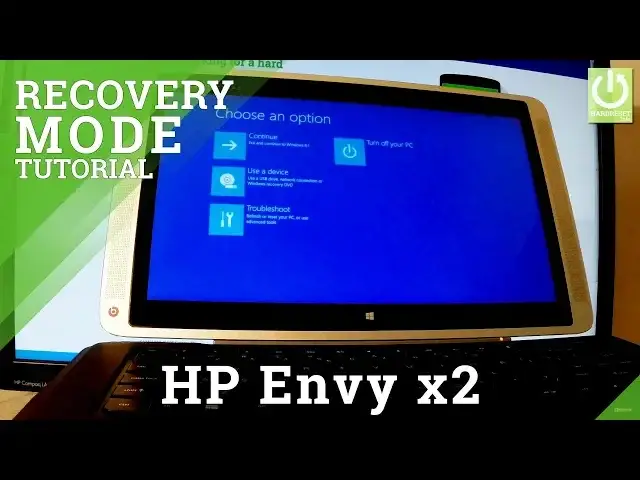
let's use a power option in that corner and choose restart. Keep holding shift button and as you can see the blue screen just pops up on the screen
0:42
of your tablet. So now you can navigate here by tapping appropriate options and as you can see here you've got
0:48
a couple of options, you can choose continue to just continue booting into Windows 8, so
0:55
just normal startup, you can choose turn off your PC, so just switch off your tablet
1:01
you can use a device, so you can use a USB drive, network connection or Windows recovery
1:06
DVD or you can choose troubleshoot. So that's what we need, let's choose troubleshoot, let's tap it and this is the troubleshoot mode
1:16
You can perform here a couple of interesting features, a couple of interesting process
1:20
you can refresh your PC, so if your PC isn't running well you can refresh it without losing
1:25
any of your files, you can reset your PC, so if you want to remove all of your files
1:31
you can reset the PC. You can recovery manager, so you can backup and recovery or contact HP support, so you
1:43
can also choose advanced options right here, let me tap it and here we have a couple of
1:50
options, you can for example choose startup settings, startup repair, you can choose system
1:55
recovery, command prompt or system image recovery. So if you would like to quit this mode you have to go back right here, let's go back
2:04
one more time by using this back arrow and let's choose either continue or turn off your
2:08
PC, let me choose continue and now the device is booting into a normal mode, let's wait
2:14
a couple of seconds. Excellent, as you can see now you can use your device, the phone is in normal mode
2:37
Thank you for watching, please subscribe our channel and leave thumbs up under the video