0:00
Welcome. In front of me is a ZTE Blade A71 and today I'll show you how you can enable the power saving mode on this phone
0:12
So to get started, pull down your notifications, extend the list and somewhere in here you will find the power saving mode
0:19
Now we have two different versions of it. One is right here in the corner and the other one is on the other corner
0:25
So we have the power saving mode and then ultra power saving mode
0:29
Now the difference between those is power saving mode will be the typical one that you see basically on every other device
0:35
while ultra power saving mode will be a little bit more extreme approach to saving your battery
0:42
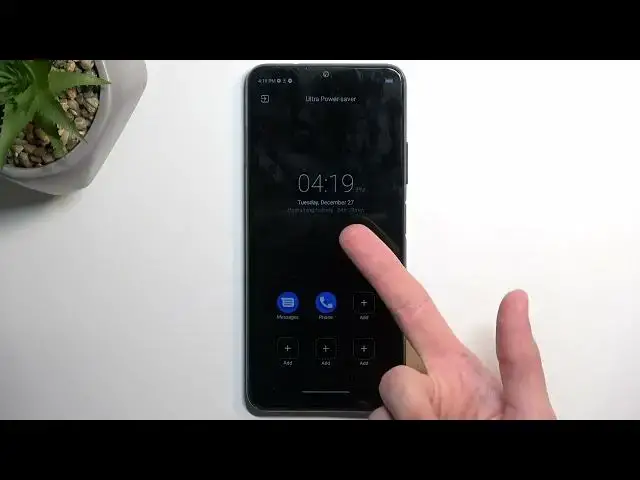
And extreme, I'll turn it on so you can just see how extreme it gets
0:49
So as you can see brightness went down, apps disappeared, wallpaper just kind of gone
0:55
and we have only access to like 6 apps that we can add here
1:01
It looks like luckily they don't reduce the amount of toggles you have access to so that's at least nice
1:09
And also as you can see battery becomes the primary focus of this mode
1:14
We're basically getting the display information about battery life, how much you have left of it right at the front
1:22
Now that being said, 54 hours and 29 minutes for basically a full battery is not actually the best
1:35
Anyway, once you're done and you want to leave this mode you can click right here on this exit button
1:40
and this will revert back to this kind of normal mode once you confirm it down here
1:46
So there we go. And just to quickly go into the normal power saving mode I'm going to tap on it and that's it
1:54
And that's basically all it does. So visually it doesn't really change much but there will be stuff happening in the background
2:00
most likely like turning off Wi-Fi and mobile data when the device goes to sleep mode to preserve battery
2:09
So that's something to keep in mind. And again just as before to turn it off just tap on a toggle here and everything should go back to functioning normally
2:18
So with this being said if you found this very helpful don't forget to hit like, subscribe and thanks for watching