0:00
Hi! Today I would like to show you how you can transfer files from an Android device to iPhone 15 Plus
0:12
Begin by opening Play Store on an Android and AppStar on iPhone
0:24
Then download free app, code, send. anywhere from this developer and when it's ready, open it
0:40
In order to use it, you need to set it up. Let's start with an Android
0:49
Click on I agree and I acknowledge at the top. Then tap on Confirm, Continue and allow
1:09
In this window about new updates you can select not now if you wish to To close it hit OK And choose clothes in white boap at the top
1:29
Now on an iPhone, select allow full access. Click on Ask Up not to track or Allow
1:43
Click on Don't Allow or Allow in Notifications pop-up. And finally, hit Nat Now over here, if you wish to
1:59
Then hit OK. Finally, if you see this kind of pop-up about notification settings, just click on Council
2:12
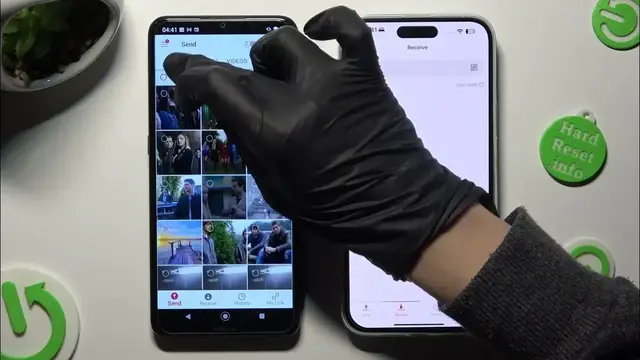
and select receive at the bottom of your iPhone. Then send at the bottom left corner right next to receive on an Android
2:26
Now thanks to all of those categories available at the top, you can choose multiple files
2:37
And click on send next to selected in the Selected in order to transfer them In last two categories though contacts and files
2:53
You need to tap on allow buttons. And then in Contacts 1, choose allow in the pop-up
3:05
and in files now, gray sweater next to allow access to manage all files
3:16
Now if you have everything ready, after selecting your content, that you wish to send
3:28
Hit send next to select it and views on got it in here's some tip pop up
3:37
Now you can tap on an input key section, type in all of those numbers in correct order in order to connect and hit receive
3:53
You can also just scan this QR code. code If you want to do it click on the scanning icon right next to input key Choose OK
4:10
And last but not least, point your devices camera, add the code
4:20
Then, after a couple seconds, if you see this kind of pop-up
4:28
Hit allow or don't allow. Then wait for transfer. All of my files
4:49
Now when I click over here All of my files were so
4:58
as well listened. Thanks so much for watching if you enjoyed this video
5:05
Don't forget to leave a like, comment and subscribe. Bye