0:00
Hello everyone and welcome back to our
0:02
channel. In front of me, I have Xiaomi
0:04
Watch S5 and today I'm going to show you
0:07
how to enable and how to disable the uh
0:09
do not disturb mode on this watch. And
0:11
the do not disturb mode is useful if you
0:13
want to um mute and unmute the
0:16
notifications on your watch. Basically,
0:17
if you turn it on, it will mute the
0:20
notifications until you turn it off. It
0:23
could be useful in some cases like maybe
0:24
when you're sleeping, maybe you're on at
0:26
work on on some meeting or something
0:28
like that and you don't want to be
0:29
disturbed by the notification uh
0:31
notifications on your watch. You can
0:33
enable the mode to mute them and then
0:35
disable it to unmute them. And of
0:37
course, I'm going to show you how to use
0:38
it. So, let's get started.
0:45
And the first thing we need to do is to
0:46
wake up the screen on our watch. And you
0:48
can do it by pressing the crown button.
0:50
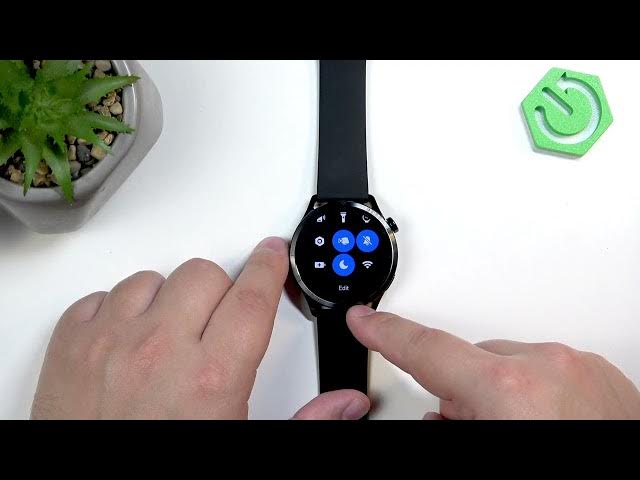
After you wake up the screen, press the
0:52
lower button right here to open the
0:54
control panel or quick panel. And here
0:56
we have bunch of icons. One of them will
0:59
be this moon icon. This is the do not
1:00
disturb mode icon. And if you want to
1:02
enable the mode, you can simply tap on
1:05
this icon. And here we have few options.
1:07
As you can see, we have all day, turn on
1:09
for 1 hour, then turn on for 4 hours,
1:12
and custom. If you select all day, it
1:15
will get turned on basically and it will
1:18
stay on until you turn it off. If you
1:20
select uh turn on for 1 hour, it will
1:24
turn on stay on for 1 hour and then turn
1:26
off automatically. Same for the 4 hours,
1:29
but it will stay on for 4 hours. And the
1:31
custom allows you to set up a schedule
1:33
for it. So basically, you can turn on
1:35
the custom option here. And if you turn
1:38
it on, you can set the time on which it
1:40
turns on and time on which it turns off,
1:42
which could be quite useful in cases
1:44
like if you want to go to sleep with
1:45
your watch on your wrist. You can set up
1:48
the sleep schedule for your uh watch
1:50
basically and it will turn on before you
1:52
go to sleep and then turn off when you
1:54
wake up. Uh and you can set the repeat
1:56
option how often it should repeat. And
1:58
we have only once daily and custom
2:00
allows you to pick specific days if you
2:02
have something in mind. Maybe you want
2:04
the schedule to work only on Saturdays
2:09
Okay. And uh once you enable the mode uh
2:16
the icon will change the color on the
2:18
quick panel and also you will see the
2:20
message DND on and that means that the
2:22
mode is enabled. You can also see the
2:24
icon on the watch face which also
2:25
indicates that the do mode is enabled.
2:28
So if you can check it and see it
2:30
immediately basically that the mode is
2:31
enabled. And to disable the mode, you
2:34
open the quick panel again,
2:36
tap on the icon, you will see the
2:38
message DND off. The icon will go back
2:40
to be not highlighted anymore, gray
2:42
color, and the icon from the watch face
2:44
will disappear, which indicates that the
2:46
mode is disabled. And basically, that's
2:47
how you enable or disable the this mode.
2:50
You basically open the quick panel, tap
2:51
on the icon, and if you want to enable
2:55
it, you choose the specific mode. If you
2:57
want to disable it, you just simply tap
2:58
on the icon, and it will turn off. Okay.
3:02
If you found this video any helpful,
3:04
please consider subscribing to our
3:05
channel and leaving a like on the video.
3:07
Thank you for watching and see you in