0:00
Welcome! Enfonomi is a Nokia G60 and today I'll show you how we can hard
0:05
reset this device through settings. So to get started open up settings. From here
0:16
scroll all the way down to system, select reset options and then choose erase all
0:21
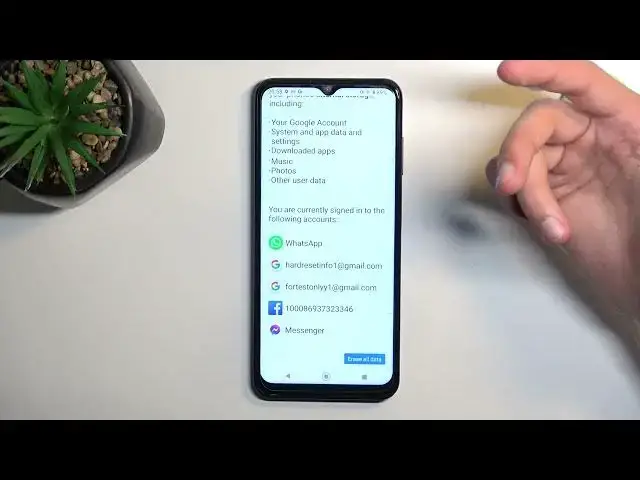
data factory reset. This will give you a quick message letting you know that
0:26
factory resetting your device results and you losing everything that is listed
0:31
right here. So that would include Google accounts, system, app data and settings
0:35
downloaded apps, music, photos and user data. It also lists the accounts right
0:41
here below so there we go. Now if you want to keep anything that is listed
0:47
right here do make a backup copy of it before you begin otherwise this data
0:50
will be lost permanently. But I'll also clarify that the list right here is a
0:56
little bit excessive. Some of it or about half of this listed things here don't
1:02
really matter all that much like Google accounts because it just logs them out
1:06
You can re-login to the Google account afterwards if you want to
1:09
System, app data and settings obviously that's just changes that you can make to
1:14
applications and settings in them so again doesn't matter can be changed
1:19
again. But what does matter would be music, photos and user data. This is
1:24
typically what you would keep locally on your phone and once you reset it it gets
1:30
automatically removed. Apps on top of that don't really matter because for the
1:36
most part most of you downloaded apps from the Play Store and you can again re-download them. Anyway with that being said we can proceed further by selecting
1:44
erase all data. If you have some kind of screen lock on your phone you will need to confirm it and then you can select erase all data once more and this will
1:52
begin the process of resetting your phone. Now this entire thing should take about like two to maybe five minutes tops to finish up and once it has we
2:00
will be presented with Android setup screen. So I'll be back once that is
2:04
visible. And as you can see the process is now finished and you can set up your
2:12
phone however you like. So if you found this video helpful don't forget to hit
2:17
like, subscribe and thanks for watching