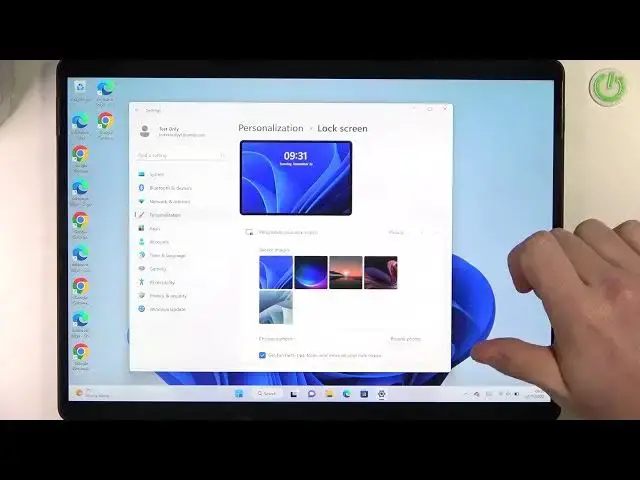

Microsoft Surface Pro 8 - How To Change Lock Screen Wallpaper
Jul 24, 2024

Check more info about Microsoft Surface Pro 8 :
https://www.hardreset.info/devices/microsoft/microsoft-surface-pro-8/tutorials/
To change the lock screen wallpaper on the Microsoft Surface Pro 8, follow these steps:
Open the "Settings" app on your Surface Pro 8.
Go to the "Personalization" section and select "Lock screen".
In the "Lock screen" settings, you will see a list of available options for the lock screen wallpaper.
To preview a wallpaper option, click on it and the wallpaper will be applied temporarily to your device.
To apply a wallpaper permanently, click on the "Apply" button under the wallpaper preview.
You can also click on the "Browse" button to open the File Explorer and select a custom image from your device or an external drive.
Once you have selected and applied a new wallpaper, the background of the lock screen on your Surface Pro 8 will be updated to the chosen image.
Keep in mind that the lock screen wallpaper on your Surface Pro 8 can be customized to personalize the look of your device. You can choose from a variety of built-in wallpapers or select your own image from your device or an external drive. You can also customize the lock screen settings, such as the app notifications and the sign-in options.
How to change lock screen on MICROSOFT SURFACE PRO 8 ?
How to switch lock screen wallpaper on MICROSOFT SURFACE PRO 8 ?
How to pick different lock screen wallpaper on MICROSOFT SURFACE PRO 8
Where can i see lock screen wallpaper on MICROSOFT SURFACE PRO 8 ?
#MICROSOFTSURFACEPRO8 #Change #LockscreenWallpaper
Follow us on Instagram ► https://www.instagram.com/hardreset.info
Like us on Facebook ► https://www.facebook.com/hardresetinfo/
Tweet us on Twitter ► https://twitter.com/HardResetI
Support us on TikTok ► https://www.tiktok.com/@hardreset.info
Use Reset Guides for many popular Apps ► https://www.hardreset.info/apps/apps/
Show More Show Less #Science