0:00
Hi everyone, in front of me I've got HTC Desire 628 and let me share with you how to update
0:13
apps on this device. So first of all make sure that you've got the internet connection and I highly recommend
0:18
to use the WiFi connection instead of mobile data because using the WiFi you can be sure
0:24
that you won't be charged for downloading something. So after making sure that you've got the connection, enter the Play Store
0:31
Ok, let's get started. Alright, so right here we are on the Google Play Store and if you will be signed in then
0:44
it will look like it. If you are not, then you can do it using accounts section
0:49
You can simply add the account using a backup option or you will be able to sign in here
0:56
So after that all you have to do is to simply tap on this three bars icon in the left upper
1:00
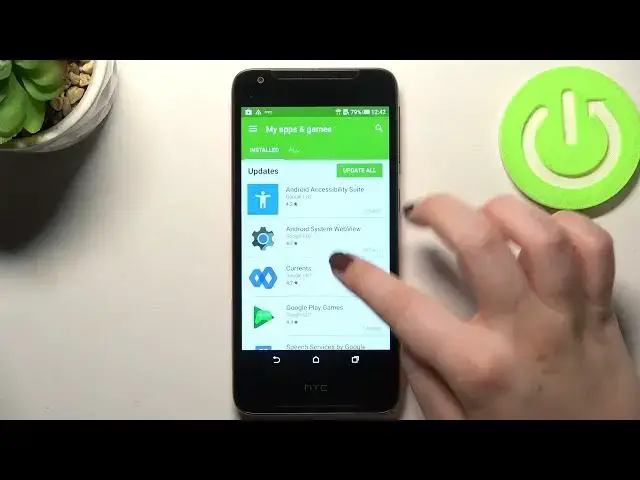
corner and as you can see we are signed in so let's tap on My Apps and Games
1:06
Here we've got, actually immediately we've been transferred to the installed apps and
1:11
here we've got the updates. So here we've got all listed updates for the apps which we've got currently installed on
1:18
our device and it depends what you want to achieve. So you can update all of those apps just by tapping on Update All and of course all
1:28
of them will be downloaded or you can simply update only one of them or two of them
1:33
It's up to you. So all you have to do is to simply find the update which is on this list, the update for
1:39
a particular app and simply tap on Update next to it. So let me pick Google Play Games and as you can see we can either open it or update
1:49
So let's simply tap on Update. Of course you will have to accept everything and as you can see right now the update is
1:57
pending, I mean it will be downloaded and after that it will be successfully installed
2:02
and automatically updated and applied. So basically you do not need to do anything more
2:08
And as you can see it will be also notified right here that your device is downloading something
2:13
So actually this is it. This is how to update apps in your HTC Desire 628
2:19
Thank you so much for watching. I hope that this video was helpful and if it was, please hit the subscribe button and