0:00
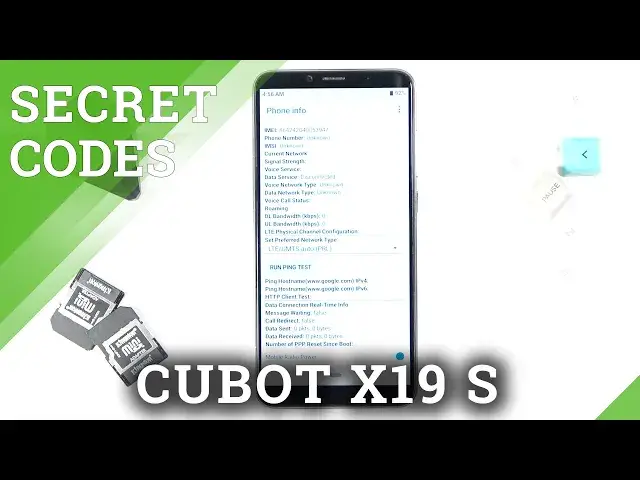
And in front of me is Cubot X19S and let me show you how to use secret codes on this phone
0:11
So first of all, just open the keypad because here I will be entering those codes
0:16
And let me start with the first one, which will open the Google panel and the code is
0:22
asterix pound asterix pound 4636 pound asterix pound asterix. And here we've got test in mode performed by Google where you can check phone information
0:34
user statistics and also Wi-Fi details. So at first let's check phone info
0:40
As you can see here, you've got daily info regarding your phone and it is email number
0:44
phone number, current network, signal strength and so on. You can also perform a ping test here
0:50
To do it, just click on run ping test and over here you've got the results
0:55
Obviously, you've got some more options just below. So let me go back
1:00
Then under user statistics, you can find the detailed information regarding the user of
1:05
your app. So here you've got the app name, then last time used and the whole usage time
1:10
So it's super useful panel. And then under Wi-Fi information, you can find Wi-Fi APA, Wi-Fi configuration and Wi-Fi status
1:20
Under Wi-Fi APA, you can check disable network, disconnected network, enable network, configured
1:25
networks and get connection info. Under Wi-Fi configuration, you will be able to find all configured networks
1:32
As you can see, currently I am not connected with any network
1:36
And then under Wi-Fi status, just refresh it. You can check the current Wi-Fi state and also the smooth allows you to perform the
1:45
same ping test as we did a few seconds ago. So this is it
1:50
That will be all for this first code. Another code that you can use also performed by Google is asterisk pound, asterisk pound
2:01
double to five, pound asterisk, pound asterisk. And here we've got the calendar info
2:07
So if you don't want to scroll all calendars every day, you can smoothly enter this code
2:13
And here, as you can see, you've got Google calendar, iPhone calendar, devices, internal
2:18
storage calendar, and you can check all upcoming events here. So you will not be surprised with any of them
2:24
So that will be all for this code. Another one is asterisk pound, asterisk pound, four to six, pound asterisk, pound asterisk
2:35
And here we've got FCM diagnostic mode. It will allow you to check events and also status
2:43
And to enroll advanced options, tap on more and select advanced view
2:48
And as you can see now, you've got more detailed info. So this is it
2:53
Let me go back. And the last code that I would like to share with you today, it's also the shortest one
2:59
is asterisk pound or six pound. It's super useful code because it will provide you with unique number assigned to your device
3:07
which is email number, and you've got both of them included here. So you don't have to search it on your box or via settings
3:14
So this is it. That will be all. These are all codes that I wanted to share with you today
3:19
Thank you for watching. Please subscribe to our channel and leave the thumbs up