0:00
Witajcie! Przed sobą mam Garmin Vivo Active 5 i pokażę Wam jak ustawić obraz jako widok na ten obraz
0:07
W zasadzie jeśli chcesz używać swojego obrazu lub zdjęcia jako widok na ten obraz
0:17
Przed rozpoczęciem, jeśli chcesz ustawić obraz jako widok na ten obraz, to obraz musi być połączony z telefonem przez aplikację Garmin Connect
0:25
Po połączeniu obrazu i telefonu, możemy kontynuować. Teraz musimy zainstalować aplikację, która jest połączona z naszym obrazem
0:34
Ta aplikacja nazywa się Connect IQ Store. Zaczynamy od otworzenia App Store na naszym telefonie
0:41
Zacznę od otworzenia Google Play Store, ponieważ używam Android Phone, ale jeśli masz iPhone
0:45
możesz zawsze otworzyć App Store i znajdziesz aplikację na iOS App Store
0:51
OK, otwórzmy App Store, kliknij na szukanie i napisz Connect IQ Store, a potem kliknij na szukanie
1:03
I powinieneś zobaczyć tę aplikację na listie aplikacji Connect IQ Store przez Garmin z tym ikonem
1:08
Po znalezieniu, kliknij na przycisk zainstalowania, aby zainstalować aplikację. Po zainstalowaniu aplikacji, kliknij na przycisk otworzenia, aby ją otworzyć
1:17
W aplikacji kliknij na Witam. Tutaj kliknij na kontynuować, albo jeśli chcesz zmienić do innego akauntu, kliknij na zmienić akunty
1:28
Potem kliknij na liście, kliknij na Następny. Pozwól wymagać pozwolenia. Pozwól wymagać pozwolenia
1:39
Po co to mi się przesunęło, a mam tutaj ten wiadomość. W zasadzie, jeśli widzisz popis o pozwoleniu, to pozwól
1:46
Kliknij tutaj, a to mnie odpowie na tę stronę. Kliknij tutaj, a to mnie odpowie na tę stronę
1:54
Kliknij na pozwolenia. Pozwolenia, którą musimy pozwolić, to przycisky z blisko. Kliknij na to, a potem na pozwolenie
2:02
Wróćmy do aplikacji. Jeśli wciąż widzisz ten wiadomość, to otwórz aplikację. Zamykam, a potem otwórzmy
2:12
Otwórzmy to znowu. I tu mamy to. Wiadomość jest już zniknąć. Ok, więc jak wiadomość jest zniknąć
2:22
to masz tutaj iCue Store, masz różne kategorie, które możesz przeczytać, ale na razie nie jesteśmy zainteresowani tym
2:28
Teraz chcemy kliknąć na opcję Face It. I tutaj możemy stworzyć własną twarz
2:34
Kliknijmy na przycisk plus. Wybierz kamerę lub galerię. W zasadzie, jeśli wybierzesz kamerę
2:40
to otworzy się aplikacja kamery. Możesz wziąć zdjęcie na swój telefon albo z twojego telefonu
2:46
i użyć go jako twarz. Opcja galerii pozwala ci przeczytać zdjęcia na swoim telefonie
2:52
Możesz je wybrać z twojego telefonu. Wybieram opcję galerii. Teraz znajdź zdjęcie, które chcesz użyć
2:58
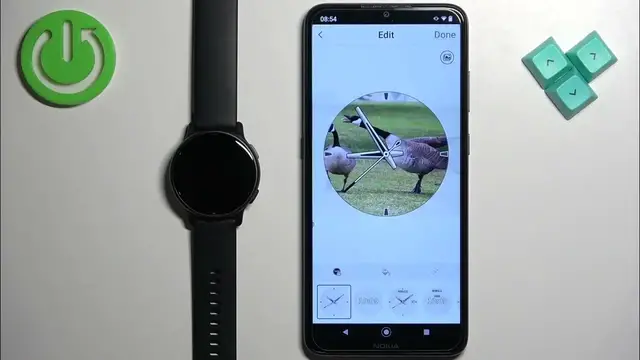
na przykład to, i kliknij na to, by je wybrać. I tutaj mamy mody edyt
3:02
Możemy edytować naszą twarz. Możemy się okazać na zdjęciu, ponieważ jest za duże
3:10
do ułożenia na twarz. Możemy wybrać część, żeby była na twarz. W zasadzie, wszystko, co będzie w tym określonym miejscu
3:18
będzie na twarz. Możemy zmienić kolor klucza. Tak
3:28
Możemy kliknąć na przycisk wody i zmienić kolor akcentu. Możemy też zmienić typ fontu
3:38
Po zakończeniu ustalania twarzy, kliknij na zakończone, nazwij to i uzyskaj. Możesz też złożyć mnóstwo
3:48
jeśli chcesz. Zostawmy jedno. Po zakończeniu ustalania twarzy, kliknij na zakończenie i będzie zakończone
4:00
Będzie to trwało trochę, ponieważ będzie się zgodnie z twarzą. Jak widać, nadal jest zakończone
4:06
ale po zakończeniu będzie się zakończone na twarzy. Możemy zamknąć akcent i tak ustalamy
4:16
zdjęcie na twarzy. Dziękuję za oglądanie. Jeśli ci się podobało, zapraszam na subskrypcj�