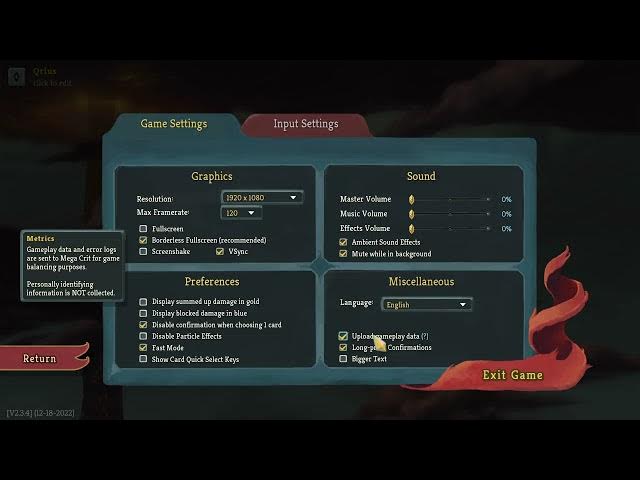

Slay The Spire - How to Enable/Disable Upload Game Data
Jan 28, 2026

In this short video I show how to enable or disable the Upload Game Data (Send Game Data) setting in Slay The Spire. You will see where the option is located in the Settings menu, how to toggle it in Game Settings → Miscellaneous, and what type of data (gameplay data and error logs) is sent to the studio. This helps you control privacy while still allowing developers to use anonymous data for balancing and bug fixes.
How to enable Upload Game Data in Slay The Spire?
How to disable Upload Game Data in Slay The Spire?
Does Slay The Spire collect personal information when Send Game Data is enabled?
0:00 Intro - What we'll change
0:08 Open Settings menu
0:18 Go to Game Settings
0:24 Find Upload Game Data under Miscellaneous and toggle
0:31 What gameplay data and error logs are sent
0:41 Return and save changes
0:45 Outro - Like, comment, subscribe
#SlayTheSpire #UploadGameData #GameSettings #Privacy
Find out more:
https://www.hardreset.info/devices/game/game-slay-the-spire/
Follow us on Instagram ► https://www.instagram.com/hardreset.info
Show More Show Less