
Slay The Spire – How to change effects volume
Jan 28, 2026

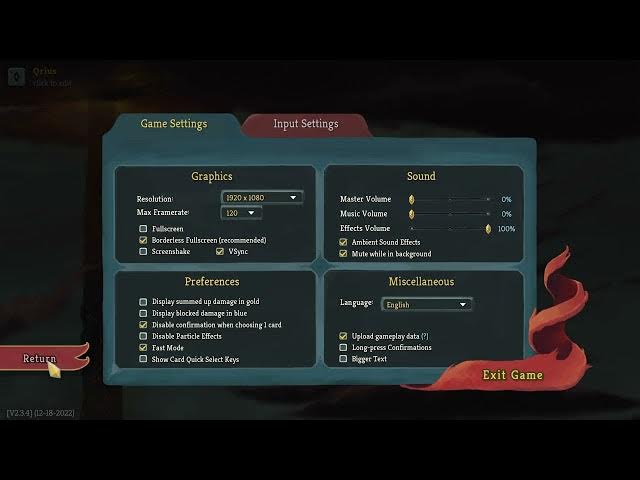
In this short video I'll show you exactly how to change the effects volume in Slay The Spire so your sound effects are at the right level. You'll see where to open the Settings menu, how to find the Sound section, adjust the Effects volume slider from 0 to 100, and an important master volume tip so you actually hear the change. This quick walkthrough is ideal for new players or anyone who wants a fast audio tweak in Slay The Spire.
How to change the effects volume in Slay The Spire?
How to adjust the sound effects volume in Slay The Spire?
How to make sound effects louder in Slay The Spire?
0:00 Introduction
0:05 Open the Settings menu
0:15 Go to Sound settings and find Effects volume
0:22 Master volume tip — ensure master volume is at least 1%
0:30 Apply changes: hit Return and Back to save
0:37 Outro and subscribe reminder
#SlayTheSpire #GamingTips #VolumeSettings #SoundSettings
Find out more:
https://www.hardreset.info/devices/game/game-slay-the-spire/
Follow us on Instagram ► https://www.instagram.com/hardreset.info
Like us on Facebook ► https://www.facebook.com/hardresetinfo/
Show More Show Less