Up next in 10


Samsung Galaxy M04 cant find bluetooth accessory
Show More Show Less View Video Transcript
0:00
Hello guys and welcome to the channel! Today I'm going to show you how you can repair your Bluetooth connection if you cannot find your Bluetooth accessory on your Samsung Galaxy M04
0:13
So when I have a problem with my headphones I'm always starting from the simplest way. Just open the settings, go to the connections and just switch off and switch on the Bluetooth connection to restart it
0:25
After that you can also try to restart your phone by holding the power button and click restart. You can restart your Bluetooth device too
0:33
Ok, so at the start you have to be sure that your Bluetooth accessory have a power mode activated and how to do it you will find in the manual to your device or maybe on your YouTube channel
0:42
In my case I have to click 3 times this button and my headphones starting in the power mode. Sometimes you have to push the button for few seconds for example, you have to check it by yourself
0:51
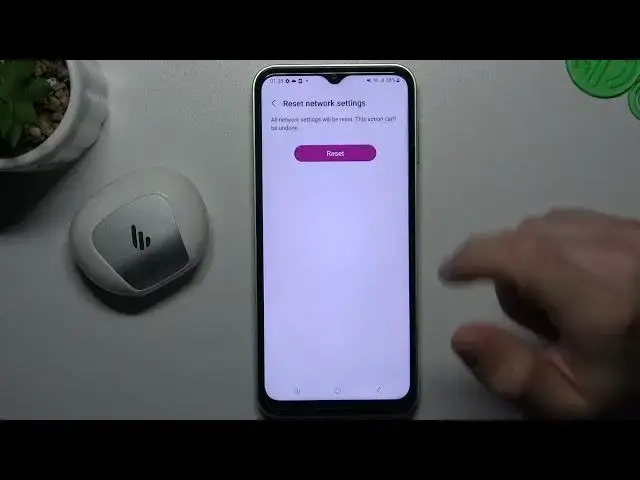
So if you're sure that your Bluetooth accessory have a power mode activated but it's still not visible for your phone you can go to the bottom of the settings, choose general management and tap on the reset here
1:04
Then tap on the reset network settings, choose reset settings, confirm your pattern and confirm it again by this big button. Then look for your device on the Bluetooth list
1:15
Next recommendation from me, just check your software update. If you have any updates just install it and check the device again
1:24
And the last recommendation from me, check your Bluetooth accessory and your phone on other device or like a laptop just the other device with Bluetooth to check which one making a problem, which one is visible, which not
1:36
That's it, thanks for the watching, leave us a subscribe, a comment and goodbye
1:44
www.mooji.org