0:00
Welcome! In front of me is a TCL 408 and today I will show you how we can enable and also set up your portable hotspot
0:14
So, to get started, swipe down from the top of your screen to gain access to your toggles
0:20
then pull down once more to extend the list of toggles. And here obviously you will be looking for a hotspot toggle
0:26
Now, if it's not on the first page, which I personally don't see it
0:30
I'm going to swipe to the left and this will show me the secondary page of toggles
0:34
which you can see hotspot is right here for me. So, once you see this toggle, the first time around you want to hold it
0:41
This will then take you to the settings and the reason you want to navigate here is because
0:46
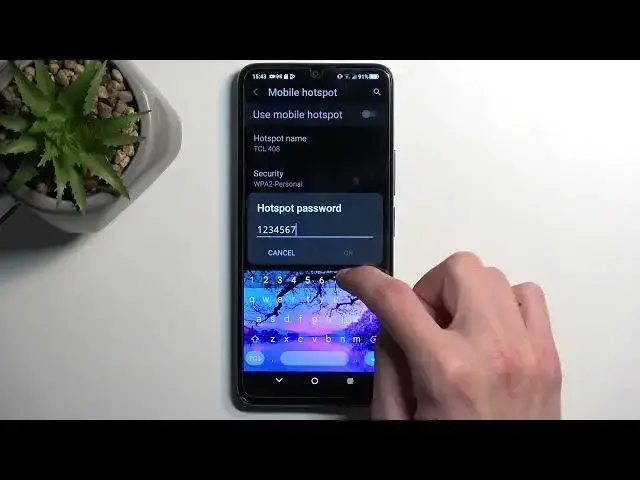
once you press on the hotspot password, you will be able to see that the password that is set here is randomly generated
0:53
So, without navigating into the settings, you have no way of actually knowing what the password is
0:59
Therefore, you won't be able to sign into your hotspot. Now, what I recommend doing here is just simply removing this one and setting up your own password that you will remember
1:09
So, I'm going to be making mine very simple and from there you can just tap on OK
1:15
And that's really the only thing that I really suggest changing. There's a couple of additional things which I would suggest maybe turning on
1:25
like for instance the turn off hotspot automatically. And then change it from like 90 seconds to, I don't know, maybe 10 minutes
1:33
depending on what you feel comfortable with, which basically will result in the hotspot being turned off automatically when you're kind of done using it
1:42
Now, typically, at least in my case personally, I would forget to turn it off
1:46
so the hotspot would be running in the background. Now, this will make it so even when I forget, the phone will turn it off for me
1:53
which is pretty nice because hotspot consumes more of your phone's battery
1:57
And if you're not using it, there's really no reason for it to be running in the background
2:01
Now, that being said, we can just close this now. And whenever you want to enable your hotspot, simply find the toggle, tap on it, and you're good to go
2:10
You can now connect to your hotspot and use your mobile network
2:14
So, there we go. Now, like I mentioned, if you turned on that setting to turn it off automatically
2:20
the phone will do that for you. But obviously, you can also turn it off prematurely yourself once you're done with it
2:26
if you remember about it, by simply tapping on the toggle once again
2:31
Now, that being said, hopefully you found this video helpful. If you did, don't forget to hit like, subscribe, and thanks for watching
2:46
Microsoft Mechanics www.microsoft.com www.microsoft.com www.microsoft.com www.microsoft.com www.microsoft.com www.microsoft.com www.microsoft.com www.microsoft.com www.microsoft.com www.microsoft.com www.microsoft.com www.microsoft.com www.microsoft.com www.microsoft.com www.microsoft.com www.microsoft.com www.microsoft.com www.microsoft.com www.microsoft.com www.microsoft.com www.microsoft.com www.microsoft.com www.microsoft.com www.microsoft.com www.microsoft.com www.microsoft.com