0:00
Hi, welcome to Hardware's Info Channel, the viewers in front of me
0:03
Wake S640 pen tablet and I gonna show you how to set up the
0:08
work area, how to set up the screen area on this device
0:16
So to do it of course you need to have the Wake drivers installed on your device
0:21
If you don't know how to do it you just need to
0:24
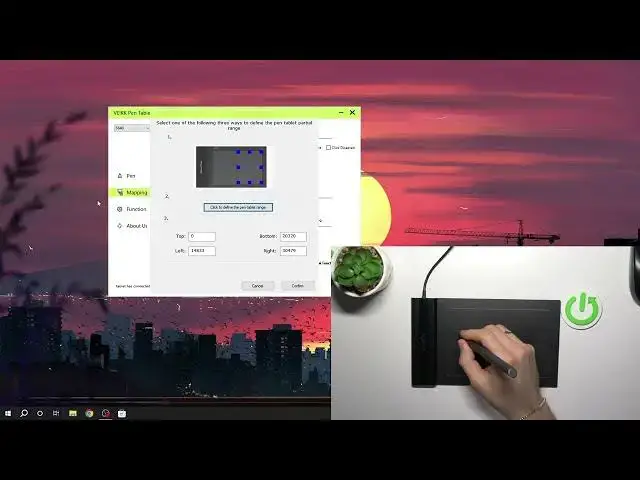
watch our video about it. And here we have several tabs pen, mapping and functions. So we have no functions on this device, we have no
0:32
functions buttons and we have no opportunity to set it up. But we have mapping here and in the mapping we can set up
0:42
everything. For example I have several displays as you can see. This is the pen display you've seen
0:50
on this recording and the several displays when I have the OBS application opened
0:58
and on this screen I've seen what I'm recording right now. So it's really great thing for me
1:06
But I don't want to use the pen on the second display for example. How can I do it
1:13
To do it I just need to click screen mapping and I wanna use
1:17
only second monitor. And now I can't move my mouse to the
1:26
first monitor as you can see. Great! Working area settings. So we can
1:33
set up the part of the working area. For example you will delete one part of the pentalobe area
1:40
and you wanna use only another part, only working part. So you can do it. It's really easy to do
1:48
Do it and click confirm. And now as you can see my pen tablet works only
1:55
in this area and here it's not working. As you can see I can't move mouse, I can't press or
2:01
do something. As you can see here my pen tablet is not working
2:08
I wanna change it to the normal all. Great! Left hand mode
2:15
So I can change it to the left hand mode. And in this mode it might be easier to
2:22
use with the left hand but for example for me it's not useful feature because it's reverting my moves
2:30
For example look at this. So I'm moving my hand to the left side and the mouse moving to the right
2:38
I'm moving to the right side and mouse moving to the left. I'm moving to the upper part of the screen
2:46
and it moving to the bottom. So it's just a reverse mode
2:52
reverted mode, I don't know how to name it. But it's not left hand mode because
2:58
I think it's really useful feature to use. Oh my gosh I have enabled
3:03
left hand mode again. Right hand. Okay, great. Brooklyn area set enable windows
3:10
ink function so we can enable windows ink function. Windows ink is the windows
3:20
whiteboard and windows pen tablet feature. It's not too handy feature so I suggest
3:28
not to enable it. And it's great. That's it. So thanks for watching
3:36
Like this video, subscribe to our channel and bye! See you