0:00
Welcome! In front of me I have Apple Watch Ultra 2 and I'm gonna show you how to set an image as a
0:06
watch face on this watch. Basically if you want to use your own image or a picture as a watch face
0:16
First thing we need to do is to open the watch application on the iPhone that is paired
0:21
with our Apple Watch. Once you open the app you should see my watch page. Now tap on the
0:27
face gallery. To open the face gallery then scroll down through it and find the category called
0:33
pictures I believe. No photos this one. Once you find the photos category tap on the watch face
0:41
right here and now tap on the add button to add it to the list of watch faces. Once you do tap on
0:50
my watch and then tap on the photos watch face to open the editing menu and here we can edit our
0:58
watch face. You can add color to the watch face, basically like a filter but you won't see it
1:05
until you add the photo. So first let's add the content to our watch face and we have the content
1:10
category right here and we have album favorites photos dynamic. Favorites is the name of the album
1:17
because you can select the album as a watch face. So basically if you select the album it will cycle
1:24
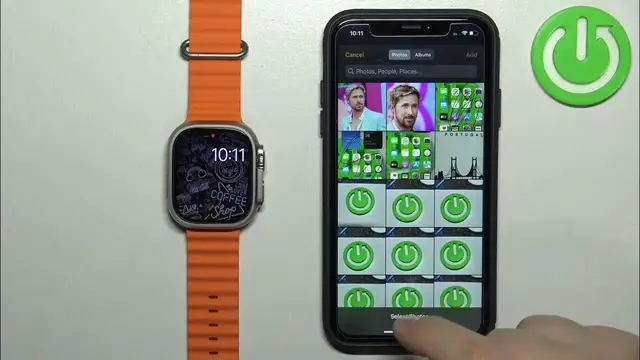
between the photos you have in the album. If you select photos you can select one or multiple photos
1:29
and if you select dynamic it will cycle between the I believe it's
1:37
cycles through the memories. So there's this specific album in the photos app called memories
1:42
and dynamic option will cycle through the photos in there. Okay so if you select the album you
1:47
can tap on the name of the album below and you can select the specific album to use as a watch
1:53
face and if you select the album tap down it will use this album as a watch face as you can see
1:59
and if you apply the option it will basically cycle through the watch faces if you tap on the screen
2:04
or if you flick your wrist on your when you have your watch on on the wrist. If you
2:10
select the photos option you can select specific photos by tapping on them. You can select one or
2:20
multiple and then you can tap on add and here we have the photo as a watch face. It should change
2:32
oh we need to tap on set tap on set as current watch face and it will update oh never mind
2:37
it updated after a couple of seconds as you can see and if you select dynamic like I said before
2:41
it will use the specific album. So once you select the background you can like I said before you can
2:47
apply the filter for it like a color filter and you can also change the time position
2:56
tap or button and you can also change the complications. You can select for example
3:00
battery at the top and at the bottom let's select today's date like that and once you're done
3:07
customizing the watch face to apply the settings you can tap on set as current watch face and it
3:12
should be applied and as you can see each time you wake up the screen or tap on the screen it will
3:16
cycle between the photos and if you selected the album it will basically cycle through every album
3:23
or rather every photo in the album so if we tap on set as current watch face and keep tapping on
3:28
the screen it will cycle through them. Okay and once you've done you can close the app and that's
3:35
how you set an image as a watch face on this watch. Thank you for watching if you found this
3:40
video helpful please consider subscribing to our channel and leaving the like on the video