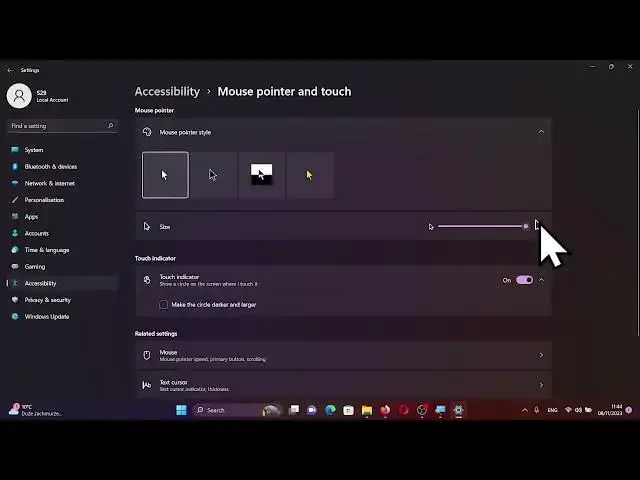

How to Personalize Your Windows 11 Experience: Changing Cursor Style and Size Customization!
Aug 5, 2024

Find out more: https://www.hardreset.info/apps/apps/
Welcome, tech enthusiasts, to the realm of Windows 11 customization on HardReset.Info! Today, we're diving into the intricacies of enhancing your user experience by exploring the possibilities of changing the style and size of your cursor.
🌐 Unlocking Transformation:
Commence your customization journey by delving into the settings through the captivating Windows logo in the Start icon.
🖱️ Discovering Accessibility Features:
Navigate through the settings application to find the accessibility features represented by a distinctive blue icon in the left panel.
🌈 Exploring Cursor Customization:
Within the accessibility menu, delve into the Mouse Pointer and Touch section, where a treasure trove of customization possibilities awaits.
✨ Crafting Aesthetic Preferences:
In the realm of cursor customization, adjust the size and explore diverse styles and colors to add a personal touch to your Windows 11 experience.
🎨 Expressing Individuality:
Experiment with different cursor styles, choosing the one that resonates with your unique taste and preferences.
🚀 Basking in Personalization Glory:
With your adjustments made, revel in the newfound glory of your personalized cursor, subtly adding individuality to your Windows 11 experience.
👏 Conclusion: Sharing the Tech Love
If this exploration of Windows 11 customization resonated with you, express your thoughts below the video. Like, share, subscribe, and stay tuned for our latest tech insights. Wishing you an amazing tech-filled day!
🖥️ #Windows11 #CustomizationJourney #TechExperience #HardResetInfo #TechLove #EET #Expertise #Authoritativeness #trustworthiness
How to Begin the Customization Journey on Windows 11 for a Personalized Experience?
Show More Show Less