Up next in 10


Find out more: https://www.hardreset.info/
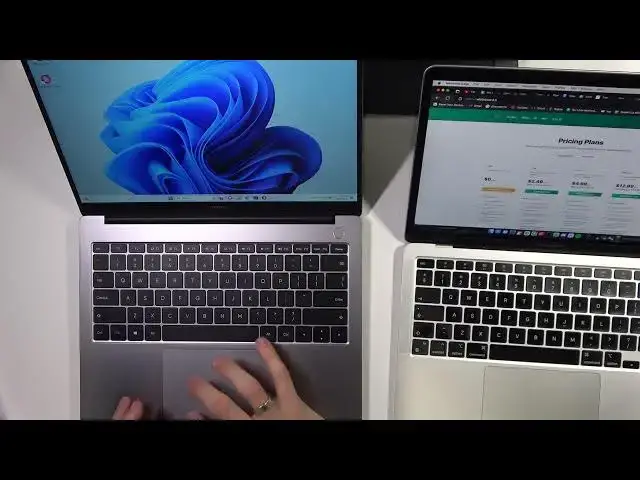
In this exciting YouTube video, we dive deep into the world of premium laptops with a head-to-head comparison of the Realme Book Prime and the MacBook Air. 📊💻 Discover the ultimate showdown between these two tech powerhouses, as we break down their design, performance, and unique features, providing you with the most detailed insights to make an informed decision for your next laptop purchase! 💡🔍
#RealmeBookPrime
#MacBookAirComparison
#LaptopShowdown
How to determine which laptop suits your lifestyle?
How to weigh the pros and cons of Realme Book Prime and MacBook Air?
How to make an educated decision before your laptop purchase?
How to maximize productivity with your chosen laptop?
How to stay up-to-date with the latest tech trends?
Follow us on Instagram ► https://www.instagram.com/hardreset.info
Like us on Facebook ► https://www.facebook.com/hardresetinfo/
Tweet us on Twitter ► https://twitter.com/HardResetI
Support us on TikTok ► https://www.tiktok.com/@hardreset.info
Use Reset Guides for many popular Apps ► https://www.hardreset.info/apps/apps/
Show More Show Less View Video Transcript
0:00
Hi, welcome to Hard Reset Info Channel, dear viewers. In front of me is Macbook Air on M1 2022, I think
0:09
And realme book 1. And now I will fastly compare both devices. I don't know anything about
0:20
specifications of this device. I just know that it has 16 gigabytes of RAM, 500 gigabytes of
0:28
internal storage on SSD and Intel i5 11th generation. That's it. So now I have closed the lid of this device maybe one minute ago and it constantly works
0:49
As you can notice. I don't know why but we will open it and let's take a closer look about it
0:57
So why the cooler is working here I don't know because I just installed the English language
1:05
package because I have Polish language on my device and I have installed the Windows
1:13
Windows 11 English package and it has enabled the coolers. So I will close it again and I will
1:22
wait a while to it will to device will disable the coolers because if it can't disable for about
1:33
after one minute I think this device has troubles. Okay so let's compare the size of devices. So as
1:43
you can see the size of devices is really really close. So the width of the device
1:59
is really really close but it looks that the lid of realme device is longer for one centimeter
2:10
One centimeter. It's really one centimeter maybe a little long. Cool and what we can
2:20
we can tell about it as you can see my MacBook is thinner and from the other side
2:31
Okay as you can see on this panel MacBook have no the coolers but this device has coolers and
2:48
have this part twice this and this and they are making that the cooler have always
2:58
access to the to the air to not overheat the realme device. As you can see after a
3:06
minute or I don't know how how long I'm recording this video coolers are not disabled and I have no
3:19
the performance application run performance application of the device and don't know
3:24
why it works in this way. So what can I do about it about this display. Display here is really
3:33
really amazing. When I opened this laptop I think that here we have normal cheap display but
3:46
no after a while drivers was successfully installed on my device automatically and then I can
3:57
now I can tell you that display here is incredible for windows devices it's really really really
4:04
cool and what I can say you here we have really bright display so I can compare it with the
4:17
with the MacBook so just I don't know let's open the whiteboard and something about it
4:24
and as you can see now as you can see here this device really really is more brighter
4:33
than the MacBook Air and it's really great result and colors here are cool too of course I more like
4:42
colors on on my book because here I can set up the colors but I don't know why at the start here I
4:50
has worst colors and now I have really great colors so I don't know what it is so cool and maybe that's
5:04
here we have the touch id here we have touch id and here we have the touchpad touchpad sizes
5:14
are are really really simultaneously maybe this touchpad is a little better but here we have
5:24
all all touchpad is clickable so I can click in in the I don't know here I can click here
5:34
I can click here here here so I can click somewhere without the making harder so here
5:42
I can click and with the same power I can click here and it's clicking as you can see so
5:50
it's very easy to make click here here of course no here we have physical key and of course on the
5:59
uh on this part of the keyboard it's easier to click so touchpad here easier to click and here
6:08
here I can't click here I can click again but here I need to press harder so of course you can't
6:16
uh disable the future of sorry we can't disable the future when we click in using the touch because in the macbook we don't
6:32
need the touch click because we can just click and it's clicking everywhere okay and the last
6:42
aspect I want to compare so every day we don't use the photoshop or other applications
6:48
every day we are using the browser and here on the realme device I will open the edge browser
6:57
as you can see the power saving mode is disabled you can enable the performance mode
7:04
so I will enable the best performance mode and I will run octane 2.0
7:19
on this device and I will run 10.2.0 on the macbook device
7:26
and let's run it simultaneously as you can see colors on the on the macbook display are
7:35
are a little better I don't know why but maybe because of apple calibration
7:43
so cool cool so let's start it together one two three so as you can see macbook is better for app surfing in the same browser as you can
8:04
as you can see this is the edge microsoft edge browser 2 of course in the safari browser results
8:10
were better but I wanted to show you the same browser but we can't install the safari browser
8:18
on the windows device and as you can see here I have a lot of opened tabs here I have a lot of
8:24
opened applications and background processes and because it's my device and I'm using it every day
8:31
I have less battery power and power saving mode is disabled yeah disabled so it's not power saving mode but it's not the performance mode because we have
8:45
no performance mode on the macbook devices so let's check the results in the normal mode because
8:53
we will now use we will don't use the performance mode to surf internet okay
9:00
so let's check it in the normal settings best performance I want to use balanced mode uh control restart uh maybe
9:15
maybe I will close all other tabs oh my gosh I had the other window with more tabs okay
9:36
so this is the magic of the macbooks when we can open a thousand of tabs and
9:42
and it will not affect our performance okay so let's try octane 2.0 javascript benchmark so
9:53
let's try to run again I will don't close all application maybe I don't want to do it
10:01
and as you can see again here we have the same result maybe a little better
10:07
but here in the balanced mode our device is this oh our device is bad I think even the iphone
10:17
has has better results I don't know I don't want to test it right now but I think it's
10:27
not a good result so just check octane score on your windows device and and just share your
10:35
result in comments because it's very very very good benchmark for checking how your device feeds
10:44
with the web interface with the websites because all websites using these
10:52
plugins is I don't know this I don't know how to explain it is maybe not the languages but
11:02
types of communication with computer okay cool and last text test aquarium test let's open it
11:14
webgl aquarium and let's check check how gpu works in in browser and how processor
11:33
works works with the opengl opengl it's webgl it's the gene when you when you see every
11:48
every moving image in the web in the web browser it's all webgl and now we will
11:57
add fish so with 15 000 fish fishes we have a 42 fps on macbook and
12:10
and maybe 45 44 on the realme book so let's add the fishes so 20
12:18
here we have 26 but as you can see here we have really stable 26 and here we have 27 29
12:29
in realme book so let's add fishes three fishes and here as you can see we have the same result so 22 fps and
12:48
24 25 okay so let's add the fishes fps and 24 25 okay that's really great we can change the view
13:11
but situation is the same we can can we add fishes or no there's speed
13:21
speed oh my god so look at it max so it will not affect our performance
13:37
okay so let's try to let's try to add fishes can we add more fishes i wanna i wanna add more
13:46
fishes no unfortunately i can't so okay as you can see as you can see it have
14:00
it here this device works really great similar to macbook and everyone knows macbook works cool
14:09
works good so maybe that's it so i can tell that this device is good oh now cooler is
14:19
is work hard is work harder than usual uh but of course what i can't tell you i can't tell you that
14:28
this device is hot right now but the macbook macbook is still cold it's not it's not warm it's cold but these devices but of course i can't
14:45
i can't show it in thermometer but unfortunately so cool i think that this is the very good device
14:53
and this is looks and works similar to huawei madebook d14 and i think that this there are the similar devices but in d14 we have
15:09
i5 is 12th generation and here we have only 11 one but if you can compare this device and if you
15:20
like windows os but maybe you like mac os so i think that the better one for you will be mac
15:30
because the price is the same for for the both devices but if you really hate mac so this is
15:39
really good device it's i think that this device will work really long and as you can see it's very
15:47
easy to open it the screen is really incredible for for windows devices and i think that you will
15:56
like it if you will use it so that's it thanks for watching like this video subscribe to our
16:04
channel and bye see you as you can see cooler was disabled so it was just back bye
#Laptops & Notebooks