0:00
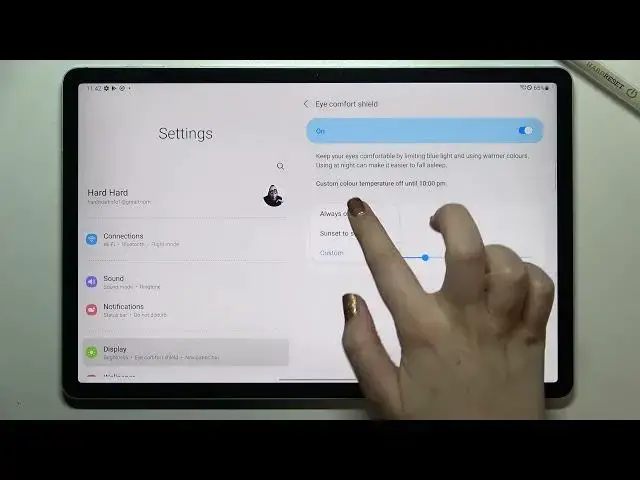
Hi everyone, in front of me I've got Samsung Galaxy Tab S7 FE and let me share with you
0:12
how to enable the night light or a comfort mode. So first of all, let's begin with opening the settings because there we will be able
0:20
to customize this mode and after that I'll show you much faster access to this feature
0:25
So first of all, let's enter the settings as I said and here from this left section
0:29
we have to tap on the display, it should be on the fourth position
0:33
Now let's move to this right section and as you can see here we've got the icon for shield
0:38
and of course you can turn it on without the customization if you want to just by tapping
0:41
on this switcher and as you can see, I hope that you can see it, the screen turned a little
0:46
bit yellowish or amber and it is in order to filter the blue light
0:50
It will be also much much easier for you to look at the screen at the dim light
0:54
So for example if you will use it at night when you've got dark conditions around you
1:00
and you do not have any light, then it will be more comfortable for you to look at the screen
1:07
It won't be as bright as usual. So as I said, you can leave it like this or you can customize it if you want to
1:13
So let's tap on icon for shield and as you can see we've got two different options
1:17
So first of all we can set the schedule, let's tap on it and right now we've got always on
1:22
which means that we have to turn on and off the icon for it manually
1:27
But we can set it from sunset to sunrise which means that your device will automatically
1:31
decide when the sunset and sunrise are, probably based on the network I believe
1:38
And we've got also custom, so after tapping on it you will be able to manually pick the
1:43
start and end time. So for example let me pick, I don't know, maybe 10 p.m. and the end time at 8
1:52
Let's tap on done and as you can see the screen immediately got back to its normal state
1:56
It is of course because we are not between the time we set
2:01
But let me leave it always on and under it we've got the color temperature
2:05
So thanks to this you can adjust the yellowishness of the screen
2:10
So by going to the left you can make it much much cooler and it is let's say almost like
2:16
it is in, like the icon for it is turned off. But you can make it yellow, really yellow just by going to the right with this switcher
2:26
So of course it's up to you which option you'd like the most, which is the most comfortable
2:30
for you. I think I will leave it like this. And actually this is the whole customization of this feature and if you'd like to have
2:38
much faster access to it, so if you don't want to get into the settings all the time
2:43
and every time you want to turn on or off this option, all you have to do is to simply
2:47
unroll the top bar fully and find the icon for the shield icon which is right here
2:53
So right now it is obviously turned on, but after tapping on it you can simply turn it
3:00
off and you can see the difference. The device just got back to its normal state
3:05
Of course you can turn it on in the same way. So actually this is it
3:08
This is how to enable the eye comfort mode in your Samsung Galaxy Tab S7 FE
3:14
Thank you so much for watching. I hope that this video was helpful and if it was, please hit the subscribe button and