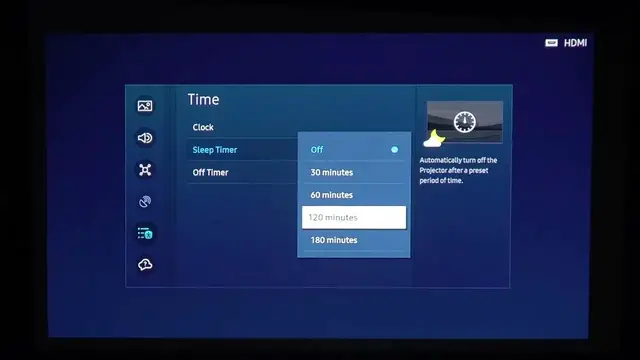

How To Change Display Sleep & Auto Power Off Time On Samsung Freestyle Gen 2
Jan 18, 2024

Find out more about Samsung Freestyle Gen 2 : https://www.hardreset.info/devices/samsung/samsung-the-freestyle/faq/buy/buy/
Optimize your device's energy consumption with the Samsung Freestyle Gen 2 by learning how to change the display sleep and auto power-off time. Whether you want to conserve power during periods of inactivity or customize the sleep settings for your preferences, follow the steps below to efficiently adjust these settings on your Samsung Freestyle Gen 2.
How do I change display sleep and auto power-off time on Samsung Freestyle Gen 2?
Can I customize these settings for different usage scenarios or preferences on Samsung Freestyle Gen 2?
What impact does changing display sleep and auto power-off time have on overall power consumption and device performance with Samsung Freestyle Gen 2?
#Samsug #freestyle #projectortips
Follow us on Instagram ► https://www.instagram.com/hardreset.info
Like us on Facebook ► https://www.facebook.com/hardresetinfo/
Tweet us on Twitter ► https://twitter.com/HardResetI
Support us on TikTok ► https://www.tiktok.com/@hardreset.info
Use Reset Guides for many popular Apps ► https://www.hardreset.info/apps/apps/
Show More Show Less