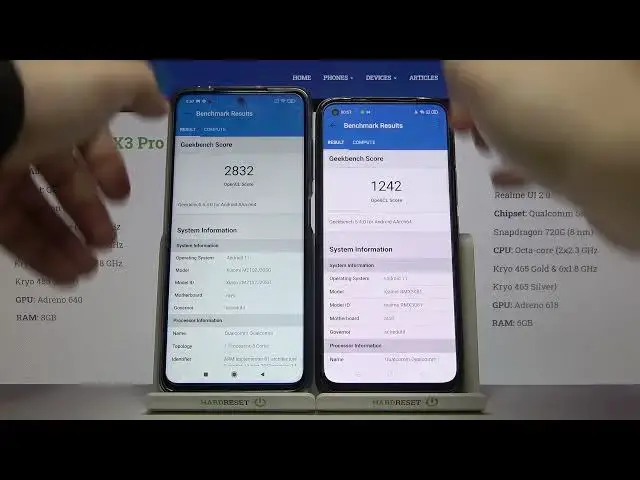

Xiaomi Poco X3 Pro vs Realme 8 Pro Geekbench 5 OpenCL GPU Bench
Jul 11, 2024

Check our website: https://www.hardreset.info/devices/xiaomi/xiaomi-poco-x3-pro/
Everything about Realme: https://www.hardreset.info/devices/realme/realme-8-pro/
The Geekbench benchmark has become quite popular in recent years and more and more users are using it to compare their sets with other people's computers. Geekbench is known by many people mainly for CPU tests, but the program also allows you to check GPU performance. In the latest version, support for API Vulkan has been added, which joined to Metal, OpenCL and CUDA. If you are interested in the GPU performance of devices such as Xiaomi Poco X3 Pro and Realme 8 Pro! Please visit our youtube channel and www.imei.info website where you will learn everything about your phone only with the help of the IMEI number!
How to use AnTuTu Benchmark in Realme 8 Pro & POCO X3 Pro? How to check Performance by Geekbench 5 of Realme 8 Pro & POCO X3 Pro? How to check performance by 3DMark sling shot extreme test of Android device? How to activate Wild Life 3DMark Benchmark on Realme 8 Pro & POCO X3 Pro? How to use Geekbench 5 GPU OpenCL Benchmark in Realme 8 Pro & POCO X3 Pro? How fast is Realme 8 Pro & POCO X3 Pro? How to test by Geekbench GPU Vulkan Benchmark Realme 8 Pro & POCO X3 Pro? How to perform benchmark in Realme 8 Pro & POCO X3 Pro?
Realme 8 Pro Specification:
OS: Android 11, Realme UI 2.0
Chipset : Snapdragon 720G (8 nm)
CPU: Octa-core (2x2.3 GHz Kryo 465 Gold & 6x1.8 GHz Kryo 465 Silver)
GPU: Adreno 618
MEMORY: 6GB RAM
POCO X3 Pro Specification:
OS: Android 11, MIUI 12 for POCO
Chipset: Snapdragon 860 (7 nm)
CPU: Octa-core (1x2.96 GHz Kryo 485 Gold & 3x2.42 GHz Kryo 485 Gold & 4x1.78 GHz Kryo 485 Silver)
GPU: Adreno 640
MEMORY: 8GB RAM
Show More Show Less