0:00
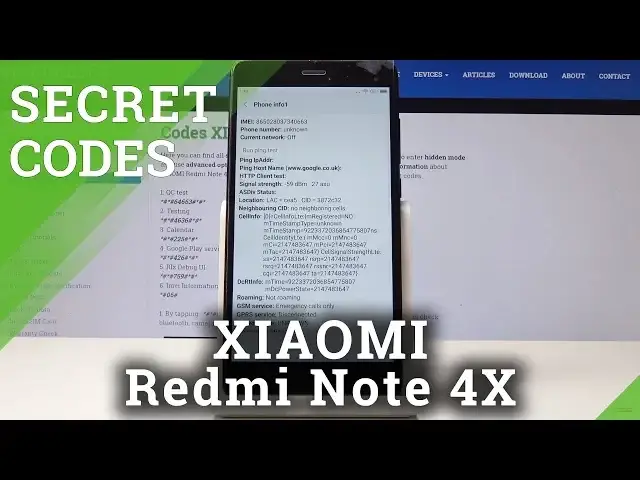
Here I've got Xiaomi Redmi Note 4X and let me show you all the secret codes for the following device
0:09
So at first let's open the phone gatherer and we will start with the first code which
0:13
is asterix pound oh six pound. And as you can see this one will provide you with both e-mail numbers dedicated to both
0:20
SIM cards in your device. Click on OK to go back and let's go to the second code which is asterix pound asterix
0:27
pound seven five nine pound asterix pound asterix. And now we are in the back menu and here you can check brand code unique device ID and
0:37
plenty of other information you can also enter PINs, events and view client IDs
0:42
So let me go back and now we will enter third code which is asterix pound asterix pound
0:49
four to six pound asterix pound asterix. And now as you can see we are in Google Play services it's diagnostic mode where you can
0:58
check events and status. If you click on the more icon which is three dots one in the right upper corner you can
1:04
activate advanced view so as you can see now we have plenty of information included here
1:09
So let's go back and another code will provide you with the calendar events and the code
1:15
is asterix pound asterix pound double to five pound asterix pound asterix
1:21
And here you will find all the events all the celebrations that are in your calendar
1:27
so you can check them in one place so you will not forget about an important event
1:31
And let's go back to another code which is asterix pound asterix pound four six three
1:38
six pound asterix pound asterix. And here you are in testing mode where you can check phone information for the second
1:45
first and the second email number so here we've got email phone number current network
1:50
You can also run ping test here simply click on it and then here you will notice the solution
1:56
also the signal strength location neighboring cell info and all the others
2:01
So let me go back and then you have the same thing for the phone information the second
2:05
for the second sim card. You can also open the battery information where you will notice battery status power
2:11
plug battery label scale health voltage temperature technology and also time since boot
2:18
So let's go back. You can also open usage statistics. And here you've got all details regarding your applications and we can go back
2:29
And finally you can also come along with Wi-Fi info. And at first we've got Wi-Fi APA where you can locate disable network disconnect network
2:37
enable network get configured networks and also connection info then Wi-Fi configuration
2:45
And Wi-Fi status you can refresh obviously it to see what your status is what your Wi-Fi
2:51
status is and also you can run a ping test here and here you've got the solution
2:56
So let me go back and it's time to enter the last code very useful one it's asterix pound
3:04
Let me do it one more time asterix pound asterix pound six four double six three pound asterix
3:11
pound asterix and now you're in testing mode where you can test your device
3:18
Now we are testing keypad and vibration so we can use them
3:29
It's the menu icon. Actually it's tagged but then you will be able if you activate it from the beginning
3:44
you will be able to use your device to use your test feature where you will be able to
3:50
test for example your keypad sound receiver vibration and all the others
3:56
So that would be all. These are all secret codes for your device
4:00
Thank you for watching. Please subscribe our channel and leave me a thumbs up