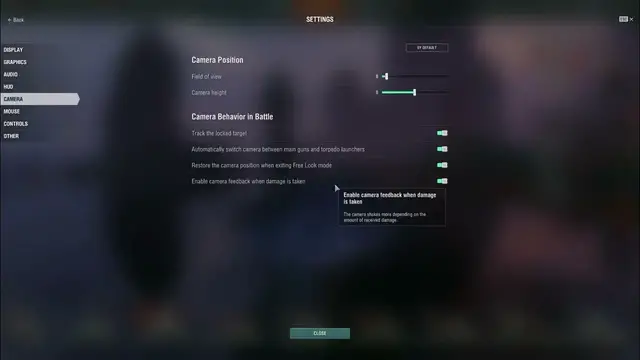

How To Enable & Disable Track Locked Target In In World Of Warships
Feb 28, 2024

Find out more: https://www.hardreset.info/
Learn how to enable and disable the feature to track locked targets in World of Warships, enhancing your combat effectiveness and situational awareness during battles. This tutorial provides step-by-step instructions on accessing the game settings menu, navigating to the target tracking options, and toggling the setting to enable or disable tracking of locked targets. By mastering this feature, players can focus their attention on priority threats and coordinate their actions more effectively with their team.
What is the track locked target feature in World of Warships, and why would players want to enable it?
Where can players find the track locked target settings in the game interface?
How do players enable or disable the option to track locked targets?
What does tracking a locked target entail, and what visual or informational cues are provided?
Can players customize the appearance or behavior of tracked targets?
#worldofwarships #WOW #worldofwarshipsgames
Follow us on Instagram ► https://www.instagram.com/hardreset.info
Like us on Facebook ► https://www.facebook.com/hardresetinfo/
Tweet us on Twitter ► https://twitter.com/HardResetI
Support us on TikTok ► https://www.tiktok.com/@hardreset.info
Use Reset Guides for many popular Apps ► https://www.hardreset.info/apps/apps/
Show More Show Less