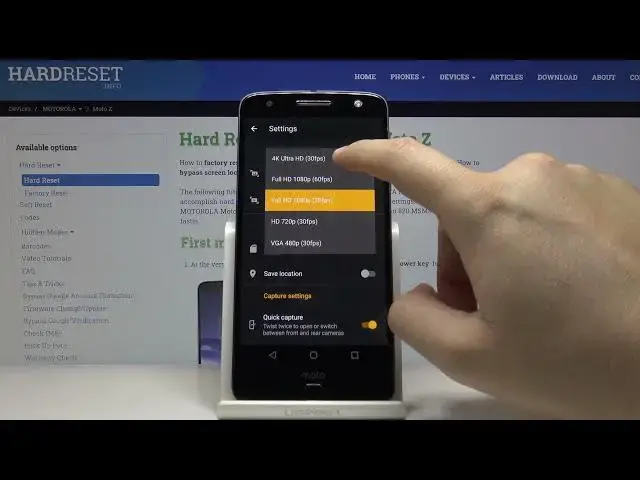

How to Change Video Resolution in MOTOROLA Moto Z – Adjust Camera Settings
Jul 8, 2024

Learn more about MOTOROLA Moto Z
https://www.hardreset.info/devices/motorola/motorola-moto-z/
Did you know that you can record really high-quality video with the camera on MOTOROLA Moto Z? Open this tutorial and go to Camera Settings, then open Video Settings. We would like to show you how to change the video resolution on MOTOROLA Moto Z. Choose a resolution that will make your video in perfect quality.
How to Change Video Resolution in MOTOROLA Moto Z? How to Activate the Best Resolution in MOTOROLA Moto Z? How to Change Video Resolution in REALME? How to Resolution in MOTOROLA Moto Z? How to Change Video Quality in MOTOROLA Moto Z? How to Set up Resolution of Recording Videos in MOTOROLA Moto Z? How to change video quality in MOTOROLA Moto Z? How to set 4K Video on MOTOROLA Moto Z? How to manage video quality in MOTOROLA Moto Z? How to open camera settings in MOTOROLA Moto Z? How to adjust camera settings in MOTOROLA Moto Z? How to adjust video quality in MOTOROLA Moto Z? How to set up high quality video resolution in MOTOROLA Moto Z? How to set up high quality video in MOTOROLA Moto Z?
#AdjustVideoQuality #VideoResolution #MOTOROLAMotoZ
Follow us on Instagram ► https://www.instagram.com/hardreset.info
Like us on Facebook ► https://www.facebook.com/hardresetinfo/
Tweet us on Twitter ► https://twitter.com/HardResetI
Support us on TikTok ► https://www.tiktok.com/@hardreset.info
Use Reset Guides for many popular Apps ► https://www.hardreset.info/apps/apps/
Show More Show Less