0:00
Hi everyone in front of me I've got Huawei Mate 50 Pro and let me share with
0:04
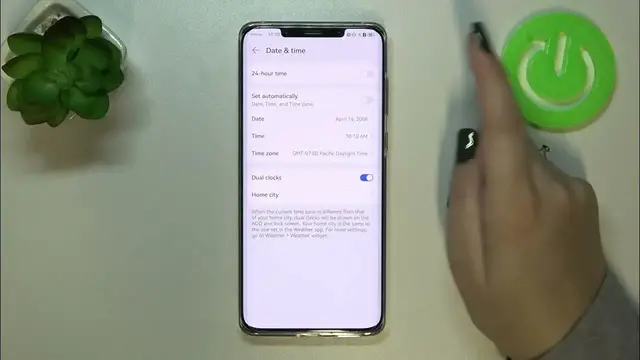
you how to change date and time on this device. So first of all we have to enter
0:11
the settings and now scroll down to the very very bottom to find system and
0:16
updates. As you can see on the fourth position we've got date and time so
0:20
let's enter and here we've got some options which we can customize. As you
0:27
can see we do not have separate options for the date time and the time zone. It
0:31
is because we are using the automatic date time and time zone they are a
0:36
network provided. So first of all we have to turn off this option and as you can
0:41
see right now we've got the date time which we can set. So let's begin with the
0:46
date as you can see right now just by swiping you can change the date. Tap on
0:51
OK it will be immediately applied of course and the same situation with the
0:56
time just by swiping pick the time you want to use. Tap on OK and the same
1:01
situation as you can see it is also visible on the status bar. What's more
1:06
we've got the time zone so let's tap on it and here we've been transferred to
1:10
the full list of all available time zones from which we can choose. So
1:14
basically we can pick for example this one just find yours and tap on it and of
1:19
course be aware that if you will change the time zone the time will also change
1:24
according to it. It's quite normal. Here you've got 24 hour format of course you
1:29
can turn it off in order to use 12 hour format it's of course up to you and here
1:36
you've got the option dual clocks and again it is your decision if you want to
1:40
use it because you will be able to set two different options I mean
1:47
two different places from which your device will take the hours so it's up to
1:51
you you can keep it turned on or you can turn it off just by tapping on the
1:56
switcher and basically this is the whole manual customization of date and time of
2:00
course you can get back to all previous settings just tap on this option to set
2:04
the date time and time zone automatically and here to use 24 hour
2:08
time. So basically that's all this is how to change the date and time in your
2:14
Huawei Mate 50 Pro. Thank you so much for watching I hope that this video was
2:19
helpful and if it was please hit the subscribe button and leave the thumbs up